



35 Gemini AI Photo Prompts for Better Photos (Copy & Paste)
A plain selfie can go a long way with the right prompt. Below are 35 copy-ready ideas for couples, groups, birthdays, Christmas, Polaroids, restorations, and product shots. Use them as written or tweak the mood, setting, and light. You can run any of them with Nano Banana 2 on Pollo AI.
TL;DR
Here’s the short version: tell Gemini what it cannot touch, then describe the makeover. Lock the face, skin tone, expression, or product details first. After that, add the new setting, clothes, light, and framing.
That’s really it. You can paste any of the Gemini AI photo prompts below into Nano Banana 2 on Pollo AI. If the first image is nearly right, keep the good parts and fix the rest with its AI photo editor.
What Is a Gemini AI Photo Prompt?
A Google Gemini AI photo prompt works best when it reads like a short creative brief. You describe the picture you want, and the model turns that direction into a new image or an edit. Google's Gemini image family also uses the Nano Banana name, and Google Nano Banana works with both written ideas and uploaded photos.
Starting from scratch? Describe the subject, scene, and visual style. Already have a photo? Upload it and draw a firm line between the details you're protecting and the ones you want to replace. That small distinction prevents a background swap from becoming an accidental face swap.
Technical language matters less than clear limits. Want a different outfit but the same person? Say both. Want a new scene while keeping the pose? Say that too. Nano Banana 2 supports text to image and image to image creation, including high-resolution output and multi-subject work.
How to Use Gemini Photo Prompts on Pollo AI
Got a photo ready? The setup on Pollo AI takes three steps.
Steps
Step 1. Open the AI image generator and pick Nano Banana 2.
Step 2. For an edit, add a clear photo of the person, group, or product you want to keep.
Step 3. Drop in the prompt, choose the frame shape, and generate.
The source image carries a lot of weight, so don't make the model guess. Use a photo where the important face, label, or object is easy to read.
Create or Edit Photos For Every Use Case
Generate and restyle photos for creative, marketing, and e-commerce needs.
Try Pollo AI Image Generator Free
Best Gemini AI Photo Prompts
Let's start with eight prompts worth slowing down for. They're not eight versions of the same glossy portrait. Each one solves a different photo job, from a two-person edit to a product campaign.
1. Soft Window-Light Editorial Portrait
Want something polished without making the subject look airbrushed? Start here. This Gemini AI photo prompt for girls works for profile pictures, lifestyle posts, and quiet editorial shots.
Prompt 1:
Edit the uploaded photo into a soft window-light editorial portrait. Keep the subject's face, skin tone, expression, and defining features unchanged. Place her beside a sheer-curtained window with warm morning light, a cream knit top, gentle shadows, and natural skin texture. Give the image a quiet magazine mood with a vertical 4:5 composition and realistic photography.
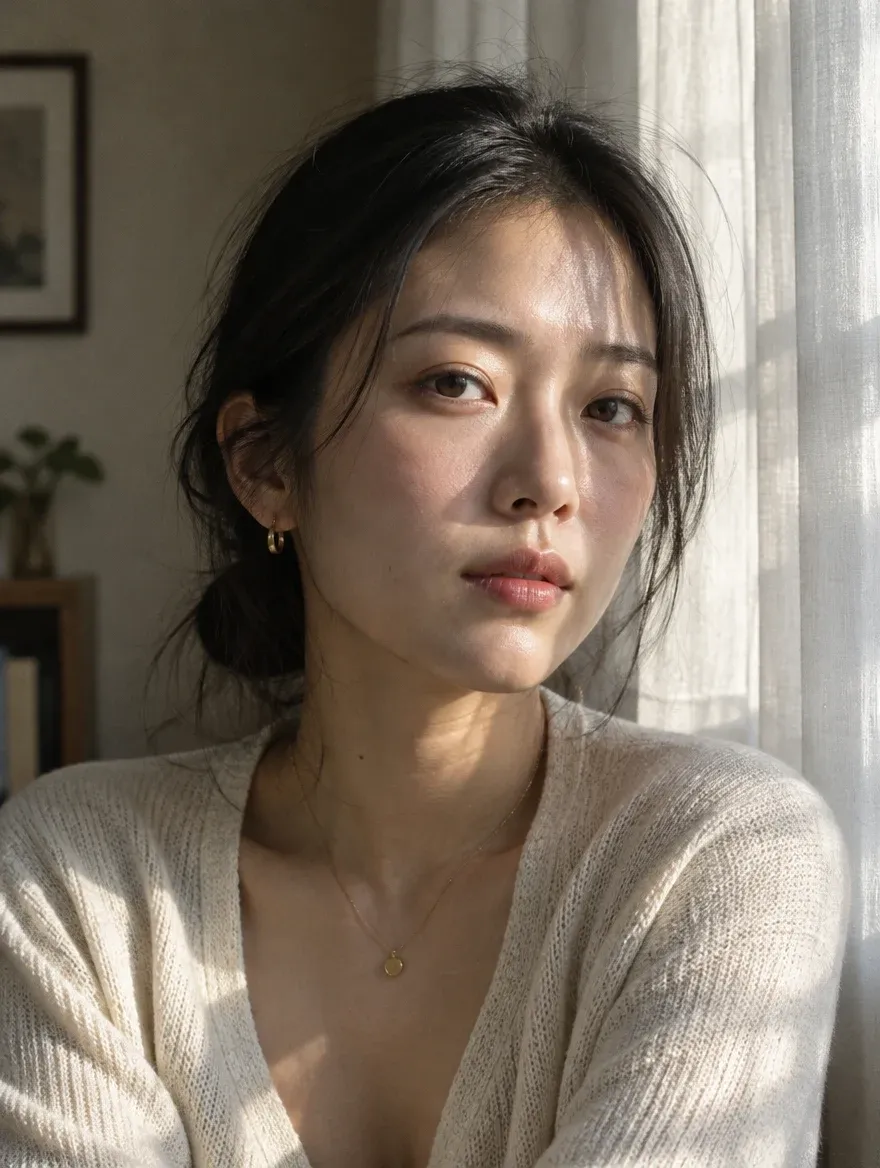
"Editorial" sets the finish, while "natural skin texture" keeps the person believable. If the portrait already has the right pose and setting, AI photo retouching can refine the skin, hair, and light without rebuilding the whole image.
2. Quiet Museum-Date Couple Portrait
Two-person edits are where things get tricky. A useful Gemini AI couple photo prompt should keep each person distinct, including the small differences that make them recognizable.
Prompt 2:
Rework the uploaded couple photo as a quiet museum-date portrait. Treat each person as a separate reference and retain their facial structure, complexion, hairstyle, expression, and height relationship. Avoid blending features between them. Place the pair beside a curved stone staircase with skylight illumination, coordinated blue-and-cream outfits, candid conversation, medium-format detail, and a vertical 4:5 frame.
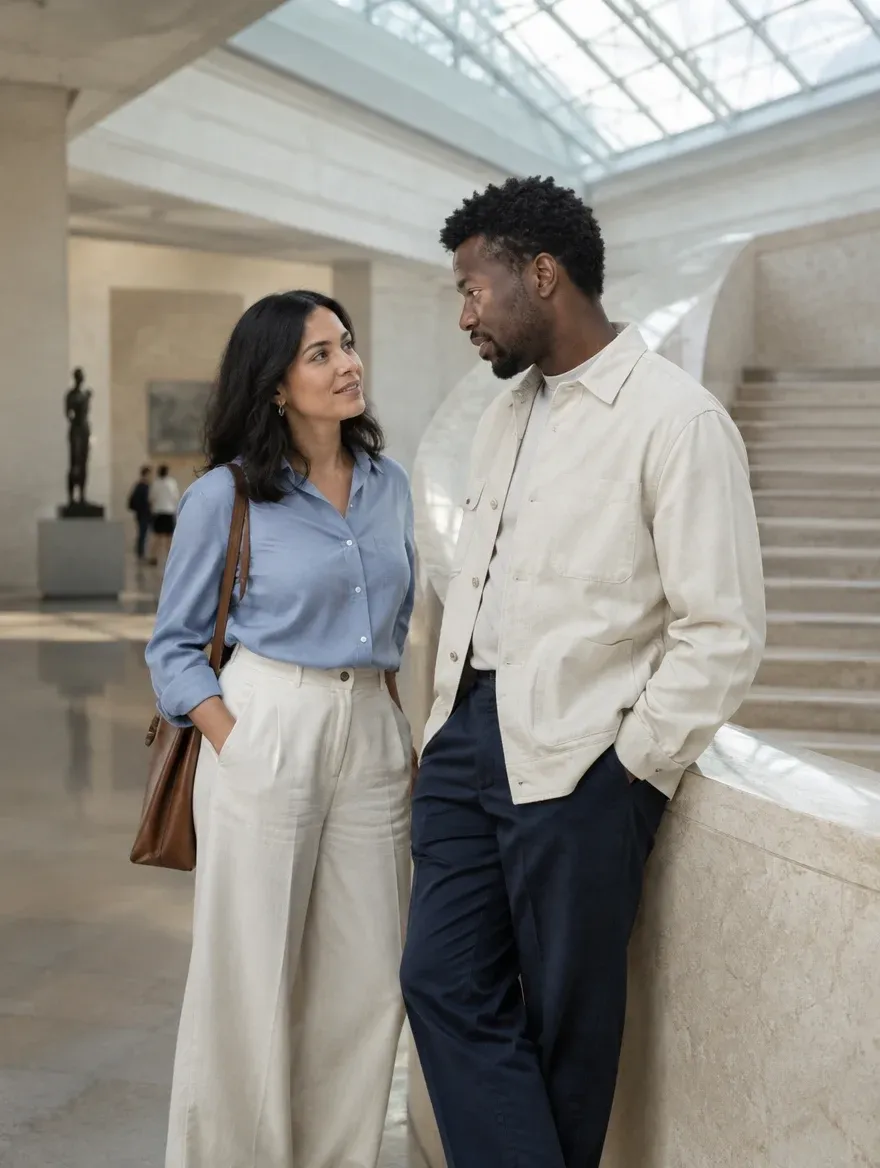
Writing a Gemini AI photo prompt for a couple? Refer to each person separately instead of treating them as one subject. If you change the setting or clothes later, repeat the identity details so neither person drifts between versions.
3. Birthday Polaroid Snapshot
A birthday Polaroid should look a little imperfect. That's the charm. This Gemini AI birthday photo prompt goes for a real party snapshot rather than a polished event poster.
Prompt 3:
Edit the uploaded photo into a candid birthday Polaroid. Keep the person's face and expression unchanged. Add a small frosted cake, a few blurred friends in the background, warm indoor flash, slightly imperfect framing, soft film grain, and a white instant-film border with a handwritten date at the bottom. Keep the colors cheerful but not oversaturated.
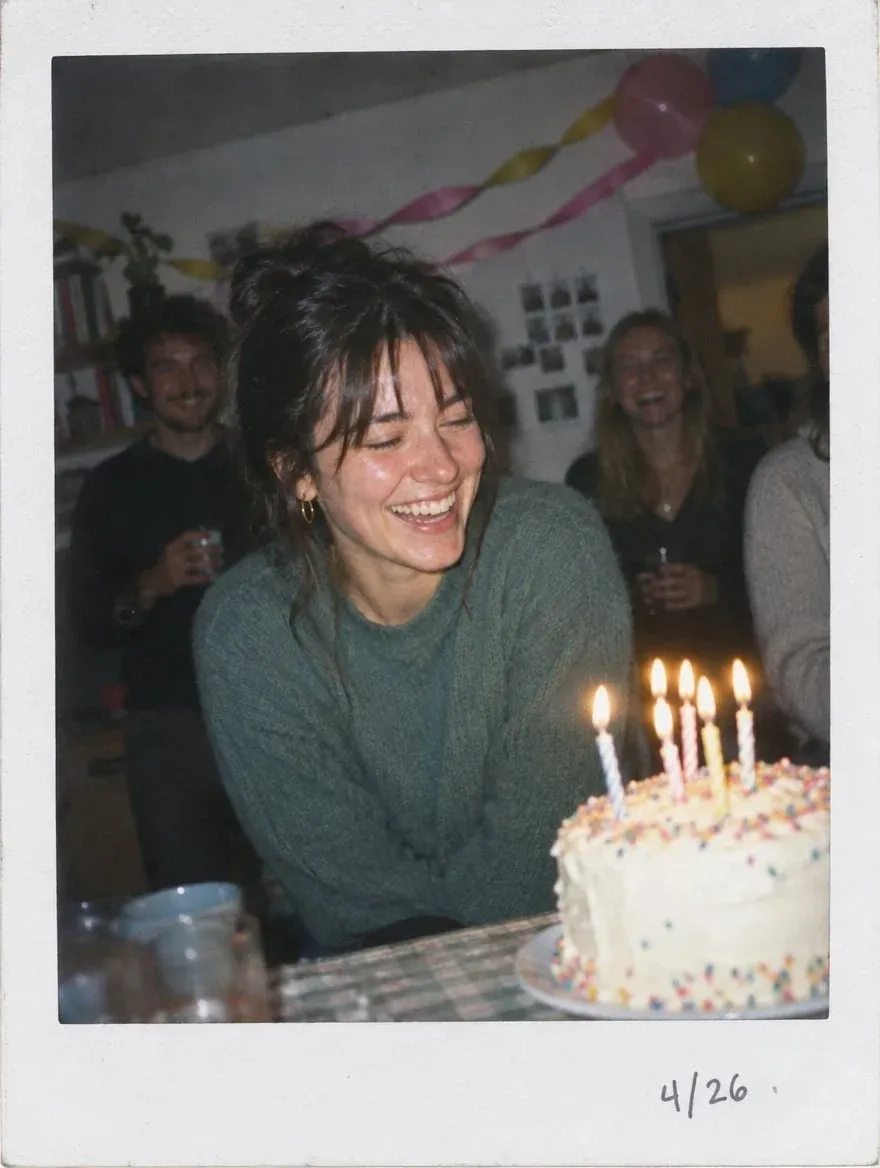
The instant-camera look comes from the flash, grain, crop, and faded color-not just the white border. That makes this a Gemini AI photo prompt for a Polaroid look, not a normal portrait dropped into a frame. For another party palette, change the color words and leave the camera description alone.
4. Coordinated Group Magazine Cover
Group edits can go sideways fast. One person disappears, another gets duplicated, and suddenly nobody remembers standing there. A good Gemini AI group photo prompt shuts down those surprises early.
Prompt 4:
Edit the uploaded group photo into a modern magazine-cover portrait. Keep every person's face, skin tone, hairstyle, and relative position recognizable. Do not remove, duplicate, or blend anyone. Style the group in coordinated earth-tone outfits against a warm gray studio backdrop with broad softbox lighting, confident natural poses, clean spacing, and room at the top for a title. Use a vertical 4:5 layout.
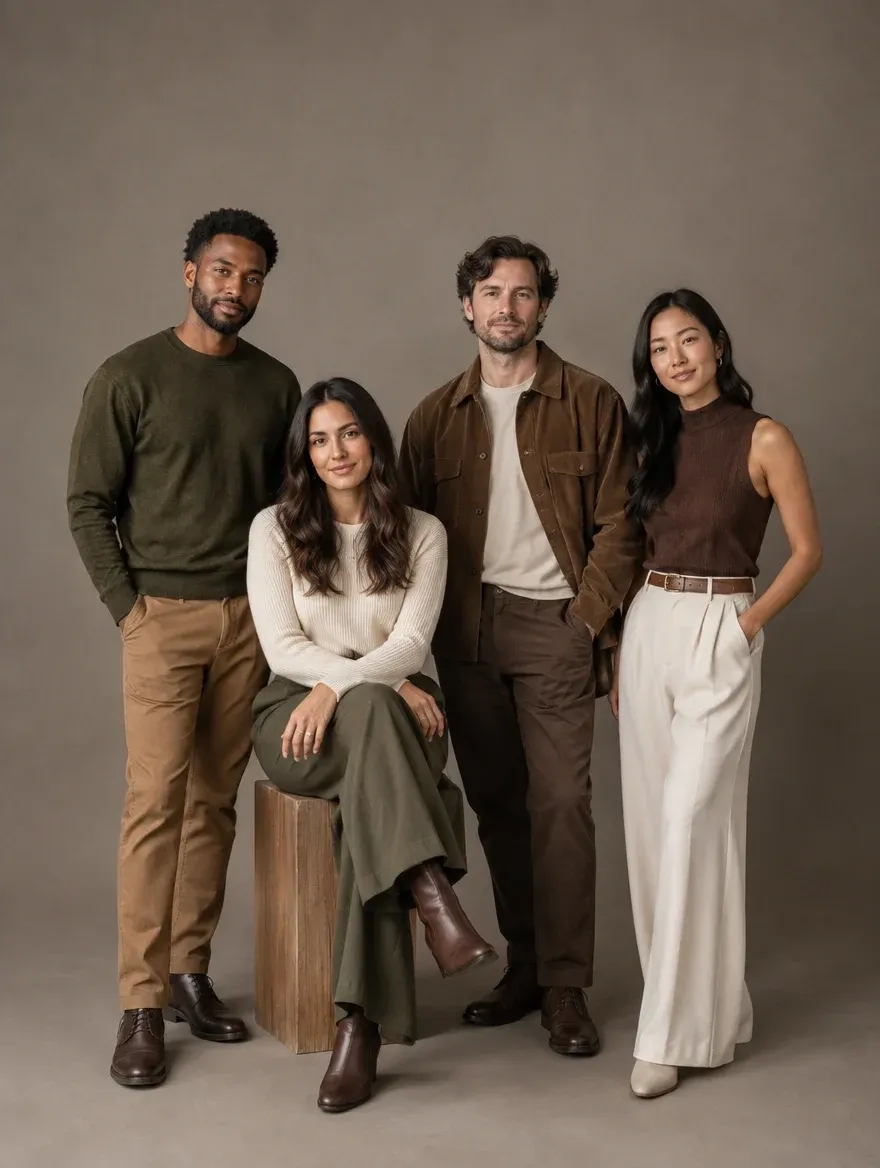
For a large group, count the people and put that number in the prompt. It sounds fussy, but it helps. If the cast looks right and only the room feels off, change it with the AI background changer.
5. Snowy Christmas Market Portrait
Holiday edits get busy fast. This Gemini AI Christmas photo prompt keeps the scene festive with a few memorable details, while the person stays easy to see.
Prompt 5:
Turn the uploaded portrait into a snowy Christmas market photo. Retain the person's face, body shape, pose, and expression. Add wooden stalls, paper star lanterns, a deep red scarf, light snowfall, and warm reflections from nearby shop windows. Keep the skin tone true to the source and the scene believable enough for a holiday card.
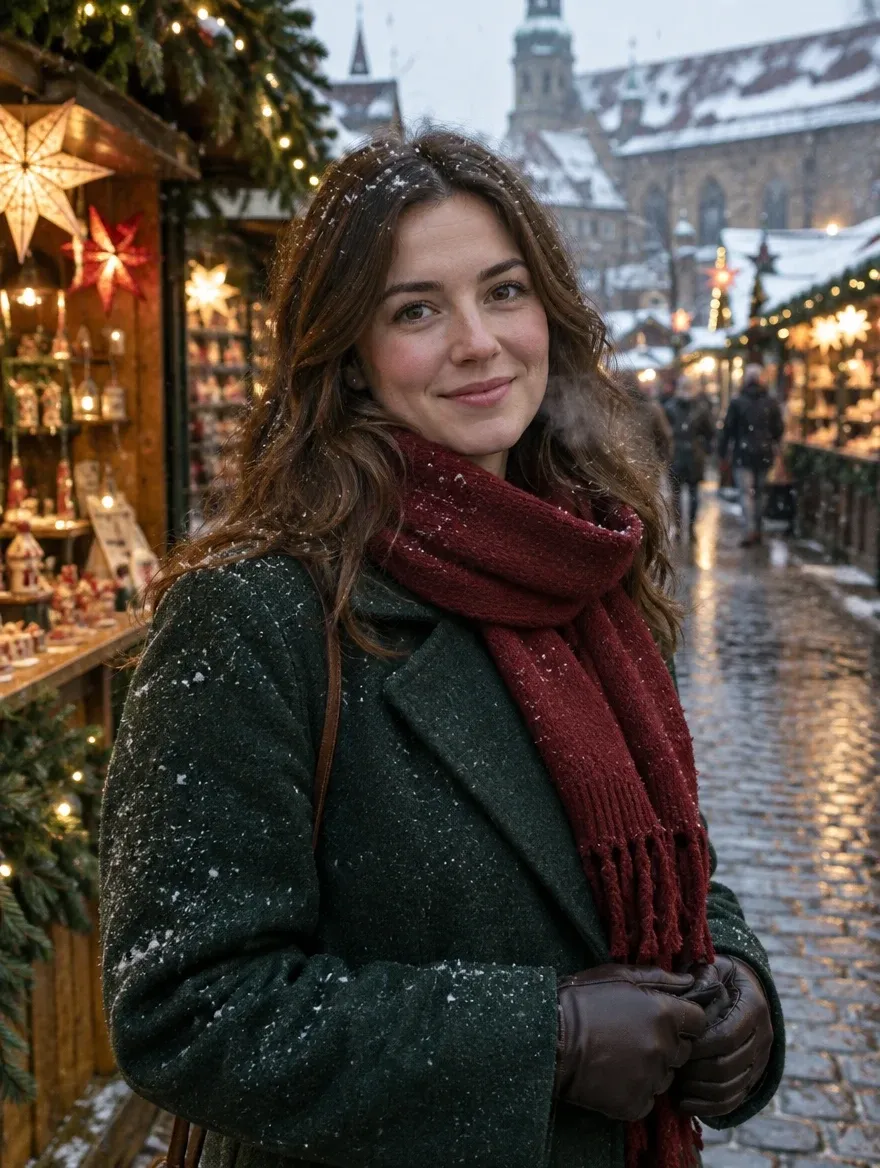
Prefer a candlelit room or a clean studio card? Swap only the location sentence. Leave the identity, skin-tone, and realism instructions in place so the person still feels like the same subject.
6. Clean Personal-Brand Headshot
A work photo doesn't have to look stiff. This version suits LinkedIn, speaker pages, team profiles, and creator bios while keeping some personality.
Prompt 6:
Edit the uploaded portrait into a clean personal-brand headshot. Preserve the person's face, age, skin tone, hairline, and natural expression. Use a softly blurred modern workspace, balanced daylight, a well-fitted navy jacket over a simple top, crisp eye detail, and realistic skin texture. Frame from the chest up in a vertical 4:5 crop.

Need several versions for different platforms? The AI profile picture generator can turn the same reference selfie into work, creator, and social profile options while keeping the person recognizable.
7. Travel-Magazine Cover Portrait
Maybe the trip was great, but the photo feels flat. This prompt cleans up the frame and gives it cover-image energy without pretending you visited somewhere else.
Prompt 7:
Edit the uploaded travel photo into a premium travel-magazine cover image. Keep the person, face, pose, and key landmarks recognizable. Improve the light to a clear golden hour, remove small background distractions, add subtle depth and richer sky color, and leave clean negative space for cover text. Keep the location realistic and use a vertical 4:5 composition.
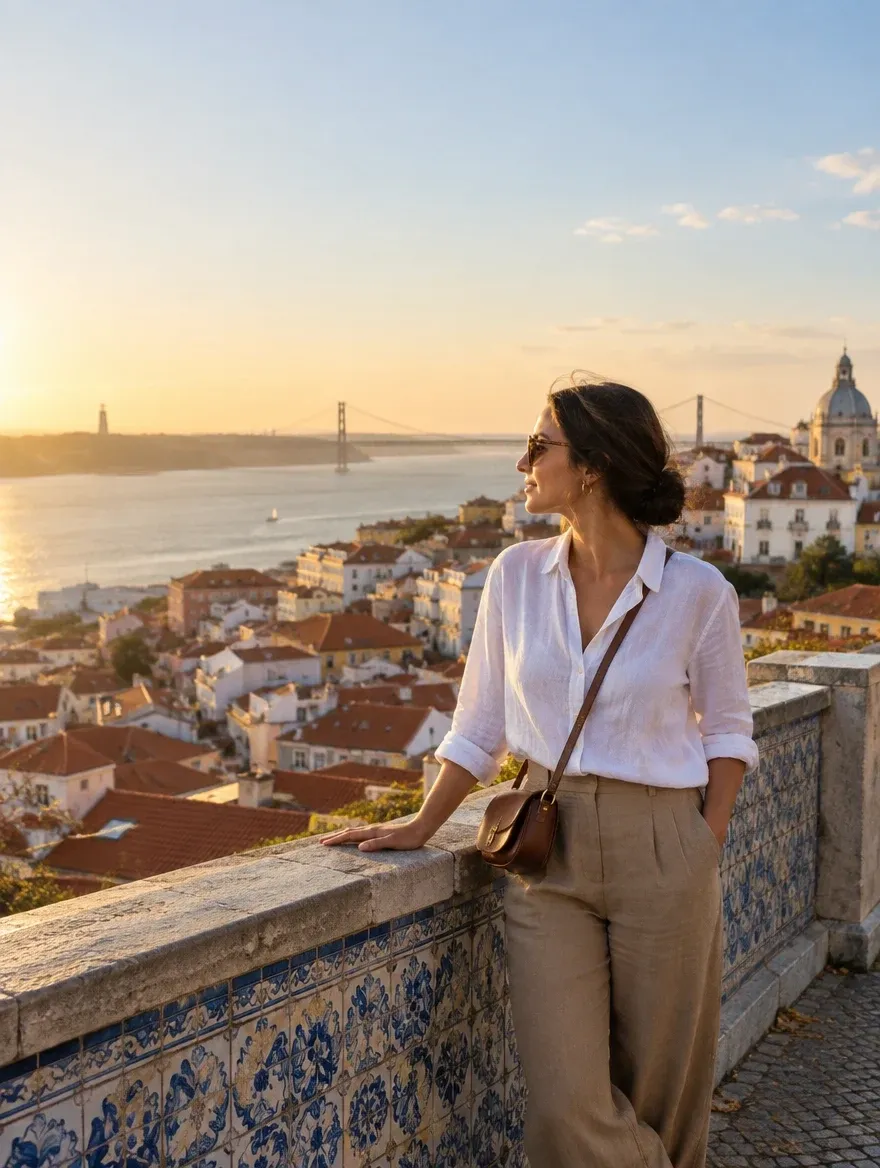
The goal is to rescue the photo you took, not invent a different vacation. Set the composition and negative space first, then adjust clarity and color only after the cover layout feels balanced.
8. Lifestyle Product Campaign Photo
For sellers, the product is the one thing the model can't get creative with. The background may change. The label, logo, color, and shape cannot.
Prompt 8:
Edit the uploaded product photo into a premium lifestyle campaign image. Keep the product's shape, logo, label, color, and material accurate. Place it on a light stone surface beside one relevant natural prop, with soft side lighting, realistic contact shadows, a clean warm background, and space for ad copy. Make the result polished, believable, and ready for a social campaign.
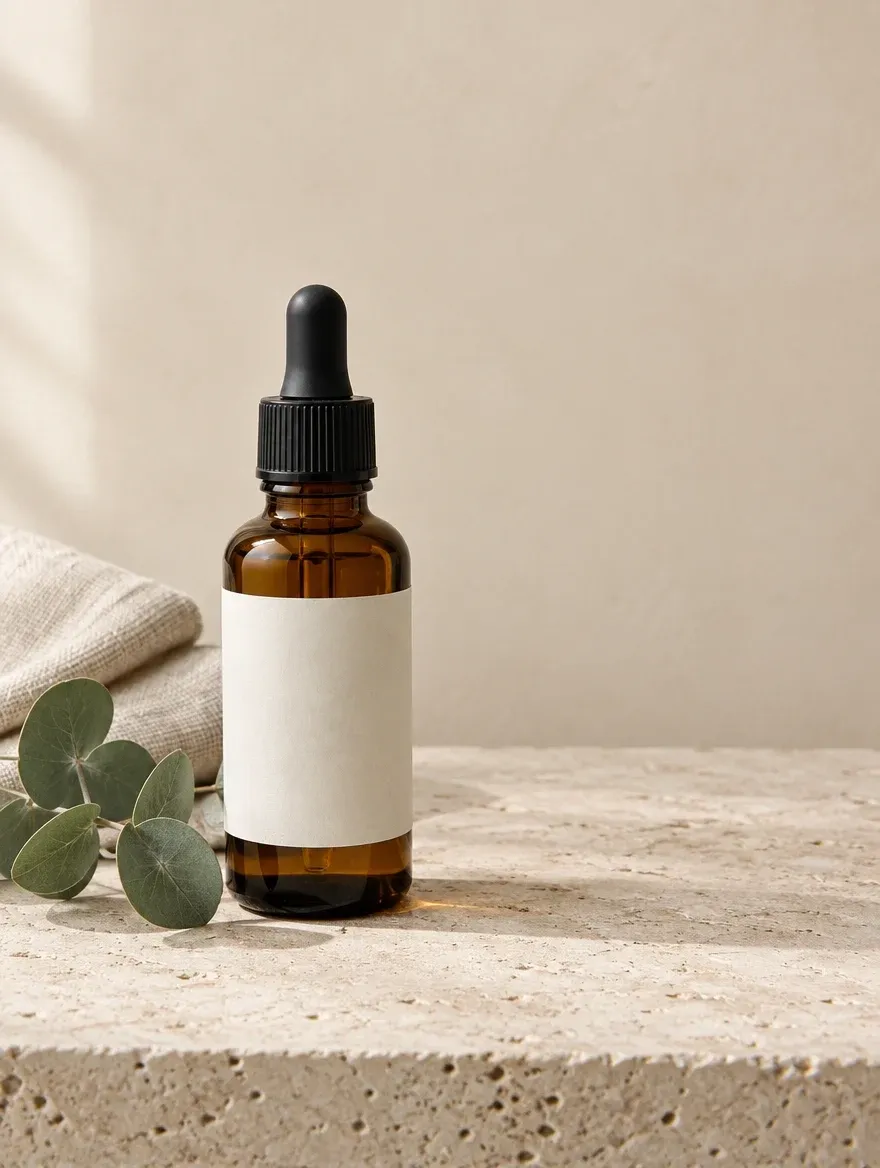
Avoid asking the model to "improve" the packaging. That wording invites redesigns. When you need a complete listing set rather than one concept image, the AI product listing image set generator can place the same item into multiple sales-ready scenes while keeping its defining details consistent.
More Gemini AI Photo Prompts to Copy and Paste
Need more range? The next 27 Gemini AI photo prompts are the quick-grab section. If you want a Gemini AI photo prompt to copy and paste, pick the closest idea and change the details that don't fit your photo.
More Portrait Prompts
Want a different portrait mood? These five cover garden light, monochrome, cultural styling, fitness, and fashion.
Prompt 9 - Sunlit Garden Portrait:
Rework the uploaded portrait as a sunlit garden photo. Retain the subject's facial proportions and expression. Use late-afternoon backlight, layered greenery, a slight breeze through the hair, a simple linen outfit, honest skin texture, and a vertical 4:5 composition.
Prompt 10 - Monochrome Fine-Art Portrait:
Turn the uploaded photo into a silver-rich monochrome gallery portrait. Preserve the subject's age and facial character. Use sculptural overhead light, a matte charcoal background, medium-format detail, soft highlight roll-off, and restrained grain.
Prompt 11 - Elegant Cultural Portrait:
Edit the uploaded photo into an elegant cultural portrait. Keep the subject's identity unchanged. Add a refined traditional outfit, authentic accessories, warm directional light, a simple architectural background, and respectful, realistic styling without mixing cultural details.
Prompt 12 - Outdoor Fitness Portrait:
Restyle the uploaded photo as a natural outdoor fitness portrait. Keep the face, body proportions, and skin tone unchanged. Use early-morning light, practical athletic wear, a clean park setting, a relaxed mid-stride pose, and realistic muscle definition without exaggeration.
Prompt 13 - High-Fashion Studio Portrait:
Edit the uploaded portrait into a high-fashion studio image. Keep the face and body recognizable. Add a structured monochrome outfit, bold geometric shadows, a muted backdrop, sharp editorial framing, and realistic fabric and skin texture.
More Couple and Group Photo Prompts
The same rule keeps showing up with couples and groups: protect people one by one. These four prompts do that in romantic and social settings.
Prompt 14 - Rooftop Date at Blue Hour:
Turn the uploaded couple photo into an unposed rooftop moment at blue hour. Retain each person's facial geometry, expression, and height relative to the other. Place them beside a low wall overlooking the city, with cobalt twilight, a breeze catching the fabric, scattered window lights, and true-to-camera night color.
Prompt 15 - Sunrise Beach Couple Portrait:
Restyle the uploaded couple photo as a quiet sunrise beach portrait. Keep both people recognizable. Add soft peach light, gentle waves, neutral linen clothing, relaxed body language, natural skin tones, and an airy horizontal 3:2 frame.
Prompt 16 - Family Album Group Photo:
Edit the uploaded family group photo into a polished album portrait. Keep every person, face, age, and position unchanged. Use a bright living room, soft window light, coordinated neutral colors, clean spacing, and a warm natural finish.
Prompt 17 - Friends' Reunion Dinner:
Edit the uploaded group photo into a candid friends' reunion dinner. Preserve every face and do not add or remove anyone. Use warm restaurant light, shared laughter, natural table details, subtle background blur, and realistic documentary photography.
More Polaroid and Film Prompts
A white border alone won't make a photo feel analog. The camera flash, color fade, grain, and slightly awkward crop do most of the work. Try these in Image to image AI, then remove small distractions with image inpaint.
Prompt 18 - Classic Solo Polaroid:
Edit the uploaded photo into a classic instant-camera portrait. Keep the face unchanged. Use direct flash, a slightly underexposed room, soft color fade, fine grain, imperfect candid framing, and a thick white Polaroid-style border.
Prompt 19 - Travel Polaroid Pair:
Turn the uploaded travel photo into two overlapping Polaroid-style prints. Preserve the person and landmark. Use warm sun-faded color, handwritten location and date notes, realistic paper texture, and soft shadows on a wooden table.
Prompt 20 - Warm 35mm Street Photo:
Restyle the uploaded photo as a warm 35mm street photograph. Keep the face and pose recognizable. Add a slight handheld softness, late-day light, muted reds and greens, gentle halation, fine film grain, and candid off-center framing.
More Photo Editing and Restyle Prompts
These four Google Gemini AI photo editing prompts ask for one controlled change at a time.
Prompt 21 - Outfit Replacement:
Edit the uploaded photo and keep the person, face, pose, body proportions, and background unchanged. Replace only the outfit with a tailored camel coat, white shirt, dark trousers, and minimal accessories. Match the original lighting and fabric shadows.
Prompt 22 - Hairstyle Preview:
Use the uploaded portrait as the reference and leave the face, expression, age, and background alone. Preview a chin-length textured bob in the subject's existing hair color. Respect the original hairline, strand direction, and natural density.
Prompt 23 - Clean Background Swap:
Edit the uploaded photo and keep the subject exactly as photographed. Replace only the background with a warm minimalist studio wall, soft floor shadow, and diffused daylight. Match the new light direction to the original subject.
Prompt 24 - Double-Exposure Portrait:
Build a double-exposure artwork from the uploaded portrait while leaving the eyes, nose, and mouth unobstructed. Fill the outer silhouette with greenhouse leaves, glass reflections, and pale morning mist. Use moss green and warm gray tones with crisp facial separation.
More Restoration and Repair Prompts
Old photos need a light touch. The model should repair the paper, not rewrite the people in it. Start badly damaged scans in photo restoration, or use the image enhancer when blur and weak color are the main problems.
Prompt 25 - Damaged Old Photo Repair:
Repair the uploaded archival photo without modernizing it. Clean away dust specks, fold marks, silvering, chemical stains, and damaged paper edges. Preserve the original faces, expressions, clothing, framing, and photographic character. Leave uncertain facial details understated rather than guessing.
Prompt 26 - Natural Black-and-White Colorization:
Add historically plausible color to the uploaded monochrome photo. Keep the people and composition intact. Base clothing on the muted dyes of the period, use believable complexions and material colors, and avoid modern teal-orange grading, neon saturation, or glossy skin.
Prompt 27 - Blurry Portrait Recovery:
Improve the optical clarity of the uploaded portrait. Reduce compression artifacts and color cast, then recover eyelashes, flyaway hair, and fabric weave where the source supports them. Do not reshape, beautify, or de-age the face.
More Seasonal and Celebration Prompts
Birthday and Christmas are already covered, so these three handle the next likely occasions. Want several seasonal settings from one good portrait? The AI background changer saves you from rebuilding the subject each time.
Prompt 28 - Halloween Editorial Portrait:
Edit the uploaded portrait into a stylish Halloween editorial. Keep the face recognizable. Add a refined dark outfit, candlelit shadows, muted autumn color, light atmospheric haze, and one subtle gothic prop. Avoid gore and costume-store styling.
Prompt 29 - Graduation Day Portrait:
Edit the uploaded photo into a bright graduation portrait. Keep the person's face and body unchanged. Add a fitted cap and gown, soft campus architecture, clear daylight, a proud natural expression, and space for a class-year caption.
Prompt 30 - New Year's Rooftop Portrait:
Restyle the uploaded photo as an elegant New Year's rooftop portrait. Preserve the face and pose. Add understated eveningwear, distant golden fireworks, soft city bokeh, realistic night lighting, and a celebratory mood without visual clutter.
More Creative and Cinematic Prompts
This is the playful corner of the prompt list. These three ideas suit social posts, covers, and mood boards.
Prompt 31 - Prism-Light Studio Portrait:
Rework the uploaded portrait as a prism-light studio photograph. Keep the face, clothing, and expression recognizable. Cast a narrow spectrum of refracted color across one side of the backdrop, add subtle glass reflections near the frame edge, and balance the effect with clean neutral light on the skin.
Prompt 32 - Paper-Cut Storybook Portrait:
Transform the uploaded portrait into a layered paper-cut storybook scene. Keep the person's face and silhouette recognizable. Use hand-cut paper textures, soft dimensional shadows, a limited color palette, and a whimsical forest background with clean composition.
Prompt 33 - Clay Character Portrait:
Restyle the uploaded person as a handcrafted clay character. Preserve the hairstyle, outfit colors, expression, and key facial features. Use visible clay texture, a miniature set, soft tabletop studio lighting, and a charming but recognizable result.
More Product and Marketing Prompts
Product and marketing prompts need tighter boundaries than personal photo edits. The product's shape, color, logo, packaging, and materials should stay accurate, while the background, lighting, framing, and ad space can change. The two prompts below cover a clean e-commerce hero image and a vertical social ad.
Prompt 34 - Clean E-Commerce Hero Image:
Edit the uploaded product into a clean e-commerce hero image. Preserve the product shape, color, label, logo, and material. Place it on a pure light background with even studio lighting, a soft contact shadow, centered framing, and accurate commercial photography.
Prompt 35 - Social Ad Poster:
Turn the uploaded product photo into a vertical social ad poster. Keep all product details accurate. Add a bold color-block background, one supporting prop, crisp directional light, clear negative space for a short headline and CTA, and a polished 4:5 campaign layout.
How to Write Your Own Gemini AI Photo Prompt
Don't start by piling up camera terms. Start with five decisions: the source, the lock, the transformation, the scene, and the finish. The framework below is not an extra prompt in the list of 35.
Five-Part Prompt Framework
Source: Work from [the uploaded photo / a new written concept].
Lock: Retain [identity / pose / product design / composition].
Transform: Replace or restyle [one clearly named element].
Scene: Set [location, light, palette, mood, and frame shape].
Finish: Preserve [skin, materials, text, and small details] realistically.
The lock is where most editing prompts succeed or fail. Be precise there. A narrow transformation also leaves the model less room to "help" by changing a face, package, or pose you already liked.
Trying a broad restyle? Take the framework to image to image AI. Making a sequence of small fixes? Use the AI photo editor and deal with one element at a time.
How to Get Better Results From Gemini AI Photo Editing Prompts
When a result looks wrong, the answer usually isn't a longer prompt. A cleaner source photo and one clear direction will take you further than another paragraph of adjectives.
1. Start with a clear photo. Faces, hands, products, and labels should be visible.
2. Name what must stay. Include identity, expression, skin tone, pose, or product details.
3. Use "change only." It stops a background edit from turning into a full redesign.
4. Describe the light. "Soft window light" is more useful than "beautiful lighting."
5. Choose one visual direction. Do not mix glossy fashion, vintage film, anime, and documentary photography in one request.
6. Protect every person in a group. State that no one should be added, removed, duplicated, or merged.
7. Finish at the right resolution. Once the composition works, use the image upscaler for a larger final image.
Does the portrait look too polished? Ask for visible texture and restrained retouching. The AI photo retouching tool can refine faces, tones, and light without rebuilding the whole scene.
Gemini vs. Other AI Image Models for Photo Prompts
Gemini is handy when you want to describe an edit the way you'd explain it to a person. Still, another model may handle a stubborn detail better. The image in front of you should make that call.
Model | A practical fit for |
|---|---|
| Nano Banana 2 | Complex prompts, multi-subject consistency, high-resolution images, and everyday photo edits |
| GPT Image 2.5 | Lifelike lighting and texture, familiar-face preservation, and repeated refinements |
| Seedream 5.0 | Precise local changes, multiple references, branded visuals, and structured compositions |
If one detail keeps failing, stop stretching the prompt. Run the same subject and goal through
another model, then compare the part that gave you trouble.
Why Use Gemini Photo Prompts on Pollo AI
Here's where Pollo AI becomes useful: you're not stuck with the first render. Start with Gemini, tidy the image, and prepare it for a profile, campaign, product page, social post, or print project in the same workflow.
When One Model Misses, Try Another
Start with Nano Banana 2 when identity, several subjects, or layered instructions matter. If the image needs a different flavor of realism or tighter follow-up edits, give the same brief to GPT Image 2.5. No new account, no rebuilding the job.
Keep Editing Instead of Starting Over
Some ideas begin as a sentence. Others begin as a selfie, product shot, or old scan. Both routes fit inside image to image AI and the AI photo editor by Pollo AI.
The editor can also handle a batch. That's useful when ten product shots need the same background or a set of portraits needs matching color and light.
Get the File Ready for Its Real Destination
Planning to print, crop, or place the image in a campaign? Pollo AI's image upscaler can enlarge it up to 16K. For portraits, AI photo retouching can refine skin, hair, color, and light without forcing a fresh generation.
Build Complete Image Campaigns In Minutes
Pollo AI's Marketing Studio is built for more than a single product shot. From one product image, marketers can create image ads, A+ content, staged lifestyle scenes, flat lays, and clean marketplace visuals in the same workspace. That makes it easier to keep the product, brand style, and campaign message consistent across Shopify, Amazon, social posts, and paid ads.
Instead of creating one image, downloading it, and rebuilding the next asset somewhere else, teams can develop a coordinated campaign set in one place. They can test different scenes and selling angles, then refine, extend, or upscale the strongest images without losing the original visual direction.
FAQs about Gemini AI Photo Prompts
What is the best Gemini AI photo prompt?
The best prompt removes ambiguity. Say what is locked, name the edit, and finish with the light, mood, and frame. Nano Banana 2 is a sensible starting point when the photo includes a familiar face or several subjects.
How do I keep the same face in a Gemini photo?
List the parts that make the person look like themselves: facial proportions, age, complexion, expression, hairline, and defining marks. Then limit the makeover to the clothes, location, or visual treatment. A clear source image helps just as much as the wording.
Is Nano Banana the same as Gemini?
Yes. Google uses the Nano Banana name for image-generation members of the Gemini family. Both Nano Banana and newer options such as Nano Banana 2 work with text concepts and uploaded-image edits.
Can I use Google Gemini AI photo editing prompts on Pollo AI?
Yes. Google Gemini AI photo editing prompts work with the free Nano Banana models on Pollo AI. Add the image, paste the instruction, and generate. From there, you can retouch the portrait, replace the background, repair damage, or upscale the file.