



How to Use Higgsfield AI: 7 Advanced Tips to Master Every Shot
I use Higgsfield to go beyond basic generation and gain more control over each shot. This guide shares my advanced workflow for cleaner, more consistent video results.
TL;DR
I get better Higgsfield results by planning the shot before generating it. I start with visual references, separate subject and camera motion, write clearer shot briefs, and refine one variable at a time.
Once a shot works, I preserve it with targeted edits instead of starting over. But for projects that extend beyond a single-generation workflow, I prefer Pollo AI for its broader flexibility.
How I Use Higgsfield Beyond Basic Video Generation
Before I write a prompt, I first decide what part of the project needs the most control. Higgsfield gives me different workflows for different creative tasks, so I choose the right starting point before I begin generating. This helps me structure the project more clearly instead of forcing every decision into one prompt.
| When I want to... | I usually start with... |
| Direct a cinematic shot | Cinema Studio |
| Keep one person recognizable across shots | Soul ID + Cinema Studio |
| Establish a visual style before animation | Soul 2.0 |
| Create product or UGC ads | Marketing Studio |
| Modify an existing video | Genjutsu |
| Build a broader multi-step project | Supercomputer |
I find this much more useful than asking one prompt to define the character, product, environment, lighting, camera, movement, and final look all at once. Once I know which part of Higgsfield should handle each decision, I can make the generation process much more deliberate.
Read our Higgsfield AI review to learn more about its features.
Lock the Visual Before Adding Motion
One of the biggest changes I made was to stop asking the video model to invent everything at once. If the character, product image, composition, styling, environment, and lighting all mattered, I established those decisions in an image before introducing motion.
Higgsfield offers tools such as Soul 2.0, Soul ID, and Soul HEX for setting visual direction, recurring identity, and color treatment before animation. This let me solve appearance and composition separately from movement.
For this campaign, I started with one static hero image.
Image prompt: An elegant woman stands behind a black marble table in a futuristic luxury hotel suite. A clear perfume bottle sits prominently in the foreground. She wears a fitted black satin evening dress with minimal silver jewelry. Warm window light enters from the right, while subtle cool ambient lighting defines the room. Premium fragrance campaign photography, refined composition, realistic skin and materials, shallow depth of field.
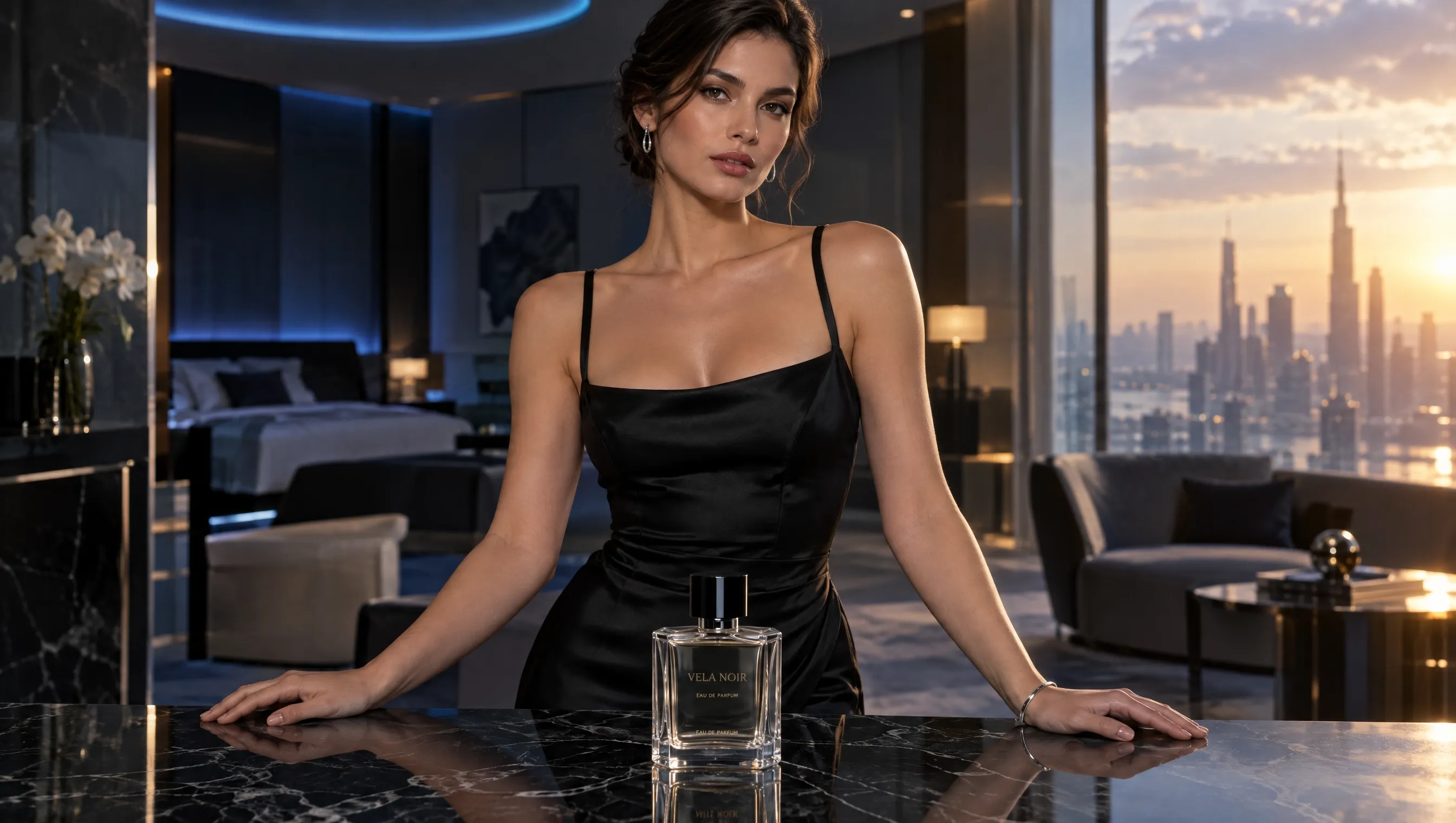
At this stage, I deliberately left movement out. I focused only on the woman, perfume, wardrobe, environment, lighting, and visual hierarchy. Once the frame worked, I treated it as an approved creative decision rather than letting Higgsfield redesign it in the next step.
Direct the Camera Instead of Asking for Something “Cinematic”
Once I had the still image, I moved into Cinema Studio and added camera movement without changing the visual foundation. Specific camera instructions gave me much more control than broad words such as “cinematic,” “dynamic,” or “dramatic.”
Because I was building a luxury product video, I also wanted every camera move to strengthen product attention rather than compete with it.
This is the kind of prompt I avoided:
Less controlled prompt: Create a dramatic cinematic product reveal with dynamic camera movement.
The problem is that “dynamic camera movement” leaves Higgsfield to decide how the shot should actually move. Instead, I took the image from the first step and added one specific camera action.
More controlled camera prompt: Use the existing image as the visual reference. Preserve the woman, perfume bottle, black satin dress, hotel environment, lighting, and composition. Start from the existing framing and slowly dolly forward toward the perfume bottle. Keep the camera level and finish with the bottle more prominent in the center of the frame.
At this point, I was testing only one new variable: camera motion. I could judge whether the dolly-in gave the perfume enough emphasis without changing the character or environment. I also give every camera movement a purpose. A push-in can concentrate attention on the product, while an orbit works better when I want to reveal its form from several angles.
Separate Subject Motion From Camera Motion
After I was happy with the camera movement, I added motion inside the same scene. I kept the approved dolly-in and introduced subject and environmental movement gradually instead of making everything move at once.
I use the same principle when thinking about mimic motion or image animation: the subject, camera, and environment should each have a clear motion role.
This is the type of prompt I avoided:
Overloaded prompt: The woman turns dramatically toward the camera, reaches for the perfume, her dress and hair move in the wind, curtains sweep across the background, lights flicker around the room, and the camera rapidly circles around her before zooming toward the bottle.
Too many elements were competing for attention, which would also make a weak result harder to diagnose.
Instead, I built directly on the camera movement from the previous step.
More controlled motion prompt: Keep the same slow dolly-in and preserve the existing woman, perfume bottle, black satin dress, hotel environment, composition, and lighting. The woman gently turns her head toward the camera and rests one hand near the perfume bottle. Keep her movement subtle and elegant. Add sheer curtains in the background and let them move gently, while keeping the rest of the scene stable.
Now each layer had one job: the camera pushed toward the product, the woman provided the main subject action, and the curtains added restrained environmental motion. If one part felt wrong, I could adjust that layer without rebuilding the whole shot.
Give Every Reference a Specific Job
Once I had a shot direction that worked, I focused on consistency across the wider campaign. I found reference to video generation more useful when each one had a specific responsibility.
I used a face to define identity and an outfit to preserve wardrobe. I kept separate references for the perfume bottle and hotel environment rather than expecting one image to control everything.
That made troubleshooting easier. If the woman's appearance drifted, I checked the identity reference. If the bottle changed, I reviewed the product reference. If the environment moved away from the campaign style, I focused on the scene reference.
When I created another shot, I reused those approved assets instead of describing everything again. The camera angle could change, but the Soul ID, perfume, wardrobe, environment, and lighting direction stayed consistent.
My workflow shifted from:
prompt → generate → rebuild everything
to:
establish assets → reuse them → direct the next shot
That is one of the clearest differences I found between casual generation and a more deliberate production workflow.
Keep Every Shot Consistent Now
Turn your character, product, or scene references into more consistent videos without rebuilding the look from scratch.
Try Reference to Video for Free
Turn the Decisions Into a Complete Shot Brief
By this point, I already knew how the character should look, where the product should sit, how the camera should move, and which references needed to remain consistent.
Because this was a promo video, I wanted the shot to communicate premium product value rather than simply look cinematic. Once the visual structure was clear, I could also define subtle ambience or a restrained sound effect.
I avoided collapsing those decisions back into a vague prompt like this:
Adjective-heavy prompt: Epic cinematic luxury perfume commercial, beautiful woman, dramatic movement, premium lighting, highly realistic, sophisticated advertising quality.
It captured the mood but lost most of the decisions I had already tested. Instead, I combined the approved image, references, camera movement, and subject action into one brief.
Complete shot prompt: Use the approved perfume campaign image and references as the visual foundation. Preserve the same woman, clear perfume bottle, black satin evening dress, futuristic luxury hotel suite, warm window light, cool ambient lighting, and refined composition. Keep the slow, level dolly-in toward the perfume bottle. The woman gently turns her head toward the camera and rests one hand near the bottle while the sheer curtains move subtly behind her. Maintain shallow depth of field and a premium fragrance campaign aesthetic. Hold the final product-focused framing briefly while preserving character identity, product design, wardrobe, and environment.
The prompt was longer, but every part came from a decision I had already tested rather than extra descriptive adjectives.
The question I kept asking was simple: What should visibly change between the first frame and the last frame? Here, the camera moved closer, the woman's pose shifted slightly, the curtains moved subtly, and the shot ended with stronger product emphasis.
Change One Important Variable at a Time
Once the complete shot was close to what I wanted, I stopped treating every new generation as a chance to redesign it. If one variable was wrong, I kept the same references and creative direction and changed only that variable.
I also kept creative iteration separate from later finishing work in AI video editor. At this stage, my priority was still getting the generation itself right. For example, the woman, product, lighting, and composition already worked, but the dolly-in felt too fast. I kept everything else unchanged.
Refinement prompt: Keep the existing woman, performance, perfume bottle, black satin dress, hotel environment, lighting, curtain movement, composition, and final framing unchanged. Preserve the same dolly-in path, but reduce its speed so the camera approaches the perfume bottle more gradually.
That generation had one clear purpose: testing whether a slower camera move improved the shot.
Changing several variables at once might have produced a better result, but I would not have known why. Instead, each iteration answered one smaller question, such as camera speed, subject movement, final hold time, or background activity.
Polish Your Video Without Starting Over
Adjust scenes, fix unwanted details, and refine existing footage without starting from scratch.
Try Free AI Video Editor NowStop Regenerating When Most of the Shot Already Works
My workflow changed again once most of the video was approved. At that point, a full regeneration created more risk because Higgsfield could change details I already liked.
If the problem was localized, I moved to Genjutsu and targeted that element instead. An unwanted detail called for removing the object from the video, while a broader visual restyle was closer to a video to video transformation. The important part was identifying how much of the shot actually needed to change before rebuilding anything.
In this campaign, the camera, woman, perfume, lighting, timing, and environment already worked, but the black dress blended too heavily into the dark room. I did not need another full Cinema Studio generation, so I used Genjutsu Object Swap for the localized change.
Targeted edit prompt: Preserve the existing woman, facial appearance, performance, camera movement, perfume bottle, hotel environment, lighting, curtain motion, timing, and composition. Replace the black satin evening dress with a deep burgundy satin dress while keeping the same fit, material quality, and elegant styling.
At that point, I was no longer asking Higgsfield to discover a new shot. I was protecting what already worked and changing only the remaining problem.
The principle I took from the experiment was simple: explore broadly at the beginning and edit narrowly near the end.
The full workflow became:
static visual → camera motion → subject and environment motion → reference consistency → complete shot brief → single-variable refinement → targeted edit
Each stage built on the result before it, so I could increase complexity without asking Higgsfield to solve the entire project again.
Best Use Cases for Higgsfield
| Use case | Why I use Higgsfield for it | Best starting point |
| Cinematic films and short videos | I can control camera movement, lenses, lighting, and recurring visual elements across multiple shots. | Cinema Studio |
| Product and UGC ads | I can turn a product image or URL into video ads, UGC videos, and other campaign assets. | Marketing Studio |
| Character-led video series | I can keep the same recognizable character across different scenes, styles, and clips instead of rebuilding the identity each time. | Soul ID + Cinema Studio |
| Music videos and visual concepts | I can develop cinematic keyframes, mood-driven scenes, and distinctive visual directions before expanding them into motion. | Soul Cinema + Cinema Studio |
| Pre-production and storyboarding | I can visualize scenes, characters, environments, and keyframes before committing to a larger video production. | Soul Cinema |
Why I Prefer Pollo AI for a More Flexible AI Video Workflow
Higgsfield works well when I want detailed control over an individual shot. But once a project expands beyond one clip, I often need different models, editing tools, enhancement options, advertising workflows, and more ways to turn an idea into finished content.
That is where Pollo AI gives me more flexibility. Instead of building every project around one model or one production method, I can adapt the workflow as my creative goal changes.
More Freedom to Match the Model to the Shot
Different shots can demand very different strengths. One may need stronger realism, while another depends more on motion, speed, audiovisual generation, or reference consistency.
Pollo AI gives me access to 70+ AI video models in one platform, including Seedance 2.5 and MiniMax H3. This lets me compare different generation approaches without moving the entire project between separate platforms.
If one result does not work, I do not have to keep rewriting the same prompt for the same model. I can test another model, compare the outputs, and keep the version that fits the shot better.
Finish Strong Results Without Starting Over
Generation is rarely the end of my workflow. I may still need to remove distractions, improve clarity, sync speech, translate my video, or reframe the video for another platform.
Pollo AI keeps these finishing tools close to the generation workflow, so I can improve footage that already works instead of immediately starting over. That helps me preserve useful shots, reduce repeated exports, and reach a more polished result faster.
I can also use specialized video apps when I need a specific format, such as ads, before and after videos, skincare routine ads, social clips, stories, or explainers. Each workflow starts from a clearer content goal, which helps me test more relevant creative directions without rebuilding the production setup every time.
Let Pollo Agent Generate Post-Ready Videos
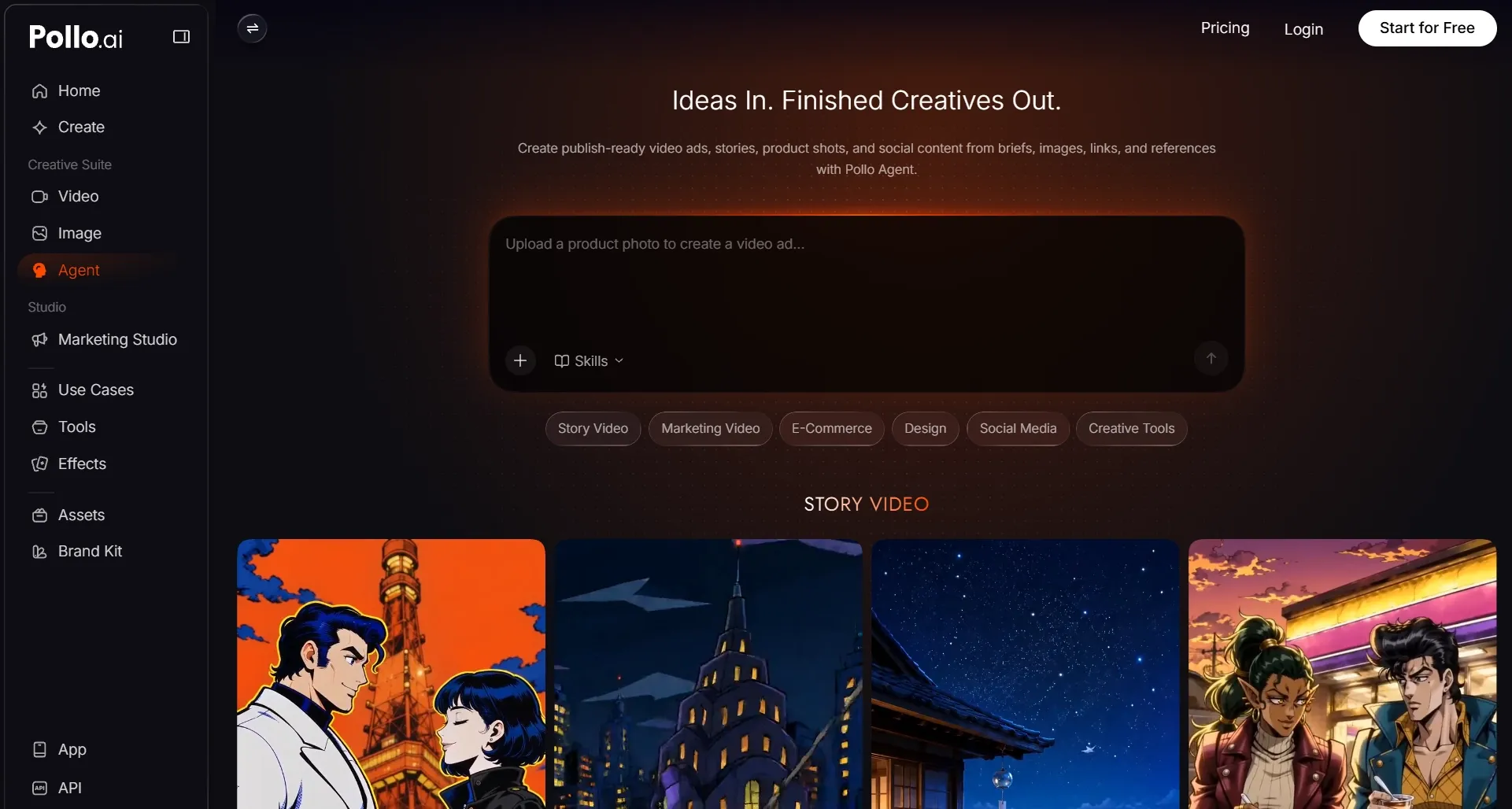
Not every project needs the same level of shot-by-shot control. Sometimes I want to direct every scene myself, but other times I already have an idea, script, reference, or URL and need to turn it into a connected video more efficiently.
That is where Pollo Agent becomes useful. Instead of manually planning each scene, matching assets, and assembling the sequence myself, I can give it the core material and let it help organize the structure, pacing, visuals, and sound around the same message.
I can still revise individual parts when needed, but I do not have to rebuild the entire production process manually. For stories, explainers, campaigns, or multi-scene videos, this gives me a faster route from idea to a more complete result.
My Final Take
The biggest lesson I learned from using Higgsfield is to control fewer things at once. I lock the visual first, add motion gradually, refine one variable at a time, and preserve what already works instead of constantly starting over.
Higgsfield is especially useful when I want stronger shot-level direction and cinematography control. But for broader production, I prefer Pollo AI because I can switch between leading models, refine footage with different tools, and adapt the workflow to each project more freely.
Try Pollo AI and build each video with the model, tools, and workflow that fit your idea best!