



How to Use Image to Video AI Free Unlimited for Video Creation
Image to video AI free unlimited generation matters because it lets you test ideas without worrying about credits too soon. I’ve seen the same problem with many AI tools: you upload an image, generate one clip, then hit a watermark, short duration limit, or paywall.
Pollo AI makes this easier with its “Unlimited” campaign, which features different models during different periods, giving you more room to test, tweak, and refine image-to-video results for free.
In this guide, I’ll show you what “unlimited” really means, how to use Pollo AI for image to video AI free unlimited generation, and what mistakes to avoid.
What Does Image to Video AI Free Unlimited Access Mean on Pollo AI?
Pollo AI’s Unlimited mode means supported models can be used repeatedly without deducting available compute credits during the active rights period. This is the key point I would highlight first, because it directly solves the “I’m afraid to waste credits” problem.
There is also no fixed upper limit on your total number of generations during the active period.
But these rights are not universal. Its image to video AI free unlimited access only applies to specific models and supported parameters, such as eligible resolution, duration, or model settings included in your subscription plan.
| Unlimited Right | What It Actually Means |
| No credit deduction | Supported Unlimited model generations do not use your available compute credits. |
| No fixed generation cap | You can keep generating during the active rights period. |
| Specific model access | Unlimited applies only to models marked with the Unlimited label. |
| Specific parameter access | Eligible resolution, duration, and settings depend on the model and your plan. |
| Subscription-based access | If your subscription ends, downgrades, or is not renewed, Unlimited rights end too. |
| Not speed-guaranteed | Unlimited rights guarantee eligibility to generate, not ultra-fast processing. |
It is also worth noting that Pollo AI’s Unlimited rights may be annual or term-based. Annual Unlimited usually lasts 365 days from purchase, while term-based Unlimited may last a set number of days, such as 10 or 14 days, depending on the pricing page or model label.
I like this setup because it gives me more room to experiment. We creators can test different prompts, moods, camera movements, and outputs without constantly checking our remaining credits.
To help you transform your images into unlimited videos, I’ve simplified the workflow into three steps.
Step 1: Start with Pollo AI’s Image to Video AI Free Unlimited Mode
Head over to image to video AI generator on Pollo AI, and look for the model label. If a model has an information icon or campaign note, check it before generating heavily.
The Unlimited campaign is always available. Besides, you can also use the free unlimited image to video AI generator covered by the Ultra subscription plan.
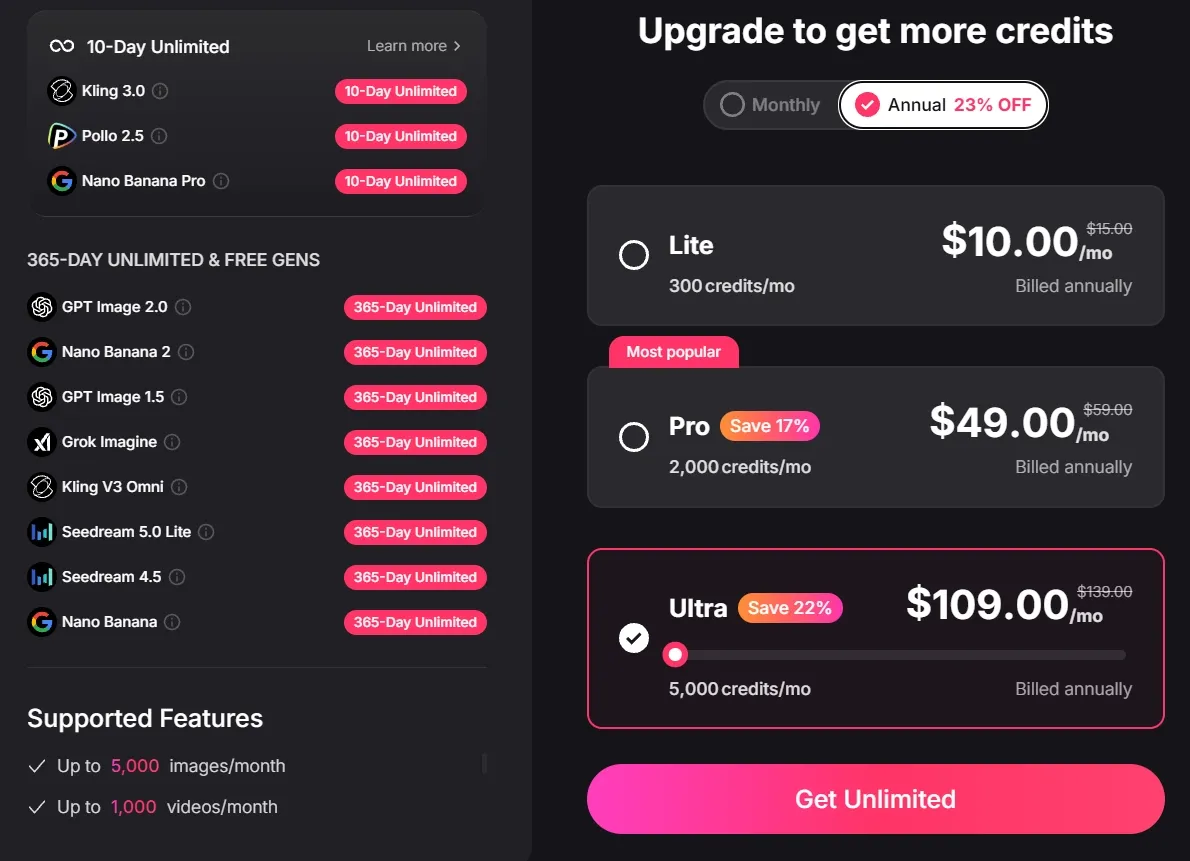
The most important thing to remember is this: free unlimited access depends on your active subscription status. If your subscription is canceled, not renewed, or downgraded to a plan without Unlimited rights, your Unlimited access ends immediately.
Step 2: Prepare Your Image and Prompt
Use a clear image and a simple prompt, because Unlimited retries help most when your inputs are already strong. I would not waste unlimited generations on blurry images or vague prompts like “make this amazing”.
Choose an image with one clear subject, good lighting, and a strong visual idea. Portraits, product photos, cartoon characters, travel shots, and cinematic stills usually work better than crowded or messy images.
For prompts, I use this simple formula:
Subject + Action + Camera Movement + Mood + Style
Here are a few examples:
| Use Case | Prompt Example |
| Portrait video | A young woman slowly turns toward the camera, soft wind moving her hair, slow cinematic push-in, warm sunset lighting, realistic film style. |
| Product video | A luxury perfume bottle sits on a marble table as golden light moves across the glass, slow orbit camera movement, premium commercial style. |
| Anime video | An anime girl stands in a rainy neon street, her coat moves gently in the wind, slow zoom-in, emotional cyberpunk atmosphere. |
Step 3: Generate and Refine Videos
Your first video may not be perfect. Maybe the camera moves too fast, the subject looks stiff, or the motion feels unnatural. That is normal.
With Unlimited mode, I would run small controlled tests:
- Test one camera movement first: Try slow zoom-in, slow pan, or gentle orbit.
- Change only one thing at a time: If you change the image, prompt, style, and camera move together, you will not know what improved the result.
- Use Unlimited mode for creative exploration: Try different emotions, lighting, and visual styles from the same image.
- Use credits-based mode for urgent work: If speed matters for a professional deadline, Pollo AI recommends switching to credits-based generation to use the priority queue.
That last point is important. Unlimited mode does not guarantee the fastest processing speed. Unlimited model tasks run through a dedicated processing queue, while credits-based generation can use the priority queue.
Try Image to Video AI Free Unlimited on Pollo AI Now!
Use Pollo AI’s Unlimited mode to test, refine, and improve your image-to-video results without wasting credits.
Start Creating Free
What You Should Notice When Using Image to Video AI Free Unlimited Mode
The biggest mistake is thinking free unlimited access means no rules, no waiting, and no limits anywhere. It does not. It means you have unlimited generation eligibility for supported models during your active rights period.
1. Ignoring the Active Period
Always check how long your Unlimited rights last. Some rights may last 365 days, while others may only last a specific number of days.
If the offer is term-based, plan your testing around that window. I would not wait until the last day to start experimenting.
2. Forgetting Subscription Dependency
Your image to video AI free unlimited access requires an active subscription. If your subscription ends, is not renewed, or is downgraded to a plan without Unlimited access, the Unlimited rights can end immediately.
This is especially important if you are planning a long creative project. Do not build your workflow around Unlimited access without checking your subscription status.
3. Expecting Priority Speed from Free Unlimited Mode
Image to video AI free unlimited access gives you more room to generate and iterate with supported models, but it is not the same as priority speed mode.
During peak demand, generation and rendering speeds may fluctuate, and the system may also apply additional parallel task limits.
4. Running Too Many Tasks at Once
When using image to video AI free unlimited generation, remember that Unlimited mode does not mean unlimited parallel tasks. Every subscription plan still has parallel generation limits, and higher-tier plans usually allow more simultaneous tasks.
I would treat Unlimited as “generate as much as allowed over time”, not “launch endless jobs at the same second”.
Next Step: Unleash Your Creativity with Pollo AI
Go to Pollo AI, check the current Unlimited-supported models, and start testing image-to-video prompts while your rights are active. That is the best way to use the offer properly. I bet you’ll love this Unlimited mode once you try it.
As an ultimate AI creative suite for marketers, creators, sellers, and brands, Pollo AI offers Unlimited mode not only for removing every limit in the system. The real advantage is that you can keep generating eligible videos for your real needs with top-tier AI models like Seedance 2.0 and Kling 3.0. You can test motion, style, camera movement, and visual direction without worrying about credit consumption.
That means you have more freedom, and a much lower barrier to learning AI image-to-video generation. Start simple, iterate often, and use Unlimited mode as a creative testing tool.