



How to Use Seedance 2.0: A Step-by-Step Tutorial
Seedance 2.0 makes video creation more powerful, but knowing how to use it properly is what makes the difference. From core features and setup to advanced techniques and real-world use cases, this article walks you through everything you need to know.
What is Seedance 2.0
Seedance 2.0 is a next-generation AI video generation model developed by ByteDance that turns ideas into cinematic videos using text, images, video clips, and audio—all in a single workflow.
Unlike earlier tools that relied on simple prompts, Seedance 2.0 functions as a multimodal AI system, allowing you to combine different inputs to guide every detail of your video—from character appearance to camera movement and soundtrack.
At its core, it functions more like a digital director than a basic generator. You describe a scene (or upload references), and the model automatically builds a complete video with multiple shots, smooth transitions, and even synchronized audio.
What makes Seedance 2.0 different
Seedance 2.0 isn’t just about generating videos. It gives you real control over how your content looks, moves, and performs, making it practical for marketing, social media, and storytelling.
- Multimodal Input System: Create videos using text, images, video clips, and audio together.
- Multi-Shot Cinematic Generation: Turn a single idea into a structured, multi-scene video automatically
- Character & Style Consistency: Keep characters, objects, and visual style consistent across scenes.
- Advanced Camera & Motion Control: Direct camera movement and scene dynamics using simple descriptions.
- Native Audio & Scene Synchronization: Generate videos with synchronized sound, music, or dialogue.
- @ Reference-Based Control: Use uploaded assets to lock in specific elements like characters or styles.
- End-to-End Video Creation Workflow: Go from idea to final video without switching between tools.
Multimodal Input System
Instead of relying on guesswork from text alone, you can guide the model with real visual and audio references. This makes outputs far more predictable and aligned with your intent.
For example, you can upload a product image and combine it with a short script to generate a product demo video that already matches your branding and tone.
Multi-Shot Cinematic Generation
Rather than producing isolated clips, the model builds a sequence with logical scene progression and transitions. This helps your content feel complete and story-driven without manual editing.
It’s especially useful when creating short-form videos for TikTok or ads where you need a clear beginning, middle, and end in just a few seconds.
Character & Style Consistency
Maintaining consistency is one of the hardest parts of AI video, but Seedance 2.0 keeps visual elements stable across frames.
This allows you to create repeatable content like branded series, character-led storytelling, or influencer-style videos without constantly fixing mismatched visuals.
Advanced Camera & Motion Control
You can specify zoom, pan, tracking shots, or subject motion to shape how the video feels. For content creators, this means you can produce cinematic-style videos, product showcases, or storytelling scenes that look professionally directed without editing experience.
Native Audio & Scene Synchronization
Audio is automatically aligned with the visuals, so you don’t need to edit or sync tracks separately. This makes it much easier to produce complete videos for platforms like TikTok, YouTube Shorts, or ads where sound plays a key role in capturing attention.
@ Reference-Based Control
By anchoring the generation to specific inputs, you gain much tighter control over how subjects appear and behave. This is especially helpful for e-commerce and marketing teams that need consistent product visuals or recognizable characters across multiple videos.
End-to-End Video Creation Workflow
You can upload assets, write prompts, generate videos, and export results in one place without re-uploading or switching tools. For example, turn a product image into a ready-to-post TikTok video in a few steps, without using separate editing software.
How to Use Seedance 2.0
Getting started with Seedance 2.0 is straightforward, but the key to better results lies in how you combine inputs and structure your prompt. Follow these steps to create more controlled and polished videos.
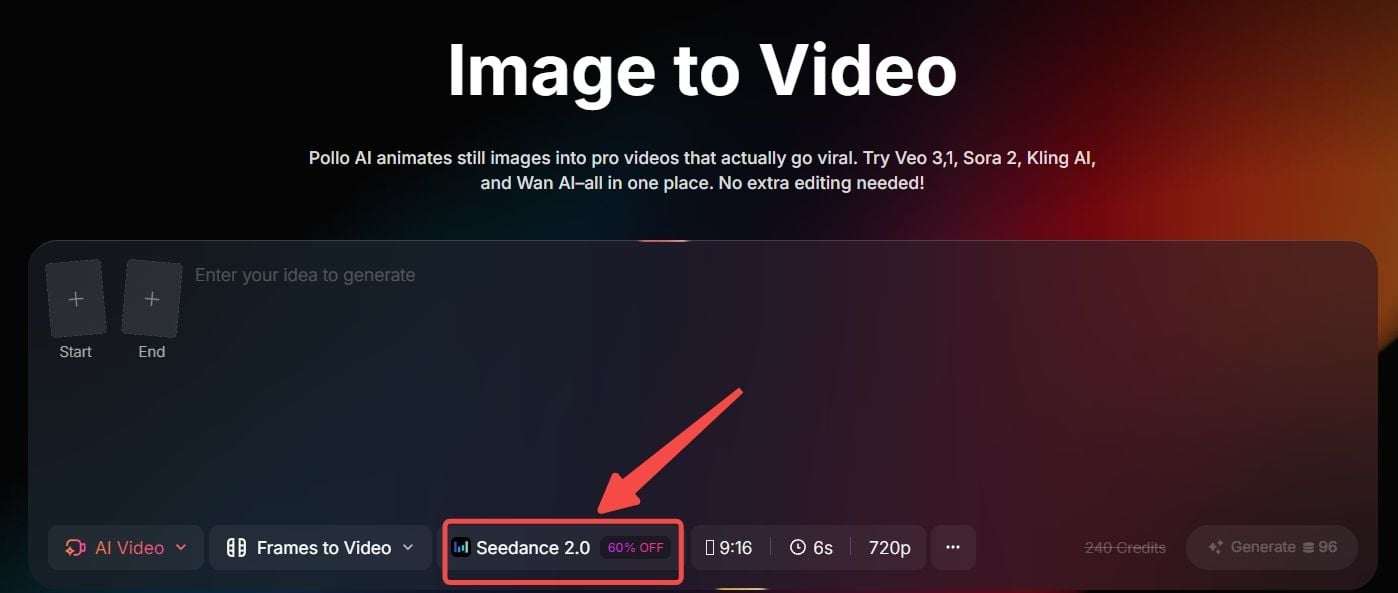
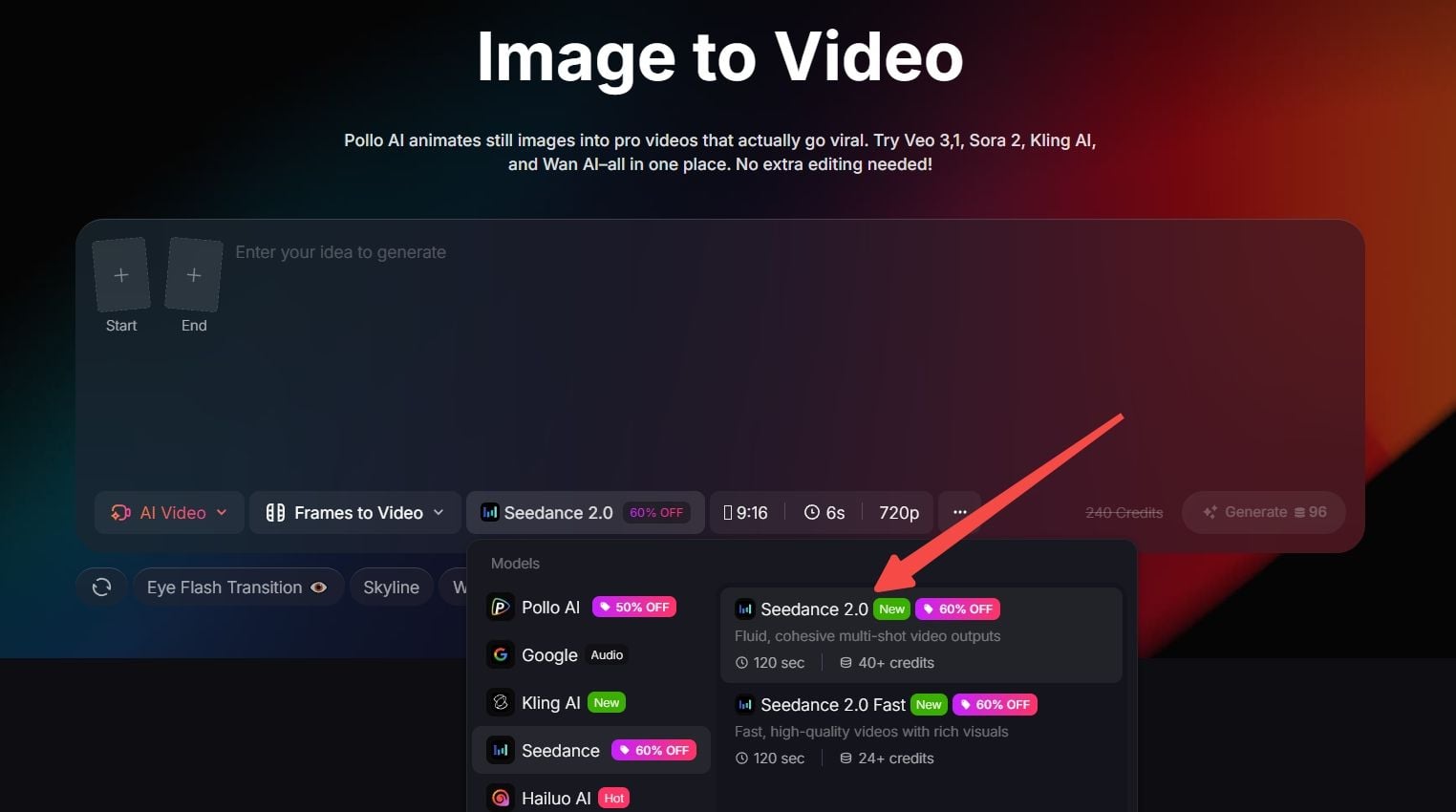
Step 1: Select Seedance 2.0 in Pollo AI
Go to the image to video page on Pollo AI and choose Seedance 2.0 as your model.
You can then input text, images, frames, or reference media to guide how your video is generated.
Step 2: Write a Structured Prompt
A clear, structured prompt makes a big difference in output quality. Instead of a vague sentence, describe your scene in layers:
- Subject – who or what is in the scene
- Action – what is happening
- Environment – where it takes place
- Camera – how the scene is shot
- Mood/style – overall tone
Example:
A woman holding a skincare product, soft natural lighting, close-up shot, slow camera zoom, clean minimal background, premium lifestyle aesthetic.
If you uploaded assets, you can reference them to lock in specific elements, making results more predictable.
Step 3: Generate and Review the Output
Click generate and let Seedance 2.0 create your video. If something feels off, adjust your prompt instead of starting over. Small changes—like refining the camera movement or adding detail—can significantly improve results.
Step 4: Refine with Iteration
Seedance 2.0 works best through iteration. Instead of aiming for a perfect result in one try:
- Add more detail to your prompt
- Adjust pacing or motion descriptions
- Swap or add reference assets
For example, if a product video feels too generic, you can refine it by adding camera directions like “slow pan from left to right” or specifying lighting conditions.
Step 5: Export and Use Your Video
Once you’re satisfied, export your video for use across platforms. You can directly use the output for:
- TikTok or Instagram Reels
- YouTube Shorts
- Product ads or landing pages
- Story-driven content
Advanced Techniques for Better Results
To get consistent and high-quality results with Seedance 2.0, focus on how you structure inputs and guide the model, not just what you type.
Use @ References for Precise Control
Instead of relying on text alone, assign roles to your uploaded assets using @ references. This lets you control exactly how characters look, how scenes move, and how the video feels.
Combine Multiple Inputs for Better Accuracy
Seedance 2.0 performs best when you combine text with images, videos, or audio. Using references reduces randomness and makes outputs closer to your intent.
This is especially useful for ads or branded content where visual accuracy matters more than creative variation.
Structure Prompts as a Sequence
Describe what happens over time instead of writing a single static scene. Breaking your prompt into steps helps the model generate smoother transitions and multi-shot videos. This works well for storytelling, product demos, or any content that needs a clear visual flow.
If you want to know how to use prompts to take your Seedance 2.0 results to the next level, read Seedance 2.0 prompt guide.
Use Video References for Motion and Camera Style
Upload a reference video to guide movement, pacing, or camera behavior. Seedance 2.0 can transfer motion patterns like panning, tracking, or scene transitions, helping you create more cinematic results without manual editing.
Iterate Instead of Generating Once
Don’t expect a perfect result in one try. Refine your prompt and references step by step. Small adjustments, like changing camera movement or adding detail, can significantly improve output quality, especially for short-form or marketing videos.
Top Use Cases of Seedance 2.0
- Social Media Creators: Produce consistent short videos for TikTok, Reels, or Shorts with repeatable styles and characters.
- Marketers & Advertisers: Turn product images and simple scripts into ready-to-run ad creatives without filming or editing.
- E-commerce Sellers: Create product showcase videos with controlled visuals and motion for listings, ads, or landing pages.
- Content Teams & Agencies: Generate multiple video variations quickly for campaigns, A/B testing, or multi-platform distribution.
Pro Tips to Improve Your Video Flow
Getting a smoother, more natural video flow with Seedance 2.0 often comes down to small execution details rather than major changes. These practical tips help improve clarity, pacing, and overall video quality without overcomplicating your workflow.
- Start with shorter clips before scaling up: Generate short outputs first to test motion, pacing, and composition before creating longer videos.
- Control pacing through timing and motion cues: Use words like “slow,” “fast,” or “gradual” to guide how scenes evolve and avoid unnatural speed changes.
- Keep scenes visually simple: Avoid overcrowding with too many elements, which can reduce clarity and make motion less stable.
- Match aspect ratio to your platform: Plan for vertical (9:16) or horizontal (16:9) outputs early to avoid awkward framing or cropping later.
- Focus on one key subject per scene: Clear subject focus helps the model maintain better composition and makes the video more engaging.
Create Videos with Seedance 2.0 on Pollo AI
Seedance 2.0 is already available on Pollo AI, so you can start creating videos instantly without switching platforms!
Alongside Seedance, Pollo AI also gives you access to multiple leading image and video models, allowing you to choose the best tool for each result instead of relying on just one.
With Pollo Agent, which incorporates Seedance 2.0, marketers can turn product ideas or campaign copy into ready-to-use video ads in minutes. Generate multiple variations, test different angles, and produce content for TikTok, Reels, or paid campaigns without manual editing.
Besides Pollo Agent, Pollo AI also goes beyond raw generation with ready-to-use marketing apps like AI TikTok video generator and marketing video maker, designed for real content production.
You can quickly create platform-specific videos, adapt one idea into multiple formats, or generate content at scale for daily posting without starting from scratch each time.