



VideoWeb AI Review: My Honest Take After Testing It for a Week
I spent a week with VideoWeb AI to see whether its multi-model workflow could really help me create better AI videos, not just more random drafts.
In this review, I’ll share what VideoWeb AI does well, where it feels limited, who it is best for, and why I would choose Pollo AI when I need a more complete path to post-ready videos.
My Quick Verdict
VideoWeb AI is an AI video generator I would use for quick drafts, visual experiments, and short social clips. I found it especially useful when I wanted to test different creative directions without building a full production workflow.
What I like most is its all-in-one setup. VideoWeb AI brings various tools into one platform, and its multi-model access gives creators more room to compare motion styles, visual looks, and generation results.
The main issue is reliability. VideoWeb AI is useful for testing ideas, but I would not fully rely on it for production-level work, because complex motion, detailed subjects, and brand-specific scenes can still take several tries to get right.
Review Area | My Verdict |
|---|---|
| Ease of Use | Beginner-friendly and quick to start |
| Model Variety | Strong, especially for testing different looks |
| Video Quality | Good for simple clips, mixed for complex motion |
| Prompt Control | Useful, but not always precise enough |
| Marketing Workflow | Better for drafts than full campaign production |
| Best For | Creators, social clips, visual tests, simple AI videos |
| Better Alternative | Pollo AI, which helps you move from creative ideas to publish-ready content with more control |
What Is VideoWeb AI?
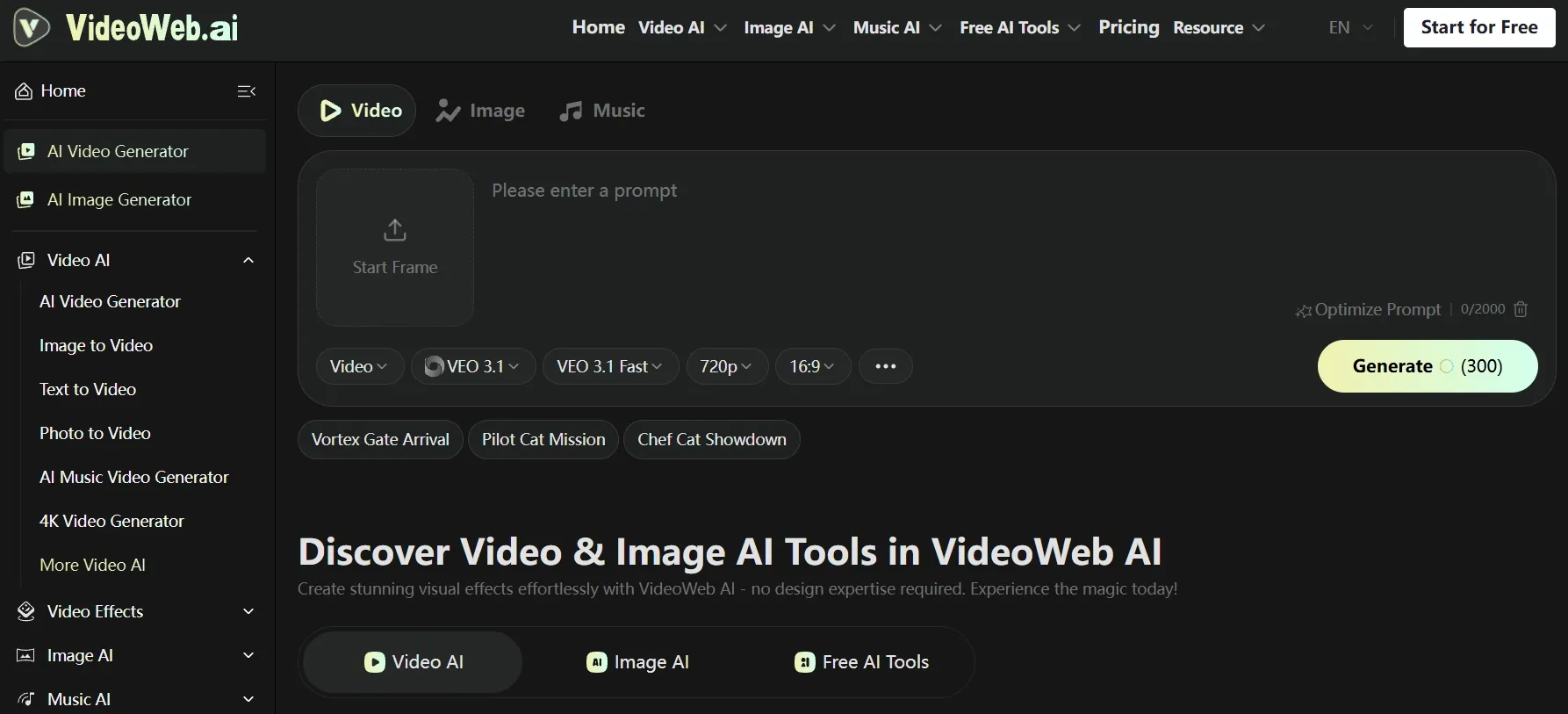
VideoWeb AI is built as a multi-model creative hub for AI video creation. It lets me create videos from prompts or uploaded images, while also giving me access to music features and visual effects in the same workspace.
That makes VideoWeb AI useful when I want to compare different models, including Veo 3.1 and Kling 3.0, test visual directions, or create early video drafts without setting up a heavier production workflow.
It works best for short creative tests, simple social clips, and idea exploration where flexibility matters more than precise control.
But that broad setup also defines its limits. VideoWeb AI is not always the best option when I need a more guided path to finished content.
If I need stronger scene control, more stable motion, cleaner subject presentation, or a smoother workflow from idea to publish-ready output, I would need a more complete creative workflow around the generation.
What Are VideoWeb AI’s Key Features?
VideoWeb works best as a flexible starting point for AI video creation, where users can explore different models, inputs, and visual directions.
Here are the main features I focused on during this review.
Multi-Model Access
VideoWeb’s multi-model access is useful when I want more than one visual direction to choose from. Instead of being locked into a single model, I can switch between Kling AI, Seedance AI and more based on the style, motion, speed, or quality I want.
This matters because different AI video models often behave differently. When I test the same prompt through its text to video generation, one model may render the scene with a stronger cinematic look, while another may handle quick effects, stylized visuals, or simple motion more smoothly.
I like this feature because it makes VideoWeb feel more flexible during the testing stage. When I am not sure which direction will work best, I can compare a few model outputs in one place before spending more time refining the video.
Multimedia Ecosystem
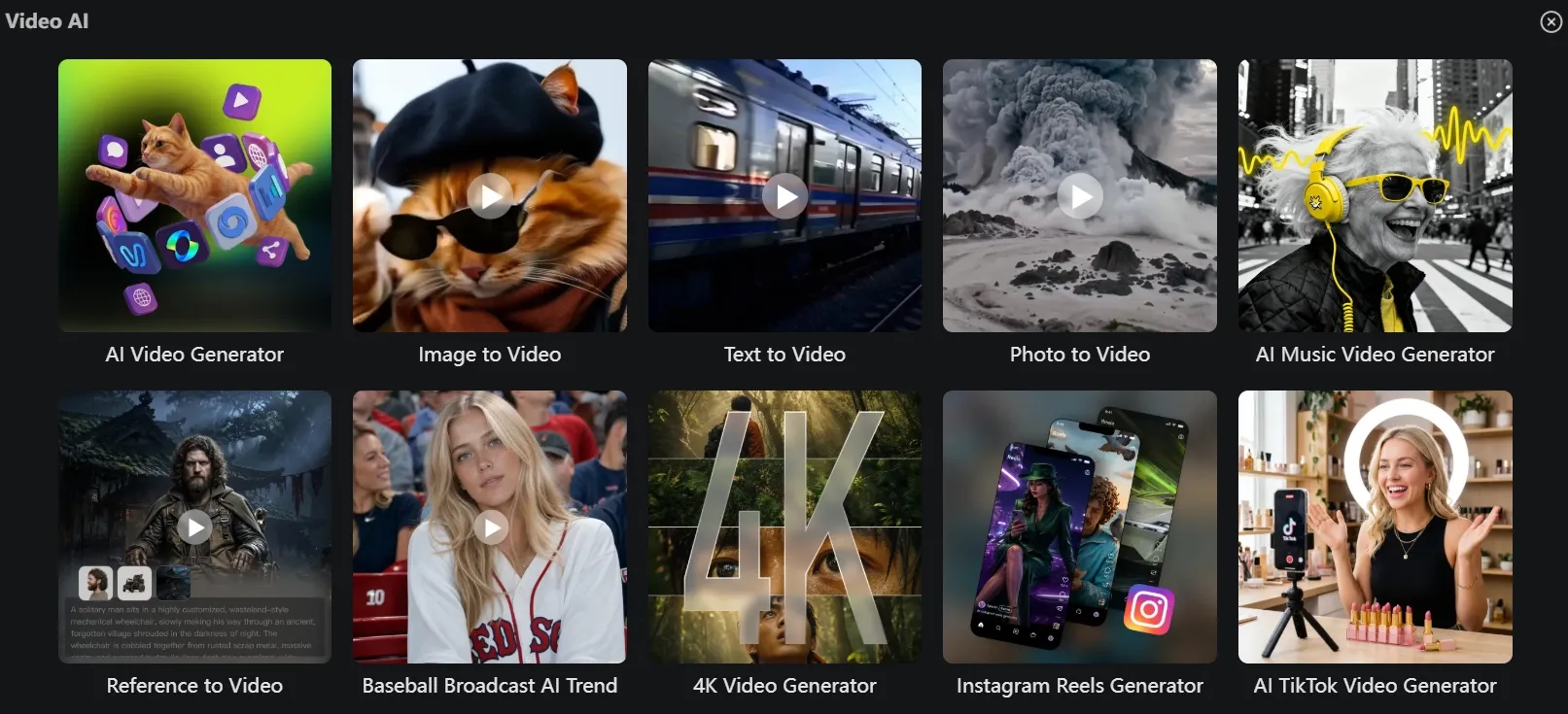
VideoWeb is useful when I do not want to create every asset in a separate tool. I can work on AI images, videos, music and visual effects in the same workspace, which makes the early creative process feel lighter.
This is helpful because a video idea rarely stops at the first clip. I can start with image to video generation to animate a product shot or portrait, then stay in the same workspace to test music, effects, and other creative directions before deciding how far to take the idea.
I like this setup most during the ideation stage. It gives me a simple way to explore a concept from different angles without treating every draft like a final production.
Fast Generation and Clean Exports
VideoWeb is helpful when I want to test ideas quickly and save clean drafts for review. Faster generation makes the creative process feel less interrupted, especially when I need to compare several video directions.
The no-watermark download option also makes the results easier to use outside the platform. Even if the video still needs refinement, I can export a cleaner version and decide whether it is worth taking further.
What Are VideoWeb AI’s Pros And Cons?
VideoWeb has clear strengths for fast creation, but its weaknesses show up when you need control, consistency, and publish-ready results.
Pros:
- Easier to test different AI video models without managing every model separately.
- It includes video, image, music, and effects tools in one workspace.
- The browser-based workflow makes it friendly for creators, marketers, and small teams that do not want a heavy editing setup.
- For quick social clips, trend ideas, and visual drafts, VideoWeb can help you move faster.
- It offers commercial rights, private generations, and a fast generation queue for paid monthly plans.
Cons:
- VideoWeb’s output quality can vary depending on the model I choose.
- Credits can also run out faster than expected when I test multiple prompts or use higher-cost models.
- Fast action, dancing, body movement, and detailed character motion can still look unnatural.
- I have less control for deeper editing or final polish.
Where Does VideoWeb AI Fall Short?
VideoWeb falls short when the job moves from quick generation to controlled video production.
Publish-Ready Output Is Not Guaranteed
VideoWeb does not always give me a video that feels ready to publish. Some outputs still need careful review before I can use them in a real project.
The biggest issues usually appear in details like faces, hands, text, logos, product shapes, or fast camera movement. When these parts look unstable, the whole video can quickly feel less reliable.
Product-Focused Videos Still Need Refinement
VideoWeb can struggle when the video depends on accurate product presentation. Labels, shapes, textures, and small design details may change or become unclear during generation.
That is a problem when I need the product to look trustworthy. If the item changes across frames or loses important details, the result still needs extra editing or regeneration.
Complex Motion Can Be Unstable
VideoWeb is not always reliable for scenes with fast or detailed movement. Dance music videos, sports actions, multi-person scenes, and precise hand-object interactions can still look unnatural.
The more the scene depends on physical accuracy, the more likely I am to need several attempts before the motion feels usable.
Creative Control Has Clear Limits
VideoWeb gives me basic generation controls, but it does not always give me enough control for demanding video projects.
When I need an exact scene direction, repeatable character look, precise product movement, or a tighter video structure, basic model selection and prompt settings are not always enough. I may still need a more guided workflow to shape the final result.
How Did I Review VideoWeb AI?
I reviewed VideoWeb by focusing on real content tasks, not just feature names.
I did not only ask, “Does it generate video?” That is too basic now. I wanted to know whether VideoWeb could help with the kinds of outputs creators, marketers, and small businesses actually need.
I looked at six areas:
- Video quality and scene stability: I checked whether each result looked clean enough to use or still felt like a rough AI draft.
- Prompt understanding: I looked at whether VideoWeb followed the idea, motion direction, mood, and subject details I gave it.
- Model flexibility: I considered how useful it felt to access and compare different models from one platform.
- Workflow speed: I checked whether VideoWeb helped me move faster from an idea to a visible result.
- Commercial usefulness: I looked at whether the output could support real content needs, such as ads, ecommerce visuals, social content, or brand videos.
- Post-production needs: I checked how much extra editing the generated video still needed before it felt ready to use.
My conclusion was simple: VideoWeb is a flexible AI video testing hub, but not a full production workflow for creating polished, publish-ready videos.
Is VideoWeb AI Right For You?
VideoWeb is right for you if you want a fast, flexible AI video hub for testing ideas across different models.
Use VideoWeb if you create short social videos, visual drafts, AI effects, music videos, or quick concept tests. It is especially useful when speed matters more than perfect control.
But I would skip VideoWeb when the project needs more than a rough creative starting point.
If I need consistent subjects, clearer details, tighter pacing, or a result that feels closer to finished content, VideoWeb can leave too much manual refinement after generation.
So if I want to create product videos, stable character stories, UGC video ads, e-commerce visuals, or repeatable brand assets, a more guided production workflow makes more sense.
How Does VideoWeb AI Perform Across Real Use Cases?
VideoWeb performs best for fast creative testing and less strongly for finished commercial production.
Use Case | My Take |
|---|---|
| Social Media Clips | Good fit for quick visual drafts and trend-style clips |
| Music Videos | Useful for short mood-driven clips |
| Product Videos | Mixed fit because product detail may need extra review |
| UGC-Style Ads | Mixed fit if the avatar or script needs more polish |
| Sales Campaigns | Weaker fit when brand consistency and product clarity matter |
| Course Or Explainer Videos | Useful for drafts, but may need clearer editing control |
That is where VideoWeb’s role becomes clearer to me. It is useful when I want to test an idea quickly, but it is not always the tool I would rely on when the result needs stronger structure, cleaner details, and a smoother path to publishing.
Why Is Pollo AI a Better VideoWeb Alternative?
Pollo AI is a better VideoWeb alternative because it is built for finished creative production, not just broad model access. Compared to VideoWeb, Pollo AI feels more complete for creators, marketers, sellers, and brands.
The bigger difference appears after generation. VideoWeb AI may still leave me with raw outputs to refine, while Pollo AI gives me a clearer path from rough concept to publish-ready content with less manual cleanup.
Pollo Agent for Finished Video Creation
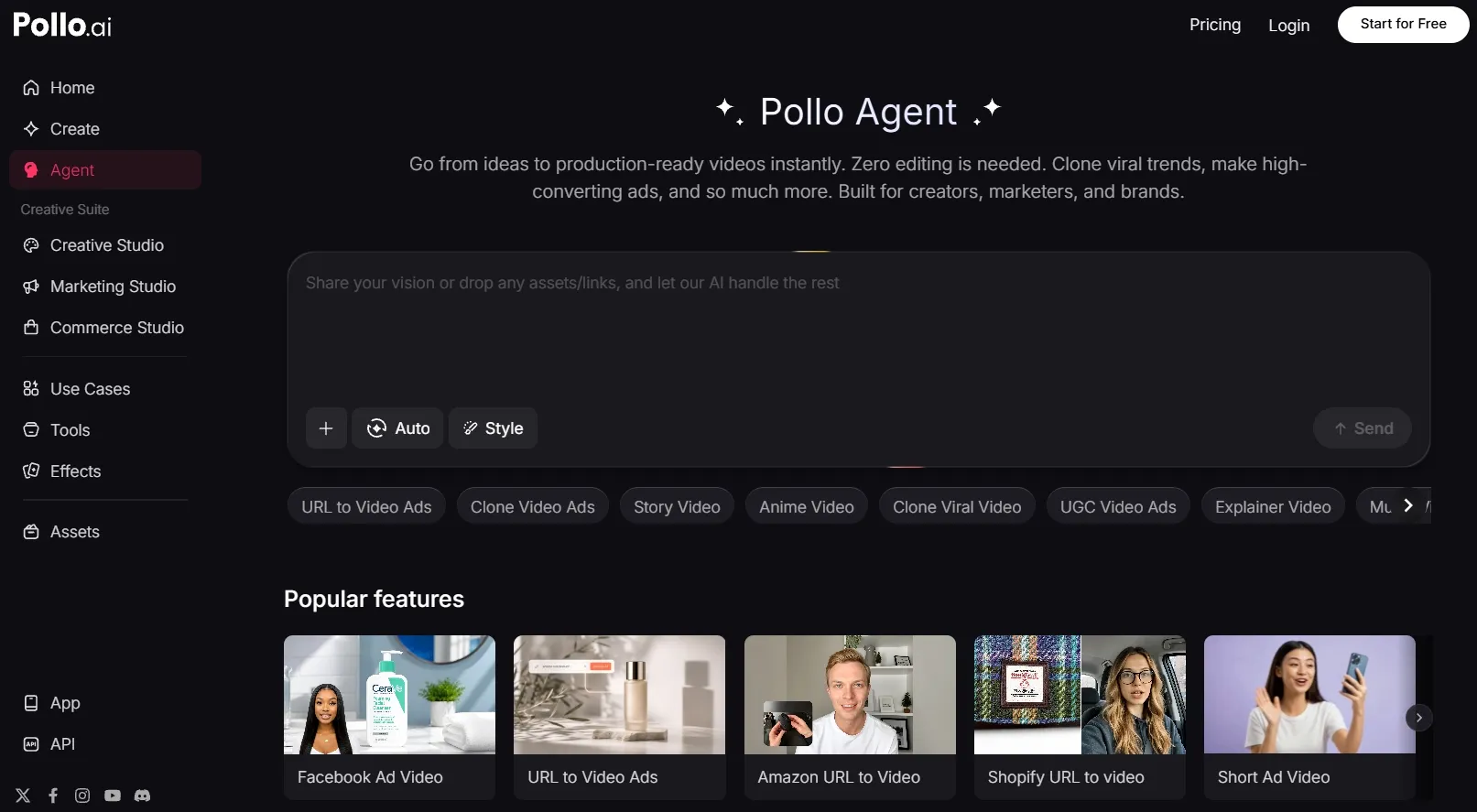
Pollo Agent is the feature that makes Pollo AI feel more production-focused to me. I can start with an idea, text, image, or link, and let the agent help shape it into a more complete video.
What I like most is that the workflow is built around finished results. Instead of only generating raw clips, Pollo Agent helps handle the structure, pacing, visuals, and sound, so I can move closer to publish-ready content with less manual editing.
Marketing Studio for Structured Campaign Work
Pollo AI’s Marketing Studio is built for marketers who need faster ad creation without a heavy production process.
I can use it to create sales-ready video ads with clearer structure, stronger messaging, and a more direct path to a ready-to-use result. That makes it especially useful when I need to move from a rough campaign idea to a polished ad faster.
Fuller Creation Workflow
Pollo AI gives me more flexibility in and after the first generation. Pollo AI offers 70+ leading AI video models, including the newest ones such as Happy Horse 1.1 and Seedance 2.5. So I am not limited to one model, one format, or one narrow creation path.
I can also create, adjust, enhance, and expand different types of content in one place, from talking avatars to video editor. That makes the workflow feel more complete when I need to keep refining an idea instead of starting over.
Move From Ideas to Finished Videos
Pollo AI helps you create more polished video content with flexible models, creative tools, and guided workflows.
Try Pollo AI for Free Now
What Is My Personal Take On VideoWeb AI?
My honest take is that VideoWeb is useful for fast testing, but I would not treat it as a full production tool.
I like its model variety, simple setup, and support for video, image, music, and effects. It makes AI video creation feel easier to start, especially when I just want to explore a few visual directions.
But VideoWeb feels less helpful at the final production stage. When I need stronger consistency, cleaner details, or a result that feels closer to finished content, I may still need extra refinement after generation.
So my split is simple. I would use VideoWeb for quick ideas, social tests, and visual experiments, but I would be more careful when the project needs polished, reliable output.
My Verdict: Is VideoWeb AI Worth Using?
VideoWeb AI is worth using if you want a flexible space for quick AI video drafts, model testing, and early creative exploration.
Its biggest value is convenience. I can test different models, create simple video ideas, and explore video, image, music, and effects in one place. That makes VideoWeb useful when I need fast inspiration or a rough visual direction.
But I would not treat VideoWeb as my main choice for finished creative production. Its results can still need several attempts, careful review, and extra refinement before they feel ready to use.
For a more complete AI video workflow, I would choose Pollo AI. It is built as a fuller AI creative suite for creators, marketers, sellers, and brands, so the workflow feels more focused on creating usable content, not just generating raw clips.
Pollo AI also gives me more flexibility for real production needs. I can choose different creation paths, use leading AI models, and work with 100+ specialized workflow apps that help move the project closer to publish-ready content with less manual editing.
Try Pollo AI to create publish-ready videos with stronger workflow support, more creative flexibility, and less editing work.