



Seedream 5.5 Review: I Tested The Most Iterative AI Image Model Yet
One thing about image generation that has always frustrated me is that you can try to make an edit, but something else also changes, making the output less usable. So, when I heard Seedream 5.5 had launched, I was itching to see what sort of improvements it may have brought to this area. So, sit back and let’s dive into it all, shall we?
TL;DR
I’m impressed by Seedream 5.5’s strong photorealism and superb control over composition and typography, making it well-suited for rendering detail-rich and text-heavy imagery. But I find its strongest advantage is its iterative workflow that ensures precise editing over multiple rounds without compromising visual identity or quality. You can try using Seedream 5.5 on Pollo AI now!
What Seedream 5.5 Has To Offer: At a Glance
Before I get deep into my personal experience with Seedream 5.5, let me give those of you who may be in a rush a quick rundown of what this model is capable of:
| Features | What it does | Strengths | Limitations |
| Multi-round editing | Allows creators to revise selected regions or objects across several editing rounds. | Supports iterative workflows; helps preserve the approved composition while changing one detail at a time. | Preservation is not guaranteed. Non-target areas may still shift, especially when changes affect lighting, reflections, shadows, or facial features. |
| Focused local edits | Changes colors, forms, materials, clothing, lighting, or other defined elements. | Works well for controlled changes such as replacing a product material or changing a garment color. | Results become less predictable when one prompt requests many unrelated edits at once. |
| Transparent and semi-transparent output | Generates assets with transparent backgrounds and partial opacity. | Useful for product cutouts, stickers, overlays, glass, ribbons, decorative elements, and reusable campaign assets. | Alpha edges, shadows, reflections, and translucent areas still require inspection and possible cleanup. |
| Layer separation | Separates an image into background, object, and text layers, with support for up to 100 layers in the preview. | Moves the output closer to a reusable design file; makes compositing, localization, and layout adjustments easier. | “Up to 100 layers” does not mean every result becomes a clean, editable PSD. Layer cleanup and organization may still be required. |
| Text and typography | Generates small, dense, multilingual, and information-rich text layouts. | Useful for labels, product posters, infographics, menus, campaign graphics, and multilingual concepts. | Generated text must be proofread. Spelling, numbers, dates, translations, and factual details are not automatically reliable. |
| Multi-image blending | Combines multiple reference images while attempting to maintain coherent scale, perspective, lighting, and subject identity. | Useful for product visualization, art direction, fashion concepts, and compositing different visual references. | Product dimensions, logos, identity details, and material properties still need to be checked against the originals. |
| Improved realism | Produces more detailed skin, fabric, materials, expressions, proportions, and lighting. | Strong for portraits, lifestyle imagery, product campaigns, and editorial concepts. | Realistic appearance does not guarantee anatomical accuracy, consistent identity, or commercially correct product details. |
What You Need To Know About Seedream 5.5: An Introduction
Most AI models can be useful for creative exploration, but I rarely find them to be dependable enough for campaign or extended production work. For example, if I wanted to change the outfit on a character or revise the text on a poster, the outputs often drift with every new change.
In other words, I can’t consistently use the same visual idea across several different layouts. But Seedream 5.5 brings focused, multi-round image editing to the table, creating a proper workstation that I can use to make continuous revisions without quality degradation.
It also offers transparent image generation, which I see as another valuable feature for extended production. Instead of removing backgrounds or asking another system to do it, which may produce incorrect edges and inconsistent results, I can have it handled natively.
What’s more? Seedream 5.5 can separate up to 100 reusable layers, which means I can isolate a background, move text, replace a decorative element, etc. I appreciate how valuable this can be for creating campaign content, exploring multiple versions, updating existing copy, etc.
Besides that, the model comes with enhanced multilingual and small-text rendering. This lets me create and edit text-rich imagery like labels, posters, and other typography layouts across various languages like Russian, Japanese, Thai, etc., with more accurate results.
I’m also glad that Seedream 5.5 emphasizes more realistic expressions, proportions, skin, fabric, material detail, etc. But what I see as the true value here is not just photorealism. It’s the ability to keep the visual coherent even while I continue to make other changes.
All in all, I believe what Seedream 5.5 has introduced is not just quality upgrades. Together, I see them as the extensions of a model that intends to remain useful after the first generation. Having said that, I carried out a few tests to see what it’s capable of, so let’s dive into that.
Push Your Creative Boundaries With Seedream 5.5
Explore endless visual possibilities with precise control over every creative detail.
Try Seedream 5.5 for Free
Generating Images with Seedream 5.5: Here’s What I Learned
I was eager to find out how Seedream 5.5 would perform, so I wasted no time. How strong is the photorealism? Does it support longer edits? Is the typography consistent? Let’s find out:
#1. Seedream 5.5: Visual Quality Test
For the first test, I wanted to see how it handles rendering something as simple as an upcoming game poster. So, I focused on assessing its capacity for handling complex visual detail like realism, texture, and scene lighting. Here’s what I went for:
| Prompt | Output Image |
|---|---|
| Generate a premium commercial poster for GTA 6, a neon-soaked open-world action game set in and inspired by 1980s Miami. Feature a double-exposure silhouette of a rebellious criminal protagonist blended with swaying palm trees, speeding supercars, glowing art-deco skyscrapers, and a vibrant waterfront skyline. Use saturated magenta, cyan, orange, and golden-hour lighting, gritty cinematic texture, dramatic contrast, and energetic pop-art-inspired typography. Create an aggressive, stylish urban atmosphere with polished blockbuster game branding. Include the exact text: “COMING SOON 2026.11.” |  |
Color me impressed (pun intended), I was blown away by the visual consistency across the composition. From the reflections to color grading to silhouettes to retro-futuristic styling, I find the model shows impressive control over advanced composition and cinematic lighting.
But what really surprised me is how on point the typography is. Even with such a dense amount of information spread all over the graphic, Seedream 5.5 ensured that all the text is accurate and readable. Not a single grammatical or symbolic error, even across the neon signs.
All in all, I’d say it’s a solid result deserving of a 7/10 score, at least.
#2. Seedream 5.5: Multilingual Typography Test
Next, I wanted to see just how well it can handle different typography. To be specific, how well it performs with small, multilingual text, which meant I was less concerned with graphic design. Instead, I wanted to generate a full text page, so this is what I went for:
| Prompt | Output Image |
|---|---|
| Generate an image of a beginner-level Japanese learning textbook opened to page 5, showing simple vocabulary, basic grammar explanations, and example sentences in a clean, easy-to-read educational layout, captured as if photographed with a smartphone. Use a realistic vertical textbook page, with soft natural lighting, subtle paper texture, and a wooden desk visible around the book. Design the page with a clear hierarchy: a prominent lesson title at the top, colored section headers, vocabulary items arranged in neat columns, small friendly illustrations, Japanese words in hiragana and simple kanji, romanized pronunciation beneath each term, and concise English translations below or beside them. | 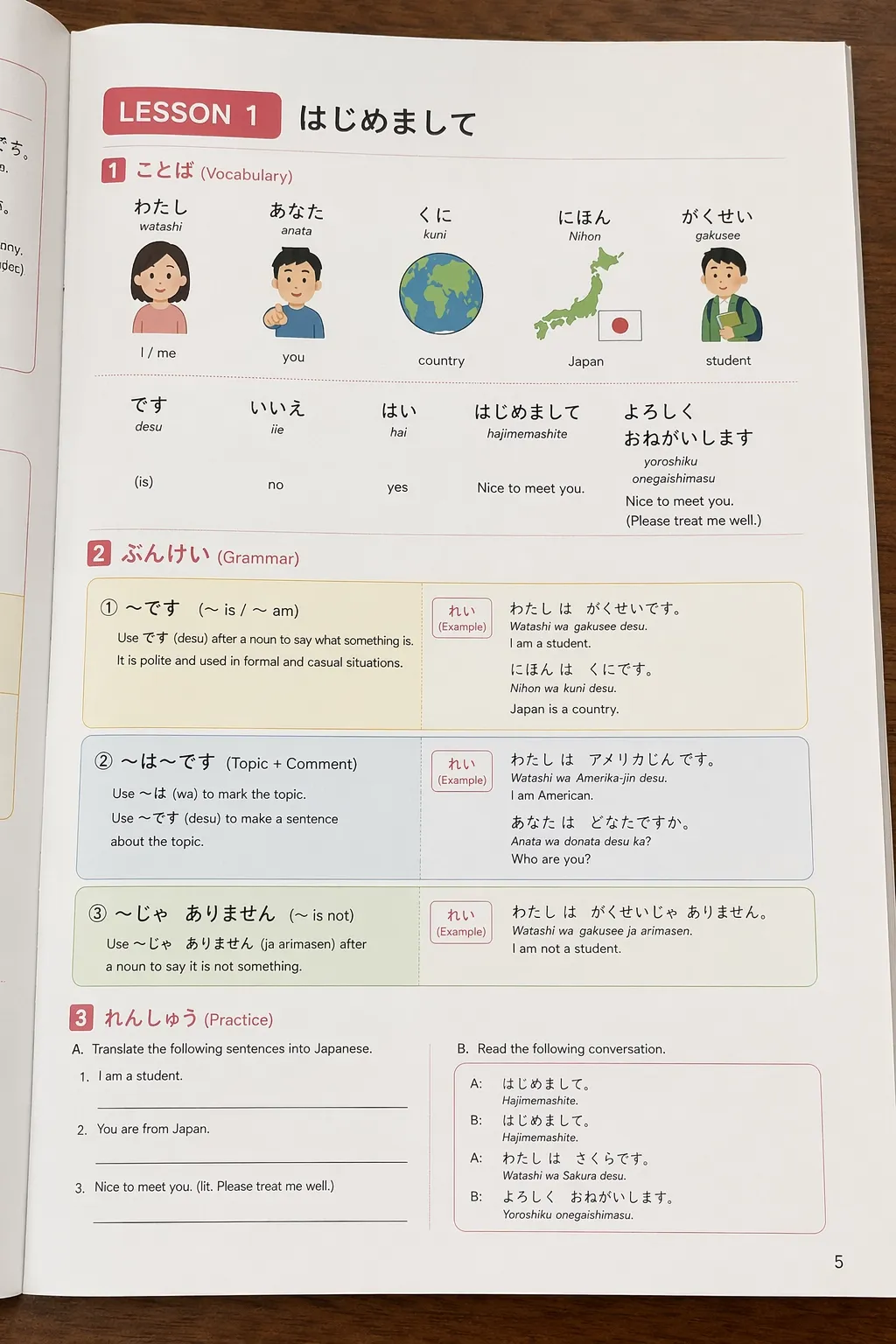 |
I have to admit this was an ambitious request, and I wasn’t expecting much. But Seedream 5.5 really delivered something spectacular. The main challenge for most models would be to produce exact text fidelity at small sizes.
Yet, Seedream 5.5 managed to handle the titles, section headings, short vocabulary labels, and simple English lines well. It even rendered relatively accurate Japanese hiragana with cute illustrations to deliver a rather realistic grammar book page.
To sum it up, this is a great result. If I didn’t generate it myself, I would’ve assumed it was a real photo taken by someone attempting to learn Japanese. Overall, I think an 8/10 is the perfect score because it’s not an exaggeration to say that Seedream 5.5 can handle typography.
#3. Seedream 5.5: Photo Editing / Prompt Following Test
For my final test, I simply wanted to see how accurate it is at following instructions, especially when it comes to making edits. So, my aim this time was to challenge the model with dense prompts that required it to blend various elements in a single image. This is what I went for:
| Input Image | Image Edit | Final Image |
|---|---|---|
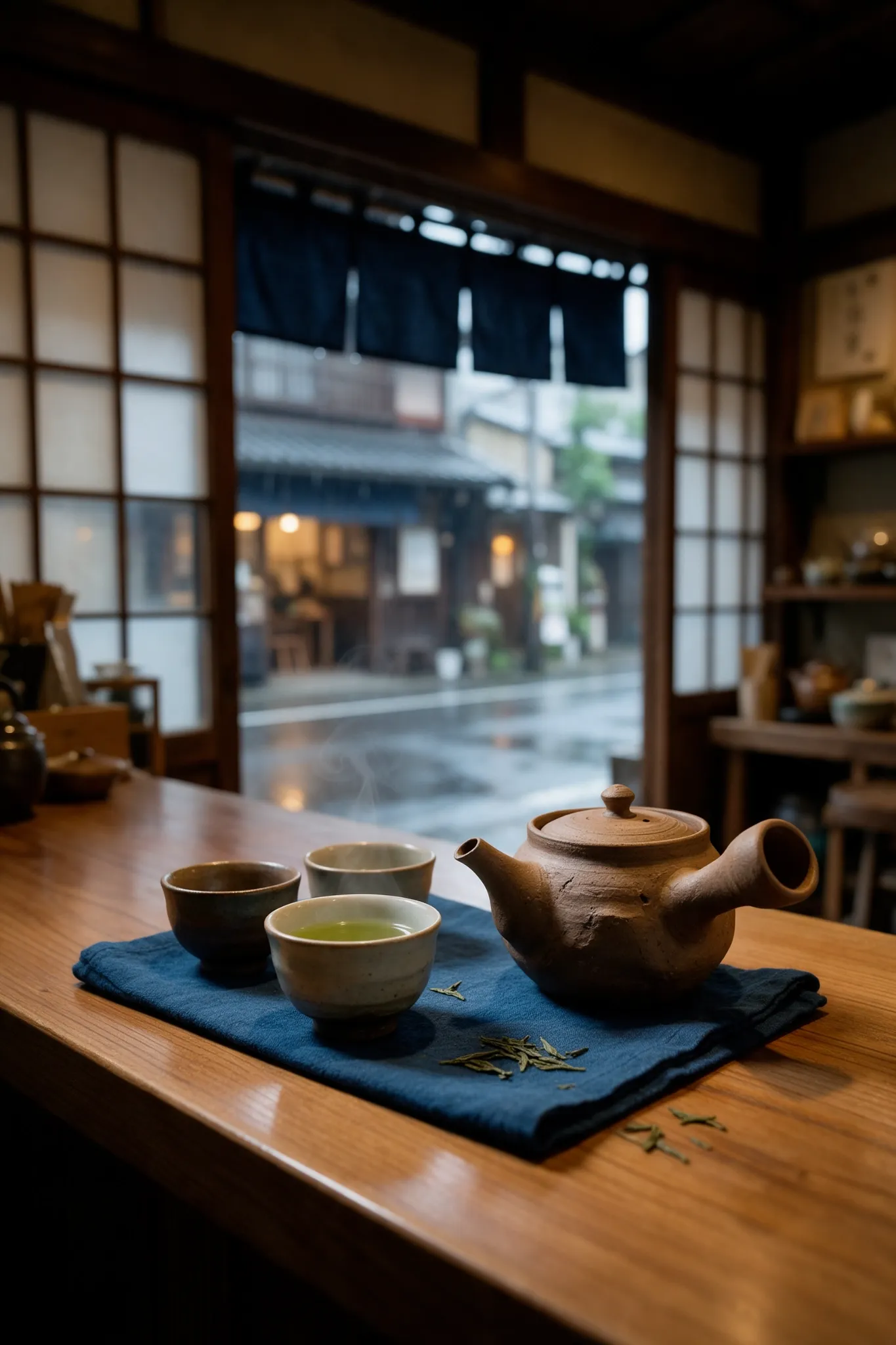 | In the background of this image, show an elderly Japanese tea maker standing right at the door of the shop in a dark linen shirt. He is standing behind the table, staring at something off-screen. His face should have realistic age, natural skin texture, fine wrinkles, and a calm, focused expression. His hands must be anatomically correct and positioned casually behind his back. Do not make him pose directly for the camera. Preserve everything else in the original image. | 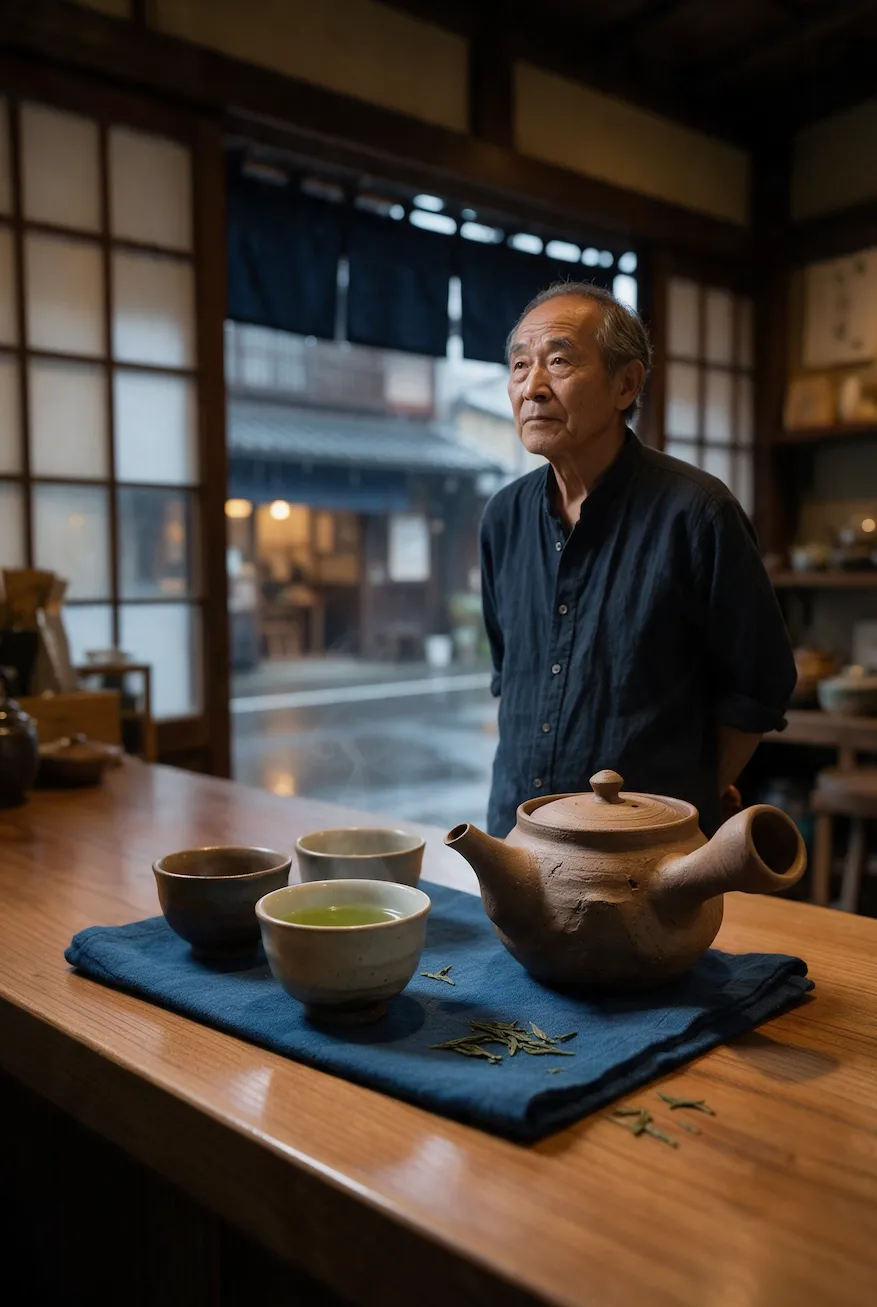 |
I was pleased with how the initial image turned out. It’s a beautiful photorealistic shot that looks like it was genuinely taken by a real person at the tea shop. The composition feels intentional, with convincing natural lighting, rich textures and a warm, atmospheric setting.
Even as I edited the man in the scene, I was surprised to see how naturally the model integrated him into the shot. His positioning, lighting, and appearance feel consistent with the environment, proving that Seedream 5.5 can maintain stable quality after a round of edits.
I think the model has made a significant leap in realism, and this particular test was the best proof of that. So for this case, I’d give it an 8.5/10 performance.
Turn Your Imagination into Reality with Seedream 5.5
Bring your boldest ideas to life with stunning detail and creative precision.
Try Seedream 5.5 NowFinal Verdict: Is Seedream 5.5 Worth Using?
From what I’ve seen, I believe that Seedream 5.5 can be a genuine visual collaborator, not just a typical image generator. Right off the bat, it seems to excel in almost every visual area. Need a photorealistic shot? Want clear typography? Looking to make a seamless edit?
I’m honestly taken aback by how capable it seems at handling various image creation, iteration, or reuse tasks that I place in front of it. And while that’s not to say every output is necessarily perfect, I can confidently say that it does well to keep obvious faults to a minimum.
So, is Seedream 5.5 worth using? Absolutely. It’s powerful, consistent, and versatile, but most importantly, it excels at turning an idea into a usable asset through controlled revisions. This is where it stands apart, and the reason, I see it as the direction image generation needs to take.
Unlike most other models that fixate on nailing a perfect render, I admire how this one focuses on making revisions a continuous first-class activity. In other words, I can confidently continue to refine with Seedream 5.5 to achieve a perfect result, which is invaluable for any project work.
Want To Explore Seedream 5.5? Head to Pollo AI
If Seedream 5.5 sounds like what you need for your next creative project, then I advise you to head to Pollo AI. As the ultimate AI creative suite for filmmakers, brands, marketers, and creators, I use it to access leading AI image models like Nano Banana 2 and GPT Image 2.5.
With all these models in one place, I can seamlessly test new visual concepts to see which one produces the best results that suit the task at hand. Whether I’m looking to create and edit ad posters, photorealistic images, character art, social memes, etc., I can handle it all here.
There’s also the Pollo Agent, which is an iterative chat tool that helps me brainstorm and refine ideas into publish-ready assets in minutes. What’s more? The platform has dozens of AI image tools that I can conveniently rely on to upscale images, remove backgrounds, etc.
Best part? Pollo AI is free to use for first-timers. So, if you don’t yet have an account, then this is your chance to explore all of its features and capabilities at no cost!
Conclusion
While Seedream 5.5 is relatively new, I already have a high opinion of it. With this image model in your daily workflow, I’m convinced you can enjoy more predictable results, be it on the first attempt or the tenth change. So, don’t wait to start creating with it on Pollo AI now!