VideoScribe AI video generator comes from Sparkol, the Bristol firm acquired by CEO Zoe Taylor in 2018. It is designed for creating whiteboard animations and explainer videos. It focuses on the "hand-drawn" aesthetic to help viewers retain information through visual storytelling. That whiteboard style works well for explanations, but it is narrow for current needs. Pollo AI gives you broader control with leading AI models, 100+ workflow apps, AI avatars, and more tools for post-ready video generation. Try Pollo AI for free!
Create your own influencer. Then jump into any trend with Recast.
Kling 4.0
Up to 10 keyframes. Unlimited for 10 days with Ultra.
Pollo Recast
Recreate viral videos. Remix new versions.
Pollo Recast Challenge
One upload in. Your viral video out. Unlimited rewards await.
Pollo Agent x DeepSeek V4.1 FLASH
Faster completion at a much lower cost.
Pollo Agent x Gemini 4 Argon
Smarter reasoning. All through Pollo Agent.
WIN iPHONE DUO
Capture a city in one minute. Join the challenge now.
Pollo MCP
End-to-end content creation. Up to 4 Videos/ 20 Images for FREE.
Key Features of VideoScribe
Traditional Whiteboard Simulation: Replicate the effect of a hand drawing images and text on a board in real-time to maintain viewer focus.
Educational Asset Bundles: Access curated collections of graphics and templates specifically designed for training and academic environments.
Concept Simplification Engine: Effortlessly transform lengthy or technical descriptions into concise, easy-to-understand explainer videos.
Timeline-Based Scene Control: Arrange images, text, transitions, and audio on a visual timeline to control the pacing of each video scene.
Camera Zoom and Pan Effects: Guide the viewer’s attention by moving the camera across the canvas and zooming into key ideas.
Multiple Animation Styles: Apply draw, fade, bounce, spin, and other animation effects to make explainer videos feel more dynamic than static slides.
Voiceover and Music Sync: Add recorded narration, AI voiceovers, sound effects, or background music, then time the visuals to match the audio.
Traditional Whiteboard Simulation
VideoScribe enables you to create a whiteboard video that mimics the look of content being hand-drawn on a classroom whiteboard or a simple white background. This technique is psychologically proven to increase information retention, as the viewer follows the movement of the hand while listening to the narration.
Educational Asset Bundles
The platform offers training content bundles that are pre-designed for educators and HR professionals. These include specific icons and scenes common in learning environments, such as laboratory equipment, office layouts, and diverse character sets, ensuring you always have the right visual for your topic.
Concept Simplification Engine
The explainer video tool is ideal for "de-cluttering" information. If you have a long, boring text document, VideoScribe helps you extract the core points and turn them into a visual sequence.
Timeline-Based Scene Control
VideoScribe gives users a timeline-based editing workflow, making it easier to control when each object appears, how long it stays on screen, and how the visual sequence flows. This is especially useful for training videos and explainers, where timing needs to match the logic of the lesson or narration.
Camera Zoom and Pan Effects
Instead of keeping every element fixed on one static frame, VideoScribe lets users control camera movement across the canvas. You can zoom into an important diagram, pan from one idea to the next, or pull back to show the bigger picture. This helps turn simple whiteboard content into a more guided video experience.
Multiple Animation Styles
VideoScribe AI is not limited to the classic hand-drawn effect. Users can also apply animation styles such as fade, bounce, pulse, and spin to create more variety in the final video. These motion options help keep explainer videos visually engaging without requiring advanced animation skills.
Voiceover and Music Sync
Audio is a major part of the VideoScribe AI workflow. Users can record or upload a voiceover, use AI-generated narration, add background music, and sync visuals to the spoken script. This makes it easier to create polished training videos, educational lessons, marketing explainers, and internal communications.
Real Use Cases of VideoScribe AI
Sales Teams: Create animated explainers that clarify offers and help prospects make faster buying decisions.
Marketers: Build branded campaign videos that improve message recall and social engagement.
HR Teams: Produce onboarding videos that help employees understand policies faster and retain key details.
Trainers: Turn lessons into visual stories that improve attention and reduce learning fatigue.
Small Businesses: Make affordable promo videos that look professional and help attract more customers.
VideoScribe AI’s Marketing Position
VideoScribe AI is designed as a communication tool, not a cinematic AI video generator. Its roots are in whiteboard animation, where clarity matters more than visual spectacle. That makes it useful for teams explaining products, policies, lessons, or internal messages.
Its market position is also shaped by Sparkol’s history. The Bristol company behind VideoScribe was acquired by CEO Zoe Taylor in 2018. The move signalled a plan to expand distribution, collaboration, and new products.
Today, VideoScribe AI sells simplicity. It targets marketers, HR teams, educators, and business owners who need quick animated videos. Its message is direct: create professional videos without design skills.
This gives VideoScribe AI a clear niche. It is not built for creators chasing cinematic realism or viral AI effects. It is built for people who need clean, understandable animated communication.
VideoScribe AI’s Community Reputation
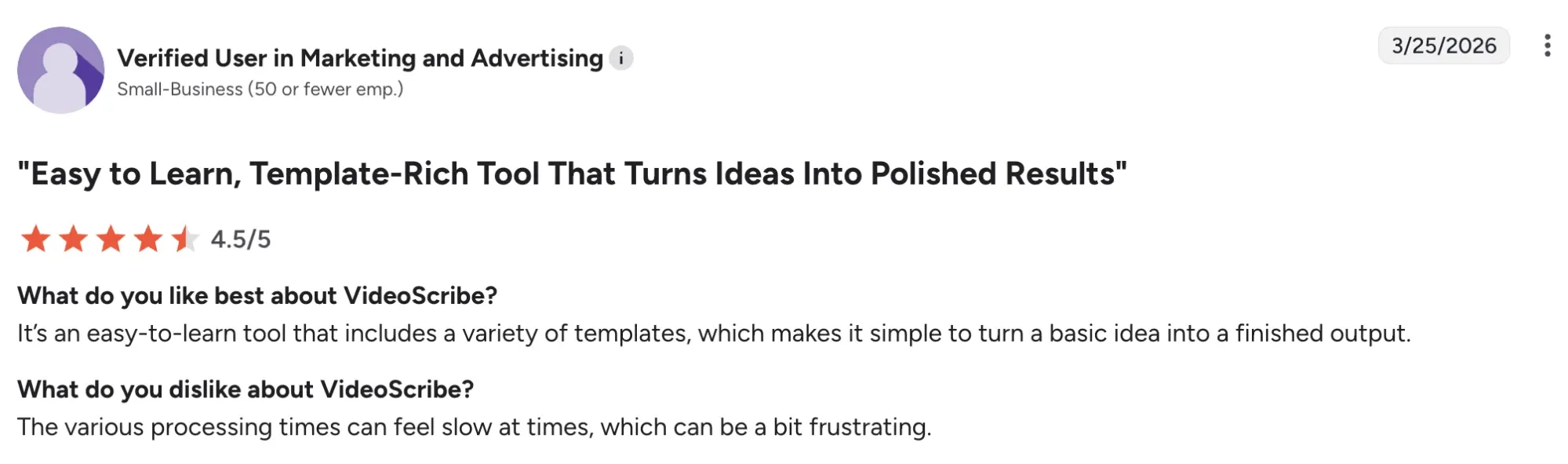
Across public review platforms like G2 and Trustpilot, VideoScribe AI is often praised for making animation feel approachable. Many users like its clean interface, familiar whiteboard style, and low learning curve. For teams without designers, that simplicity is the product’s biggest advantage.
Users also value the way VideoScribe AI turns plain ideas into clear visual stories. Its hand-drawn animation style helps make abstract topics easier to follow. That is especially useful for educators, trainers, and small businesses.
But some users say rendering can feel slow, especially when projects become longer or more complex. Others mention crashes, limited customization, or missing features that require extra editing elsewhere.
I’ve been using Pollo AI mainly for short videos and quick image-to-video tests. The interface is straightforward and it works well even with simple prompts, which is a big plus compared to tools that need long, complicated instructions. The results can be really impressive, and it’s honestly been fun to experiment with. I’d love a bit more consistency on faces when there’s movement, but overall it’s been a solid experience for what I needed.
Awesome website. loads of options and a great way to learn how to work with 'AI' my reasoning for 5 stars is based upon price, versatility and ease of use. Also I would like to add, Pollo AI runs a lot of promos on different AI products as well. I rate their customer service at 5 stars, when I purchased my first subscription my computer crashed the following weekend and I lost all my data and info passwords you name it I lost it, contacted pollo by email they responded quickly and found my info/username and account, and I was able to restore my account.
I have been using Pollo AI for short videos. It is easy to use and works well with simple prompts. Other generators seem to need long drawn out complicated explanations to get even close to what I want.
i tried 220 online img to vid in 2 months, and this is the best online video.I will subscribe for a year; there are many reasons. But freedom is the most important.
Discover Other Powerful AI Video Generators on Pollo AI
It is ideal for education, training, and explainer videos because the drawing process helps keep the audience engaged and improves memory retention.
Can I change the hand that draws in VideoScribe?
Yes, you can choose from many different hand styles, skin tones, and drawing tools like pens, pencils, or chalk.
Does VideoScribe provide images to use?
Yes, it includes a large library of thousands of images and icons that are already optimized for the 'drawing' effect.
Is it easy to make an explainer video?
Yes, VideoScribe is designed specifically for this purpose, providing the templates and tools needed to simplify complex concepts quickly.
Is VideoScribe effective for corporate or business presentations?
While highly popular in education, it is equally effective for business. Companies often use it for internal training, 'how-it-works' product explainers, and boardroom presentations to turn dry statistics and technical jargon into a more visually engaging, narrative-driven experience.
Turn Simple Ideas into Finished Videos with Pollo AI for Free!
Create post-ready AI videos with flexible styles, stronger visuals, and less manual work.








 Liz Cassidy


