



AI Video Prompt Guide for Marketing Videos: Subject, Motion, Camera, Lighting, and Sound
TL;DR
An effective AI marketing video prompt defines subject, motion, camera, lighting and sound, with reference roles, shot timing and an ending added for complete ads. Pollo AI is the best platform for marketers who want to apply this framework in one place, combining text to video, image to video and reference workflows with Pollo Agent to turn a structured brief into a complete video with scenes and sound.
How to Write an AI Video Prompt for Marketing Videos
Follow three steps: prepare your goal and references, describe the five prompt elements, then generate and refine. Use this foundation for a single shot or add a timeline for a complete commercial.
Step 1: Define the Goal, References, and Output
Decide what viewers should remember, what assets define the visuals, and where the finished video will appear. These choices help you give each instruction a clear purpose.
- Message: Identify the product benefit or impression to communicate.
- References: Explain which asset defines the product, person or visual style.
- Output: Choose the duration, aspect ratio and resolution available for your placement.
- Scope: Decide whether you need one shot or a complete sequence.
When you build a product showcase from existing photos, distinguish the details to preserve from the changes you want. A product photo can define packaging and colors, while a portrait supplies the model's appearance. Clothing and background can then be specified separately.
For complete ads, Pollo AI offers Pollo Agent to turn a brief and supporting references into a finished video. Provide your goal and assets, describe the sequence, and refine the project through conversation.
Step 2: Describe the Five Elements
Define subject, motion, camera, lighting, and sound for each shot. For a complete ad, explain how those shots connect and what the ending should achieve.
| Prompt element | Question it answers | Details to include |
| Subject | What must viewers recognize? | Product, person, setting and essential visual details |
| Motion | What happens? | Actions, order, speed and final position |
| Camera | How is the action shown? | Framing, angle, movement and space for text |
| Lighting | How should materials appear? | Light direction, softness, color and highlights |
| Sound | What should viewers hear? | Music, effects, speech and timing |
Subject: What Must Viewers Recognize?
Describe the main product or person using visible details. Instead of “luxury makeup,” specify the compact's shape, finish, logo, mirror, and arrangement of eyeshadow pans.
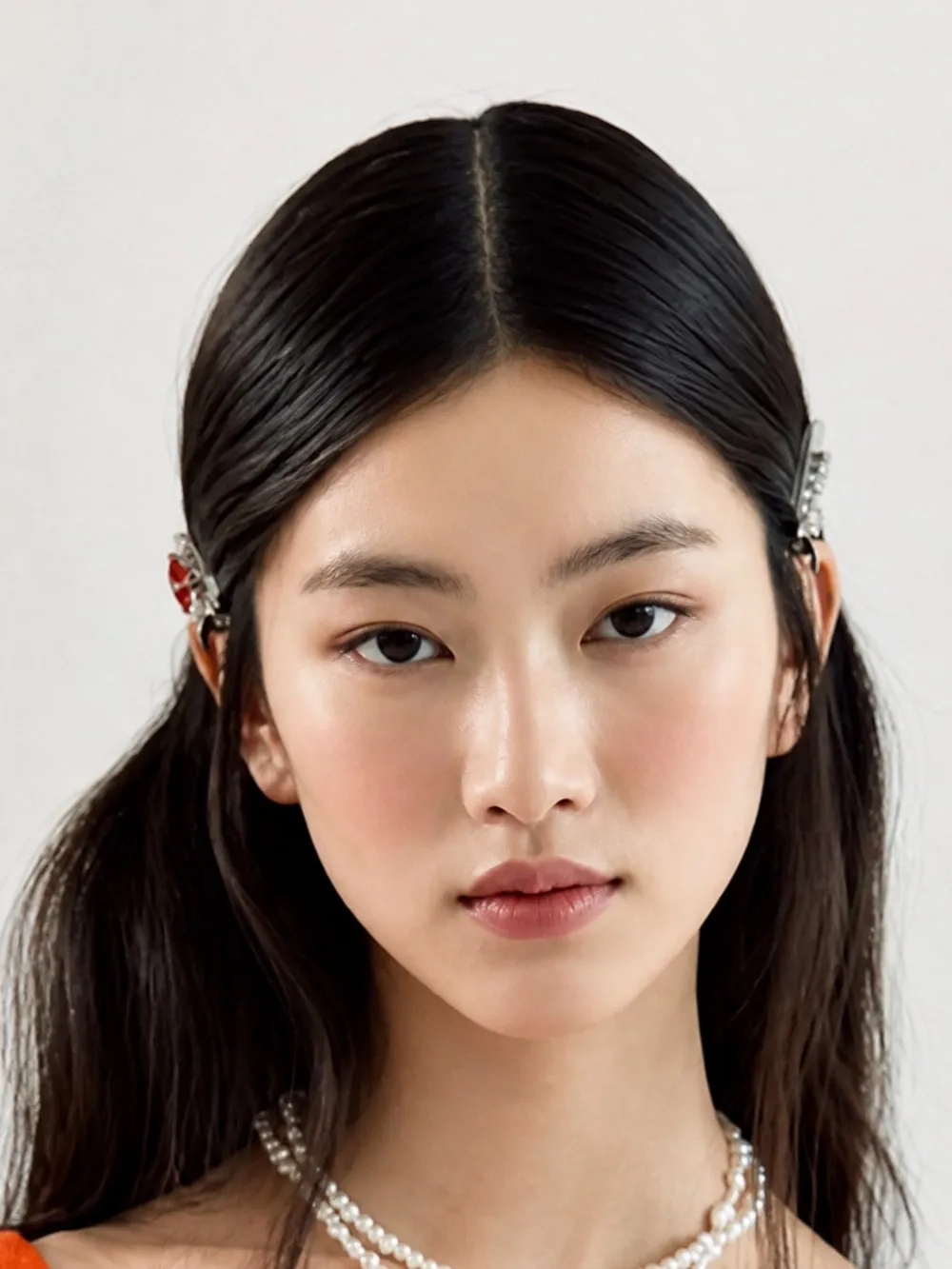
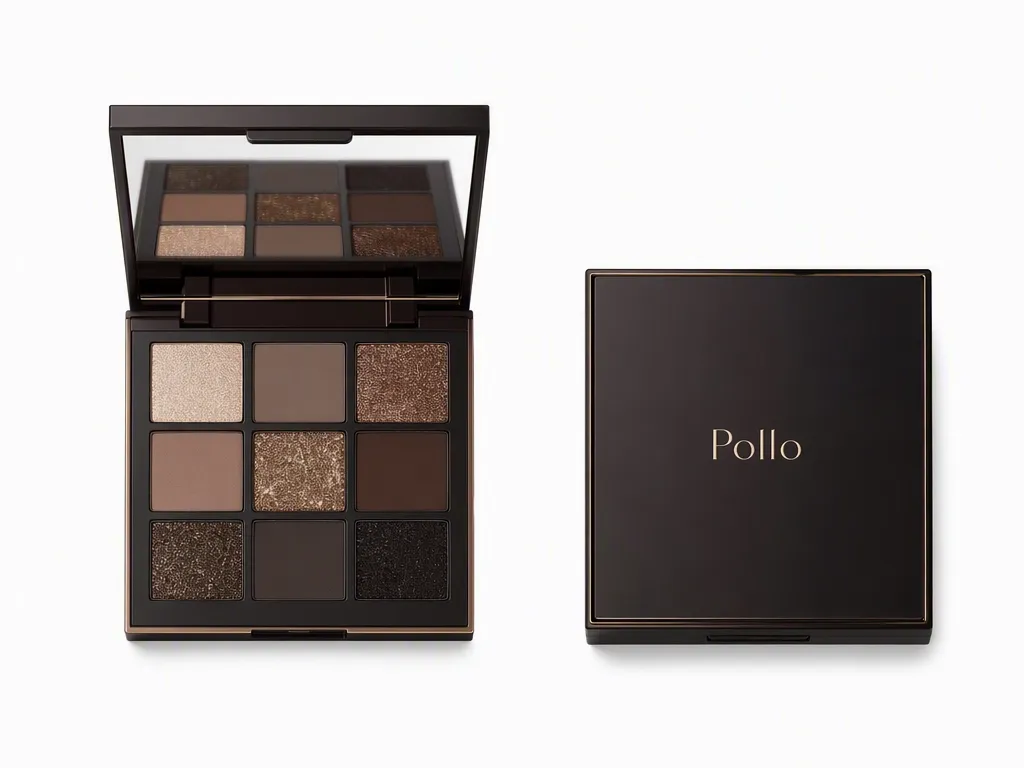
In the eyeshadow example below, one reference supplies the dark nine-pan compact; another defines the model, hair clips, and pearl necklace. The prompt adds a pale pink top and studio background, separating reference details from new styling.
To carry the same product and character into new scenes, identify the features that should stay recognizable and explain each reference's role.
Motion: What Exactly Happens?
Describe who moves, what they do, and in what order. A clear physical action gives the model more direction than a mood word such as “elegant.”
The eyeshadow brief assigns the hands separate jobs: one supports the compact while the other lifts the lid. Later shots cover brush application and a gentle head turn, giving each moment its own action.
When you animate a product image, focus on the motion to add. Specify its speed, direction, and end position, and keep the action manageable within the shot's duration.
Camera: How Should the Action Be Shown?
Specify framing, angle, and camera movement separately. A person turning their head produces a different view from a camera moving around a stationary person.
The eyeshadow ad uses an extreme eye close-up for application, a product view for the shades and a chest-up portrait for the finished look. Each composition reveals something useful about the product.
When developing a cinematic brand scene, choose the framing before adding camera movement. State what must remain visible and where text needs room, then select a movement that supports the message.
Lighting: What Should the Materials Look Like?
Explain how light should reveal the product's surface and texture. Replace “premium lighting” with directions such as broad soft illumination, warm rim light or controlled highlights on reflective details.
The eyeshadow brief uses diffused light for skin, warm edge lighting for the silhouette, and small highlights on shimmer and gold trim. Pink backgrounds connect the different shots.
Keep atmospheric effects specific. Light mist can add depth, but it should leave the pans, branding, and product edges visible. Name the details that need to remain clear.
Sound: What Should Viewers Hear, and When?
Separate music, sound effects, and speech, and connect key sounds to visible actions. Include the desired mood, rhythm, and timing rather than simply asking for background music.
The eyeshadow brief requests 96–104 BPM glam pop or soft R&B, with electric piano, light percussion, synths, bass, and atmospheric female vocals. Sound accents accompany the compact opening, brush movement, and final pose. It includes no scripted voiceover.
For narration, provide the exact words, language, and delivery. Pollo AI's voice generator can create a voiceover from an approved script. Check the selected video workflow's audio options before expecting every sound layer to be generated together.
Step 3: Generate, Review and Refine
Generate with your references and output settings, then review the result against the brief. Check the marketing message first, followed by product details, physical actions, composition, lighting, text, and sound.
Identify the moment that needs changing and describe the desired result. With Pollo Agent, you can give feedback on a scene, asset or creative direction within the project. For an existing clip, you can also describe a visual change in text. Address one clear issue at a time so the effect of each revision is easier to assess.
A Real Example: A 22-Second Eyeshadow Commercial
This example uses two reference images and a timed brief to create a 22-second eyeshadow commercial. It identifies the workflow as a product showcase video agent and provides its prompt, references, and generation settings.
The References and Settings
The references establish the two subjects that recur throughout the ad:
| Image 1 | Image 2 |
 |  |
| Setting | Published information |
| Platform | Pollo AI |
| Workflow | Product Showcase Video Agent |
| Requested output | One 22-second video, 16:9, 720p |
| Public preview | 22.08 seconds, 1138 × 640, with audio |
| Underlying model | Not disclosed |
A Practical Prompt Adapted from the Published Brief
The original prompt contains roughly 680 words and seven timed sections. This edited version preserves its creative direction, clarifies the reference roles, and replaces the generic brand placeholder with the Pollo wordmark visible in the product image.
Goal and references: Create a premium, 22-second beauty commercial in 16:9. Use image1 for the model and image2 for the eyeshadow palette. Preserve the model's appearance and the product's construction and branding.
Subject and styling: Show a chocolate-black square compact with fine gold trim, a Pollo wordmark, an internal mirror and nine pans. Retain nude mattes, mocha and coffee browns, champagne shimmer and bronze glitter. Style the model with long dark hair parted centrally, silver clips, pearls and a pale rose top.
Setting and lighting: Use a beauty studio with blended rose, muted pink, cream-pink and powder-pink backgrounds. Apply broad soft light for luminous skin, controlled highlights on gold and shimmer, and warm pink rim light for the silhouette. Keep haze delicate and product details visible. Give each shot a purposeful action and avoid long static holds.
- 0–3 seconds — opening reveal: Frame both hands and the compact. One hand supports the base while the other lifts the lid, revealing the mirror and nine pans. Show believable hand contact and hinge movement. Place fine white copy on the right: “NEW LUXURY PALETTE / Pollo nine-pan eyeshadow”.
- 3–6 seconds — application detail: Cut to an extreme close-up of the closed eye. Sweep a brush from the outer corner toward the crease, applying pink and warm brown shimmer. Show bristles, lashes, skin highlights and fine powder detail.
- 6–9 seconds — profile transition: Show a dark side profile against a rose-to-muted-pink gradient with warm edge light. Include the brush and open palette. Sequence a hand lift, a downward glance and a gentle head turn.
- 9–13 seconds — texture reveal: Keep the palette open, held or gently floating in light pink mist and fine sparkle. Move the camera across champagne shimmer, brown matte texture, bronze glitter and the mirror. Let the gold trim and branding catch the light.
- 13–17 seconds — product and finished eye: Bring the open palette near the camera, with the finished eye makeup beside it. Show pink-to-champagne shading at the outer eye. Keep the mirror reflection brief and secondary, with precise fingers, nails and product edges.
- 17–20 seconds — portrait: Return to a chest-up view. The model turns gently, raises her chin slightly and settles into a confident gaze. Preserve the necklace, clips, pale pink clothing and subtle eyelid shimmer.
- 20–22 seconds — closing pose: Make the model's chest-up portrait the main focus. Hold the open palette beside her face while the other hand rests near her cheek or chin. Keep the pans visible and the mirror secondary. Hold the pose with “Which gaze today?” on the right or lower part of the frame.
Sound: Use 96–104 BPM glam pop or soft R&B with electric piano, light drums, delicate synths, bass and airy female vocal texture. Align gentle accents with the opening, brush sweep, profile turn, texture reveal and ending. Add compact-opening and fingertip-contact sounds, brush and powder accents, mirror and pearl chimes, light mist and sparkle effects, and a low closing hit. Keep the pacing natural within 22 seconds.
The reusable structure is references + subject details + shot timeline + camera and lighting + sound + ending. Each section gives the agent a clear visual or audio task while maintaining one campaign direction.
Which Video Workflow Fits Your Marketing Task?
Pollo AI is an AI-native creative suite for all, bringing video, image, and audio creation into one platform. For marketing, it offers ways to develop individual product shots, adapt existing footage, or create complete ads from a brief.
Choose a workflow based on your starting assets and the result you need:
| Workflow | Starting point | What to specify |
| Text to video AI | You want to visualize a scene from a written concept | Subject, setting, action, camera, light, and sound |
| Image to video AI | An approved product image or composition | Details to preserve and motion to add |
| Reference to video AI | Images or videos defining a subject or visual direction | Each reference's role and the features to retain |
| Video to video AI | You want to restyle footage you already have | The target visual style and available subject or background options |
| Pollo Agent | A brief and assets for a complete commercial | Goal, reference roles, shot order, timing, sound, and ending |
Limitations and FAQs
Available controls and output limits vary by workflow and model. Check the current settings and review the finished video before approving it for a campaign.
How long should an AI marketing video prompt be?
Use a few precise sentences for a simple shot and a structured brief for a complete ad. Include details that affect the result, and check the selected workflow's input limit.
How can I keep my product consistent?
Provide clear references and identify essential details, including shape, colors, packaging, and logos. Describe intended changes separately, then review product geometry, small text, and reflections in the result.
Can I use this structure for UGC or presenter-led ads?
Yes. When using Pollo AI to create a presenter-led product ad, define the speaker, product, demonstration, framing, lighting and exact spoken message. Specify the delivery and keep claims aligned with approved copy.
Will sound instructions produce the exact music and effects?
Sound instructions provide creative direction. Results depend on the workflow and model, so check audio support and review the output's pacing, mix, and alignment with visible actions.
What duration, format, and resolution should I use?
Choose available settings that match your placement, then inspect the downloaded file. If needed, upscale a video for delivery and review text and product details again.
Can I use the video commercially and upload private assets?
Confirm rights to your references, branding, music, and likenesses. Review the applicable terms, privacy policy and visibility settings before commercial use or uploading unreleased assets.
Create Your Marketing Video with Pollo AI
Start with an approved product reference and one clear message. Describe the five elements, then add a timeline for a complete commercial. With Pollo AI, you can develop a single shot or use Pollo Agent to build the full ad from your brief.