



What Is Pollo Relight? Everything You Need to Know
You captured the perfect shot, but the lighting missed the mark. Pollo Relight lets you reposition virtual light and transform the atmosphere of existing photos and videos. Let's explore how it works, what makes it different, and when to use it.
TL; DR: What Is Pollo Relight?
Pollo Relight is an AI lighting editor that lets you change the direction and style of light in an existing photo or video. Instead of simply brightening the whole frame, you can move a virtual light around your subject and generate new highlights, shadows, and atmosphere.
It brings Image Relight and Video Relight into one workspace. That makes it useful whether you are preparing a product photo, refining a portrait, or giving a filmed scene a different mood. You work with the material you already have, rather than recreating the shot from scratch.
| Mode | What you can do | Input and output options |
| Image Relight | Adjust lighting in a still photo and choose from nine light styles | Upload JPEG or PNG images up to 7 MB and 4096 × 4096 pixels |
| Video Relight | Change the lighting of an existing clip while retaining its motion | Upload a 4–30-second video; choose 480p, 720p, or 1080p output |
Both modes offer six quick-select light positions and a 3D control that lets you drag the light direction more freely.
Give Your Existing Shots a New Light
Reposition the light, try a different atmosphere, and make more of the photos and footage you already have.
Try Pollo Relight Free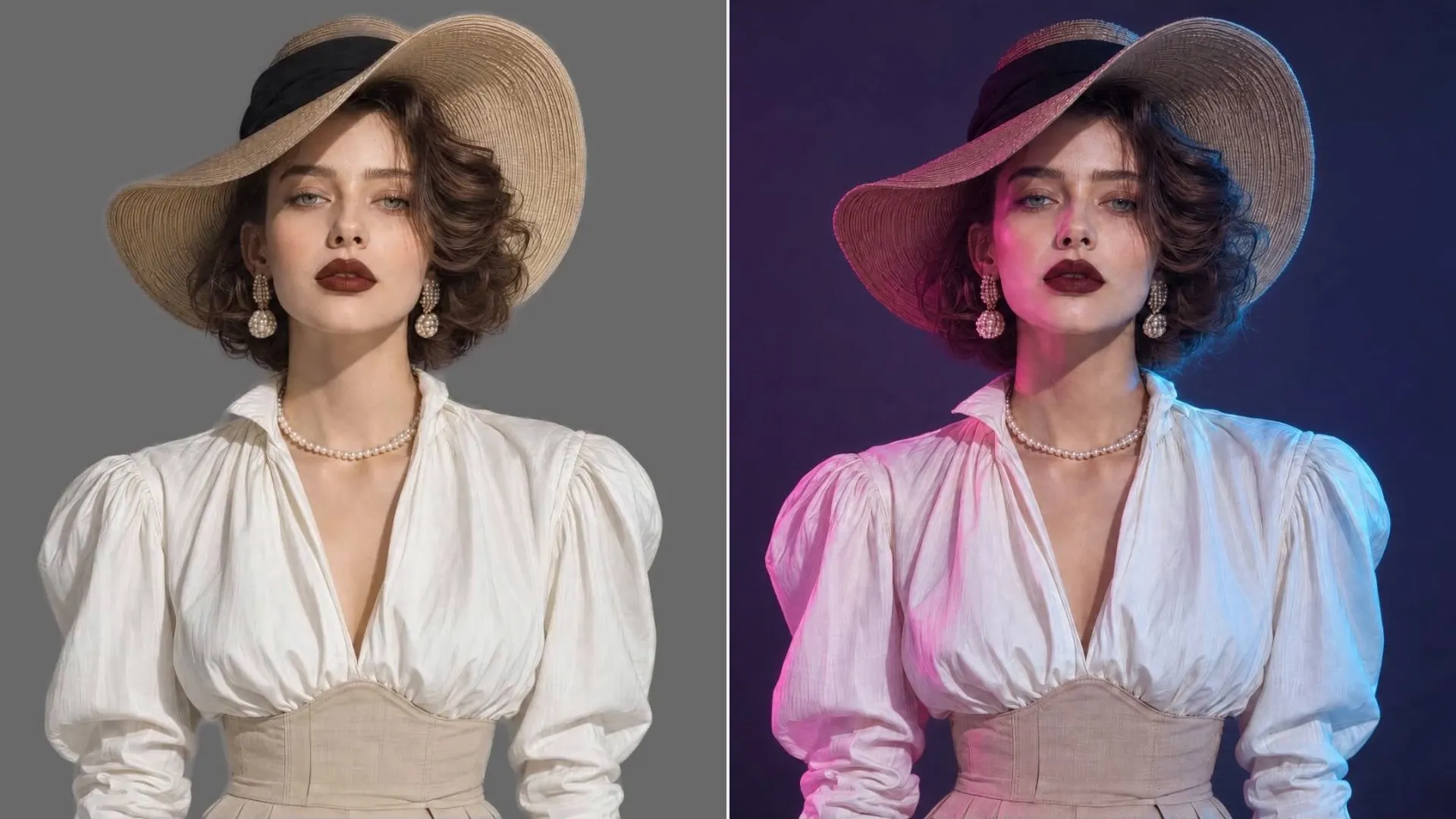
What Makes Pollo Relight Worth Trying?
1. Put the Light Where Your Subject Needs It
With an interactive 3D lighting controller, you can position virtual light precisely around your subject. Select from six preset directions or manually adjust the angle to redefine highlights, shadows, and visual depth in photos and videos.
For instance, side lighting brings out the texture of jewelry, while frontal illumination makes product details easier to distinguish. This precision gives you greater creative control and helps achieve professional-looking results without elaborate lighting equipment.
2. Change the Atmosphere Without Recreating the Shot
From soft daylight and golden tones to moody moonlight and vibrant neon, a range of lighting presets lets you create distinct visual atmospheres. These styles can transform the mood of existing footage, making ordinary shots feel more expressive and cinematic.
You can give portraits a warmer appearance, build suspense in dramatic sequences, or establish a recognizable aesthetic for brand campaigns. This versatility helps strengthen your visual identity and communicate emotions more effectively.
3. Keep Your Original Subject and Motion in Focus
Changing the illumination doesn't mean losing the details that make your content recognizable. AI relighting is designed to preserve subjects and important visual elements, while video relight also retains existing movements and aims to maintain consistent lighting across frames.
For interviews, product demonstrations, and action footage, this means keeping natural expressions and gestures intact. You can improve the overall appearance while preserving the performances and moments that make your content engaging.
4. Get More Value From a Shoot
Supporting both photos and videos, Pollo Relight lets you develop multiple visual treatments from the same source material. Apply clean, balanced illumination to product photography or create a more dramatic atmosphere for promo videos, all within one platform.
For photographers, marketers, and content creators, this means making better use of existing assets. You can expand your content library, maintain visual consistency across channels, and reduce production costs without arranging additional shoots.
Put Every Shot in Its Best Light
Redirect light after capture to improve clarity, mood, and depth in your photos and videos.
Try Pollo Relight NowHow Does Pollo Relight Work?
Pollo Relight uses your original image or video as the starting point. You select a light direction and a lighting style, and Pollo AI generates a new version with the corresponding visual treatment. The goal is to make the lighting feel part of the scene, with highlights and shadows that give the subject more depth.
This is different from adding a colored filter. A filter generally changes the look of the existing pixels, while relighting is intended to change how light appears to fall on the subject. You can make a face more readable from the front, emphasize a product's shape with side lighting, or create a dramatic silhouette with light from behind.
Here is the basic workflow:
Upload Your Photo or Video
Open Pollo Relight and choose Image Relight or Video Relight. Upload the photo or clip you want to adjust. If you are working with video, choose footage between 4 and 30 seconds long.
Direct the Light and Choose a Style
Start with one of six preset positions: Top, Front, Right, Left, Back, or Bottom. You can also hold and drag the 3D light controller to explore other directions. Then choose a lighting style that fits your scene.
For images, options include Natural Light, Sunrise Light, Blue Hour, Moonlight, and Cyberpunk Neon. Video styles include Golden Hour, Teal & Orange, Low-key Noir, Candlelight, and God Rays. The two modes have different preset collections.
Create and Review the Result
Click Create to generate the relit version. For videos, select your preferred output resolution before generating. Review the subject, fine details, shadows, and overall mood, then download the result you want to keep.
For another walkthrough of the image workflow, see our step-by-step Pollo Relight guide.
What Can You Create With Pollo Relight?
Pollo Relight is useful whenever the subject is right but the illumination could tell the story better. Here are a few practical ways to use it.
| Creative goal | How Pollo Relight can help |
| E-commerce product visuals | Bring out the contours and surface details of clothing, cosmetics, jewelry, or gadgets in product photos and demonstration clips. |
| Portraits and creator content | Improve the lighting on faces or change the mood of profile photos, interviews, and vlogs without filming another take. |
| Advertising variations | Try warmer, cooler, brighter, or more dramatic lighting on the same campaign asset to explore different visual directions. |
| Short films and music videos | Reinforce a scene's atmosphere with moonlight, neon-inspired looks, or more directional light while retaining the original performance. |
| Property and hospitality marketing | Make interior details easier to see and give rooms or hospitality footage a more welcoming atmosphere. |
Tips for Better Pollo Relight Results
- Start with a clear source: Use a photo or clip where the subject and important details are visible.
- Choose light direction with a purpose: Use front lighting when clarity matters, side lighting for shape and texture, or backlighting when you want a stronger outline.
- Match the mood to the message: Soft, natural light may suit a product demonstration or portrait; dramatic neon or low-key lighting may fit a music video or story video.
- Check moving subjects carefully: In a relit video, review faces, hands, reflective materials, and shadow transitions at normal playback speed.
- Keep related assets visually aligned: When you are working on a campaign, apply a similar lighting direction and atmosphere across its photos and clips.
My Final Take
Pollo Relight turns lighting into something you can redirect after capture. Its 3D controls and lighting styles help clarify subjects, reshape mood, and improve existing photos or videos without flat brightness fixes or unnecessary reshoots.
When your shot is worth keeping while its lighting falls short, use Pollo Relight to bring out its full potential.