Artbreeder focuses on visual remixing, portrait editing, canvas expansion, and community challenges. For broader AI image creation, Pollo AI combines leading models, specialized image generators, and editing tools in one platform. Try Pollo AI image generator for free now!
Text to Image
Image to Image
Pollo Recast
Recreate viral videos. Remix new versions.
Pollo Recast Challenge
One upload in. Your viral video out. Unlimited rewards await.
Pollo Agent x DeepSeek V4.1 FLASH
Faster completion at a much lower cost.
Pollo Agent x Gemini 4 Argon
Smarter reasoning. All through Pollo Agent.
WIN iPHONE DUO
Capture a city in one minute. Join the challenge now.
Pollo MCP
End-to-end content creation. Up to 4 Videos/ 20 Images for FREE.
Get Unlimited GPT Image 2.5
Faster. Sharper. Smarter. Go Unlimited with Ultra.
Key Features
Multi-Image Concept Remixing: Mix reference images and branch new visual directions.
Reference-Guided Image Creation: Control image creation with both references and written direction.
Visual Collage Image Building: Assemble shapes, images, and text before generation.
Gene-Based Portrait Remixing: Mix images and adjust visual genes for portraits.
AI Canvas Expansion: Expand an existing Art breeder image beyond its frame.
Community Remix Challenges: Explore shared image ideas through remixes, contests, and voting.
Multi-Image Concept Remixing
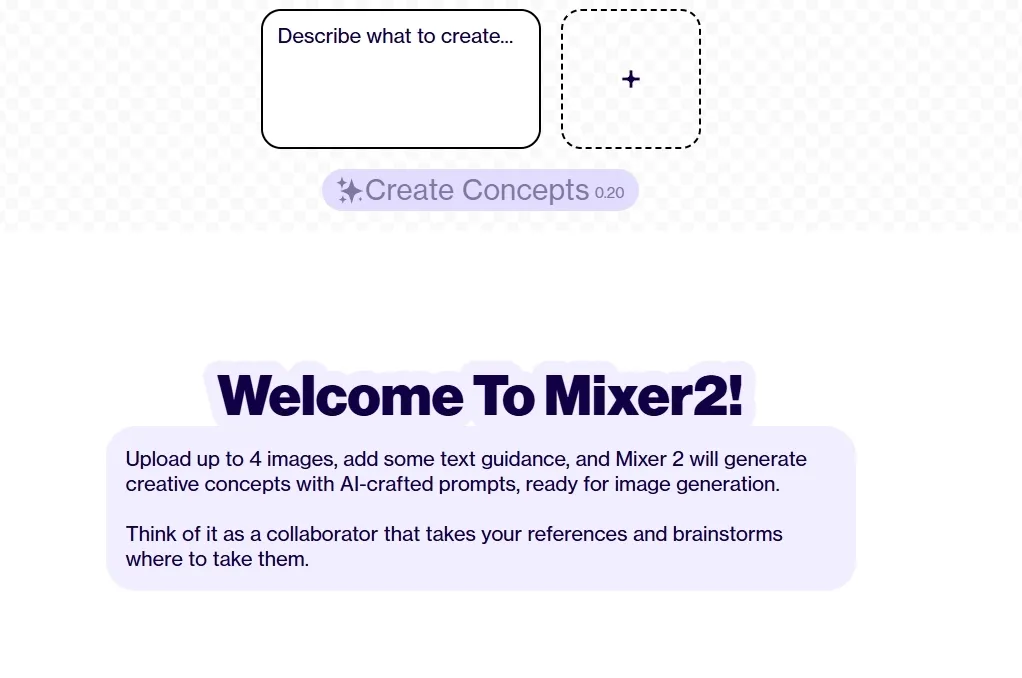
For early-stage visual exploration, Art breeder’s splicer2 and mixer2 help users combine image references, branch from existing visuals, and form richer creative directions before final production of AI images.
This is useful when a concept artist wants to test character looks, merge costume and mood references, or compare multiple fantasy portrait directions from the same starting idea.
When one reference image needs a practical second life, image to image of Pollo AI gives users more direct control over how it changes.
It supports text-guided changes, multiple output images, flexible aspect ratios, and leading models like GPT Image 2 and Stable Diffusion, while preserving key subjects, compositions, and visual details across new variations.
That makes it useful for restyling portraits, shaping ecommerce visuals, or turning rough references into polished creative assets.
Reference-Guided Image Creation
In more structured creative work, Artbreeder’s composer gives users a way to combine image references with text instructions for a more intentional result.
This can help designers shape a scene’s mood, subject, and style in a single workflow, such as drafting an editorial visual, refining a character study, or building a more specific story image.
Visual Collage Image Building
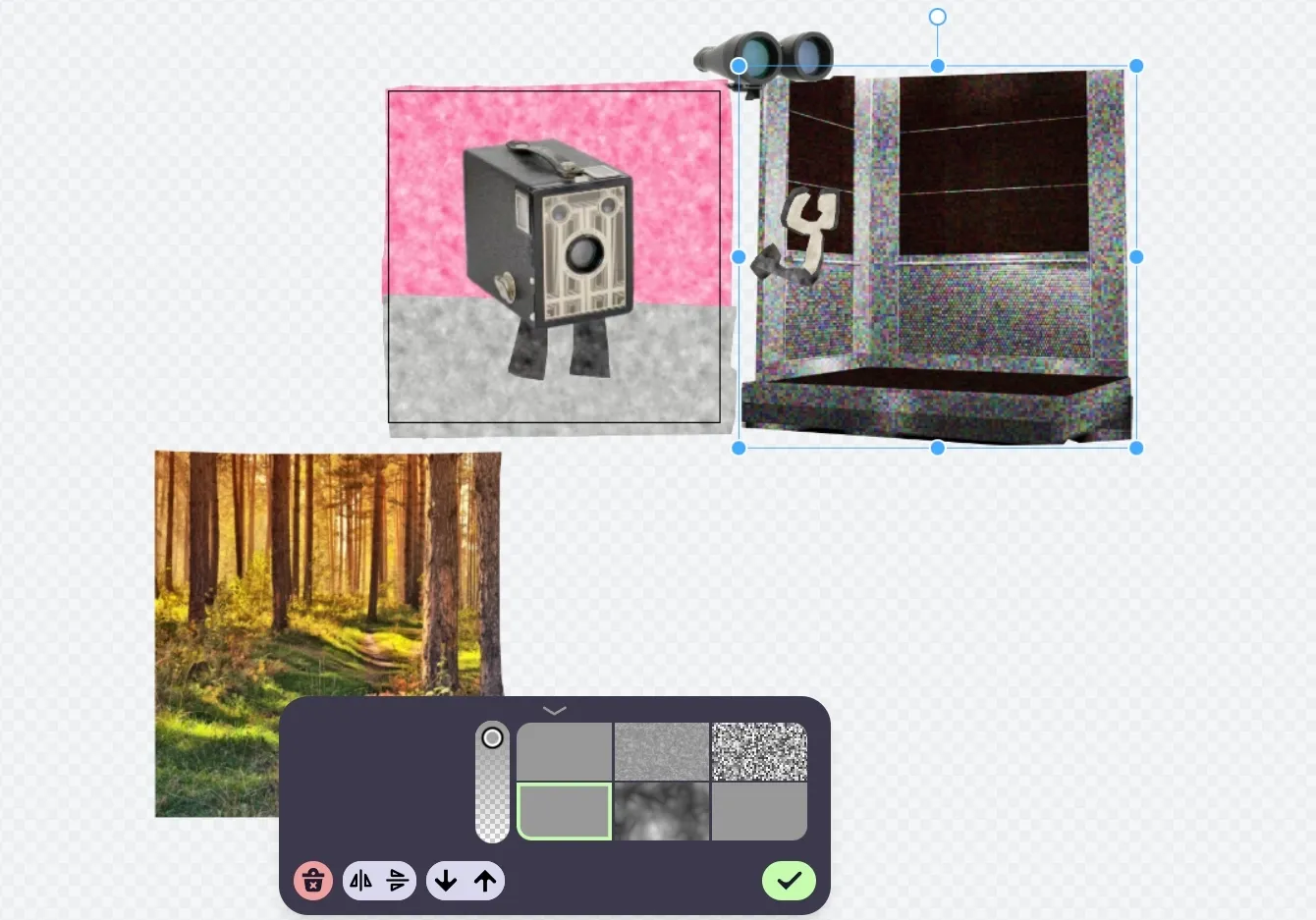
For users who want to guide composition visually, Artbreeder’s collager starts with a rough arrangement of shapes, images, and text.
It is practical for poster layouts, story scenes, game environments, or social visuals where object placement and scene structure matter before the AI completes the image.
Gene-Based Portrait Remixing
Artbreeder’s original slicer focuses on image mixing and gene-style editing, especially for portraits and character visuals.
It helps users adjust facial traits, mood, and appearance through a more visual process, which is useful for profile concepts, fictional cast design, and portrait variation studies.
AI Canvas Expansion
When an image feels too narrow or tightly cropped, Artbreeder’s outpainter extends the surrounding canvas.
This helps creators add background space, widen a portrait, or adapt an artwork for banners, scene concepts, and social layouts without recreating the original image from scratch.
Community Remix Challenges
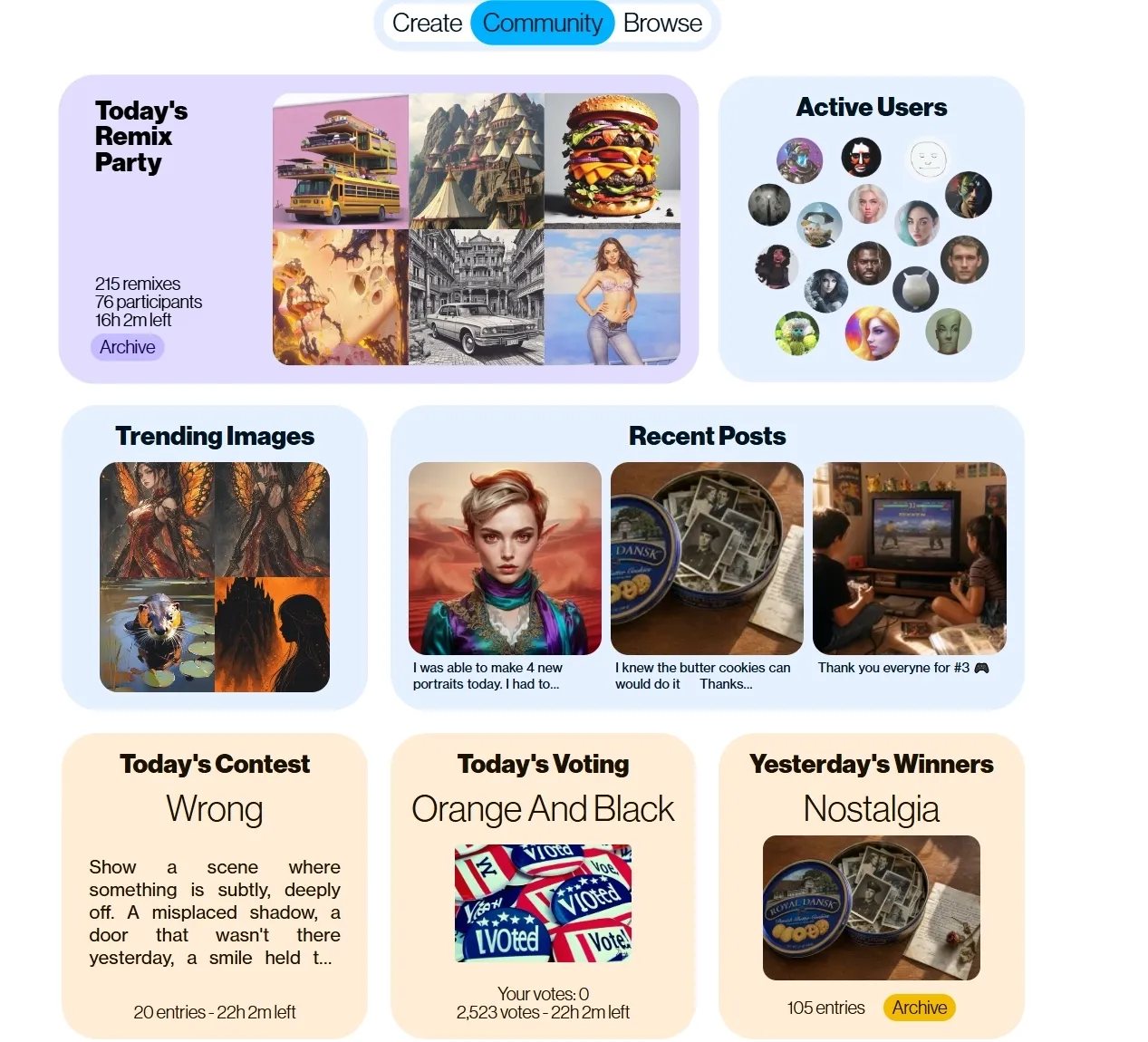
Beyond individual creation, Artbreeder includes a community space where users can join remix parties, view trending images, follow recent posts, and participate in daily contests or voting.
This helps artists and hobbyists study how others develop visual ideas, test their own images against a shared theme, and find practical inspiration for portraits, fantasy scenes, or nostalgic visual concepts.
Who Uses Artbreeder Best
Concept Artists
Concept artists can explore character faces, costume directions, creature ideas, and fantasy portraits by mixing references and branching visual variations before final illustration work.
Game Developers
Game developers build early visual drafts for playable characters, NPCs, game maps, and world settings, especially when a small team needs many art directions quickly.
Writers & Storytellers
Writers turn fictional characters, locations, and story moods into visual references for novels, tabletop campaigns, pitch decks, or world-building notes.
Digital Art Communities
Digital artists can join remix parties, contests, and voting activities to develop images around shared themes, study other creators’ variations, and test new visual ideas.
User feedback around Art breeder often focuses less on raw image quality and more on the platform’s community experience.
Several long-time users describe the remix culture, active participation, and supportive creative environment as one of Artbreeder’s strongest qualities, especially compared with more isolated prompt-based image generators.
Where Does Artbreeder Fit
Art breeder sits between an AI image generator and a creative remix network. Its value is not just producing one polished image, but helping users evolve ideas through branching, image mixing, gene editing, and community participation.
Artbreeder is best suited to visual discovery, character exploration, and collaborative image development. It may feel less fitting for teams that need strict brand control, commercial-ready assets, or a direct path from prompt to finished marketing content.
From Artbreeder Remixing To Pollo AI Production
Pollo AI is an all-in-one creative suite for marketers, creators, and sellers, built for turning ideas into usable visuals rather than isolated experiments.
Pollo AI offers multiple leading image models, including FLUX, making it easier to create realistic product visuals, stylized portraits, marketing graphics, and cinematic concepts in one workflow.
Its AI photo editor supports prompt-based edits, batch changes, background removal, object cleanup, image expansion, and enhancement for faster content production.
Pollo AI also provides dedicated tools for creating static ads and marketing assets. Users can turn product images into ad creatives, product photos, listing image sets, virtual try-on visuals, and other sales-ready graphics without building each asset manually.
Where Does Pollo AI Pull Ahead
Step 1
50+ Stylized Image Generators
Explore 50+ stylized generators for sketches, emojis, characters, and niche artwork without advanced design skills.
Step 2
Product Marketing Assets
Turn product photos into listing sets, virtual try-on images, and campaign creatives that shorten asset production.
Step 3
Integrated Image Editing Tools
Remove backgrounds, upscale, sharpen, denoise, and enhance images to produce cleaner assets with less manual editing.
I’ve been using Pollo AI mainly for short videos and quick image-to-video tests. The interface is straightforward and it works well even with simple prompts, which is a big plus compared to tools that need long, complicated instructions. The results can be really impressive, and it’s honestly been fun to experiment with. I’d love a bit more consistency on faces when there’s movement, but overall it’s been a solid experience for what I needed.
Awesome website. loads of options and a great way to learn how to work with 'AI' my reasoning for 5 stars is based upon price, versatility and ease of use. Also I would like to add, Pollo AI runs a lot of promos on different AI products as well. I rate their customer service at 5 stars, when I purchased my first subscription my computer crashed the following weekend and I lost all my data and info passwords you name it I lost it, contacted pollo by email they responded quickly and found my info/username and account, and I was able to restore my account.
I have been using Pollo AI for short videos. It is easy to use and works well with simple prompts. Other generators seem to need long drawn out complicated explanations to get even close to what I want.
i tried 220 online img to vid in 2 months, and this is the best online video.I will subscribe for a year; there are many reasons. But freedom is the most important.
Artbreeder is an AI image creation platform built around visual remixing. Its main strengths include multi-image mixing, branch-based exploration, gene-style portrait editing, image-and-text composition, outpainting, animation, and community remix challenges.
Is Artbreeder mainly for text-to-image generation?
Not exactly. Artbreeder does include a prompter for text-based image creation, but its stronger identity comes from image mixing, visual branching, collage-style control, and remixing existing images into new directions.
What is Artbreeder best used for?
Artbreeder is especially useful for character concepts, fantasy portraits, story-world references, experimental art directions, and community-led image exploration. It suits early creative discovery more than polished production work.
Does Art breeder have a community feature?
Yes. Art breeder has a strong community layer with remix parties, contests, voting, trending images, and recent posts. For many users, this shared creative environment is one of the platform’s clearest attractions.
Is Artbreeder good for professional marketing visuals?
Artbreeder can support early ideation, but it may feel limited for teams that need brand-ready visuals, batch editing, or finished campaign assets. For those workflows, Pollo AI is often more practical because it helps teams turn ideas and product images into polished ads, listing visuals, and branded campaign assets faster, with fewer manual refines and less reliance on separate design tools.
Create Beyond Artbreeder with Pollo AI
More models. More tools. From image ideas to comprehensive visuals.








 Liz Cassidy


