



Kling AI Virtual Try On
With Kling AI Virtual Try On, you can instantly change the outfits of real or virtual characters and models in your AI videos. With this tool, you can visualize outfits, experiment with styles, and customize garments with unprecedented realism. You can now try it on Kling 1.5, Kling 1.6 and Pollo AI video generator offers both of these AI video models.
Kling 4.0
Up to 10 keyframes. Impressive performance.
Key Features
Single garment try on : Dress up your real or virtual models in single garments, such as suits or dresses.Multiple garment try on : Upload images of multiple separate garments to try on your video model.Generated models : Apply your garments to a range of pre-generated AI models of different genders and ages, or make your own.Upload your own model : Upload photos of yourself or any other subject to use as the model for your virtual try on videos.
Single Garment Try On
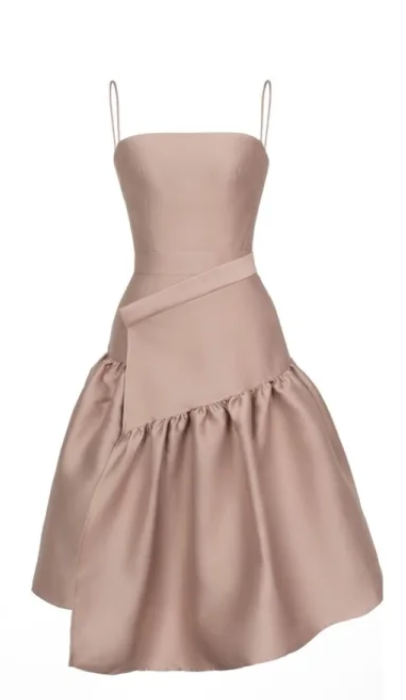
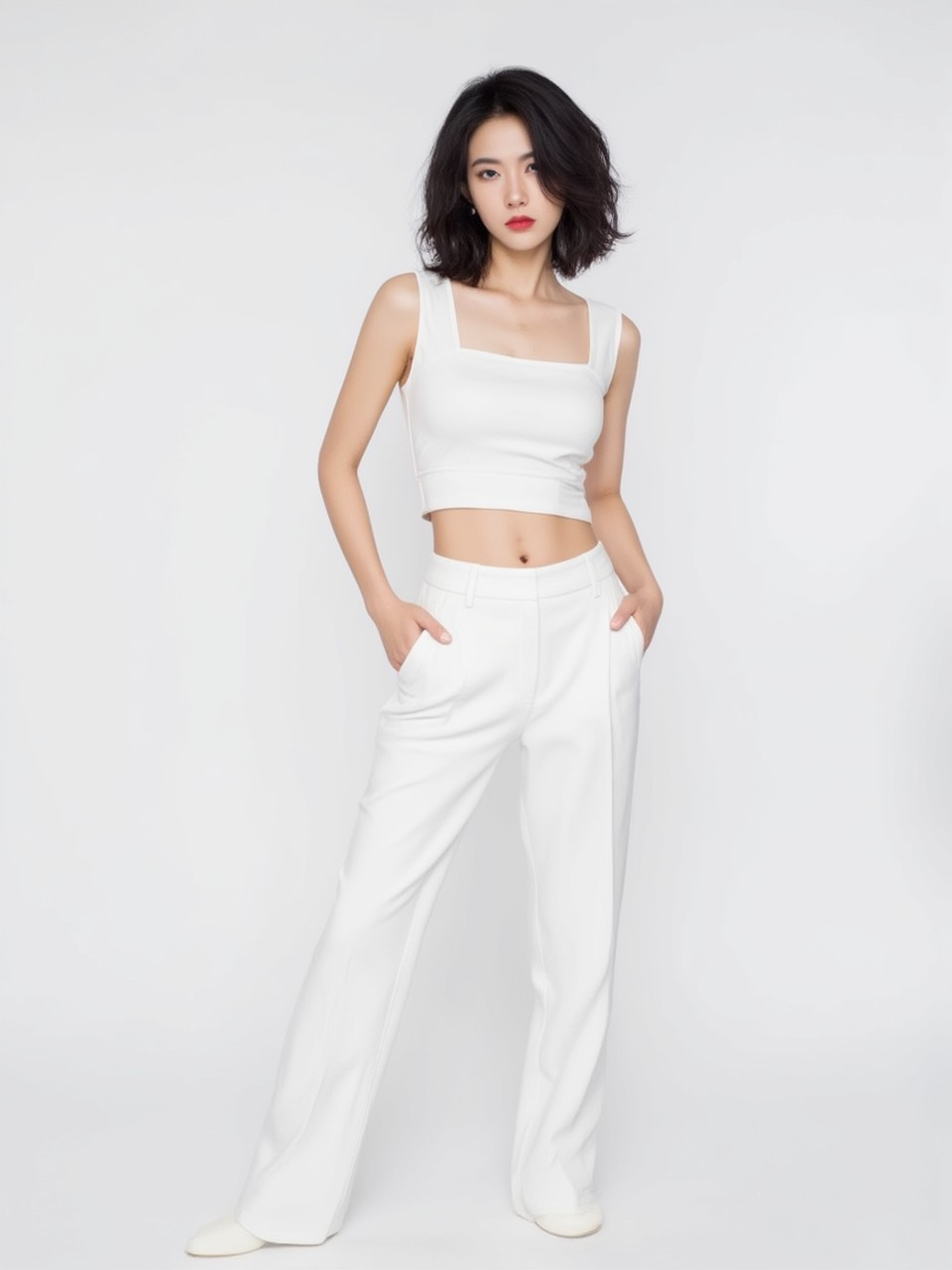
With the Virtual Try On feature of Kling AI, you can create AI videos that show either real or generated videos wearing single garments. This includes the likes of dresses, bodysuits, or suits. Just upload a picture of the full garment, then choose your model, and then you’ll be able to make an AI video of the model wearing the item in question.
| Garment image | Model image | Output video |
 |
 |
Multi-Garment Try On
As well as supporting single garment try on, Kling AI’s Virtual Try On feature also works with multiple garments. You can upload multiple separate images of different items of clothing, from T-shirts to blouses, skirts, shirts, coats, jackets, shoes, and more, and see a full AI video with whatever outfit you’ve built.
AI Model Generation
When it comes to choosing models to wear your outfits with Kling AI Virtual Try On, you can generate your own AI models or pick and choose from a range of pre-generated ones. If you use this option, you’re free to select between male and female models of various ages, and you can even customize their height, hairstyle, skin tone, and other characteristics.
Upload Your Own Model
You can also upload images of a model to use in your Virtual Try On videos, as well. This allows you to, for example, upload an image of yourself and see yourself wearing a variety of different outfits, or to upload images of other people, which could include famous faces and historical figures, and dress them up however you like.
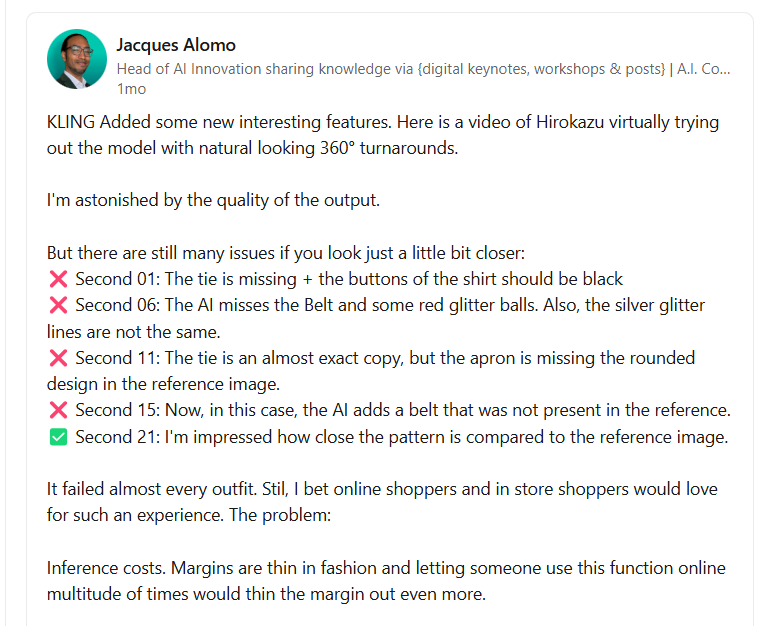
User Reviews on Linkedin
The user admires and criticizes the Kling AI Virtual Try On feature. While they praise its potential to revolutionize the fashion industry and improve user experience, they also note its current limitations.
Video Reviews
Other Reviews on X
Kling AI just dropped AI Try-On.
— Min Choi (@minchoi) November 30, 2024
Now anyone can change outfits on anyone.
8 wild examples:pic.twitter.com/EKoYjKxTRd
KLING TRY-ON → PRETTY SOLID
— Rory Flynn (@Ror_Fly) November 30, 2024
Very satisfying.
PROCESS:
01. Select "Virtual Try-On"
02. Upload a garment
03. Upload a model
04. Generate Image
05. Generate Video
MIDJOURNEY BASE PROMPT:
editorial photo, medium shot, asian female model with bleached blonde hair in a dynamic… pic.twitter.com/KlYlklZ8j0
The new @Kling_ai Virtual Try-On is absolutely insane 🤯🔥. In just a few minutes, you can make a model wear any outfit and bring it to life afterwards 🎥✨.
— Pierrick Chevallier | IA (@CharaspowerAI) December 1, 2024
Check out the workflow in this video. A game-changing feature for the fashion industry 🚀👗 #kling_ai pic.twitter.com/MuEiWdE0lI
Testing @Kling_ai Virtual Try-On with Puma Jacket
— Teodora P L (@toolstelegraph) November 30, 2024
It works well!
15 sec tutorial, how you can check it out.
Go to Kling AI >>. Ai Images >> Virtual Try ON
Add your clothing peace ( I add screenshots from a website; it cuts it automatically for you; you dont need to remove… pic.twitter.com/GXw8YHViBp
I played with @Kling_ai AI Virtual Try-On. It's a new feature where you can upload outfits for your virtual models. Have fun with it. I know I did. 🧥🐱🥻 pic.twitter.com/m9LEMMVTRo
— beholdersai (@beholdersai) December 1, 2024

10M+Users
Using Pollo AI to Create and Inspire


Chosen by 10M+ Creators and Marketers Worldwide
- Liz CassidyDec 15, 2025Easy to use, great results for short videosI’ve been using Pollo AI mainly for short videos and quick image-to-video tests. The interface is straightforward and it works well even with simple prompts, which is a big plus compared to tools that need long, complicated instructions. The results can be really impressive, and it’s honestly been fun to experiment with. I’d love a bit more consistency on faces when there’s movement, but overall it’s been a solid experience for what I needed.
- Richard QuickOct 15, 2025Awesome websiteAwesome website. loads of options and a great way to learn how to work with 'AI' my reasoning for 5 stars is based upon price, versatility and ease of use. Also I would like to add, Pollo AI runs a lot of promos on different AI products as well. I rate their customer service at 5 stars, when I purchased my first subscription my computer crashed the following weekend and I lost all my data and info passwords you name it I lost it, contacted pollo by email they responded quickly and found my info/username and account, and I was able to restore my account.
- armourdudeNov 19, 2025I have been using Pollo AI for short…I have been using Pollo AI for short videos. It is easy to use and works well with simple prompts. Other generators seem to need long drawn out complicated explanations to get even close to what I want.
- DuduJan 14, 2026I'm just amazed by the level of quality…I'm just amazed by the level of quality output that Pollo AI can produce from a simple image. The motion, the realism, It's too good!!
- Ray WarnesDec 30, 2025A fabulous journeyI find Pollo easy to use, it gives me great results and I'd recommend it to anyone. It has been a wonderful experience for me.
- lawless clanNov 22, 2025i tried 220 online img to vid in 2…i tried 220 online img to vid in 2 months, and this is the best online video.I will subscribe for a year; there are many reasons. But freedom is the most important.


Helpful Articles About Kling AI Virtual Try On
FAQs
Who is the Kling AI Virtual Try On feature for?
The Virtual Try On feature is popular with a lot of different users. It’s good for those who work with clothing on a professional basis, like fashion designers and retail brands, for example, or just for people to play around with and see themselves in different clothes.
Is Kling AI Virtual Try On free to use?
It is accessible to free users, but it costs credits every time you use the Virtual Try On feature. So, if you’re a free user, you have to be careful in terms of how much you use it, as you may run out of credits quickly.
What kinds of videos can you make with Kling AI Virtual Try On?
The main point of the Virtual Try On feature is to see characters or models in different clothes, so it’s a good feature to use if you want to make model runway or catwalk style videos that show off the outfits.
What are some best practices for using Kling AI Virtual Try On?
When using the Kling AI Virtual Try On feature, it’s best to use the best quality garment images you can find. Make sure the garment is fully seen and in clear detail, without any obstructions or blurriness.
Yes, you can upload your own images to its image-to-video generator to serve as reference frames for video generation.
Does Kling AI provide other video generation methods?
Sure. You can try Kling AI to generate videos based on your text prompts or uploaded image. Since Pollo AI has integrated Kling AI models, both of these methods are supported in Pollo AI text to video AI and image to video AI with better performance.

Try Kling AI on Pollo AI for Free
Experience Kling AI for free on Pollo AI firsthand.