


Runway Expand Video
Accessible on Gen-3 Alpha Turbo, Runway AI's Expand Video feature allows users to reimagine and adjust the aspect ratio of any existing video with no technical expertise required. Simply choose a new format and the tool will resize it to create a new AI video without cropping out any important details. Try out Runway AI below!
Kling 4.0
Up to 10 keyframes. Impressive performance.
Varied Aspect Ratios
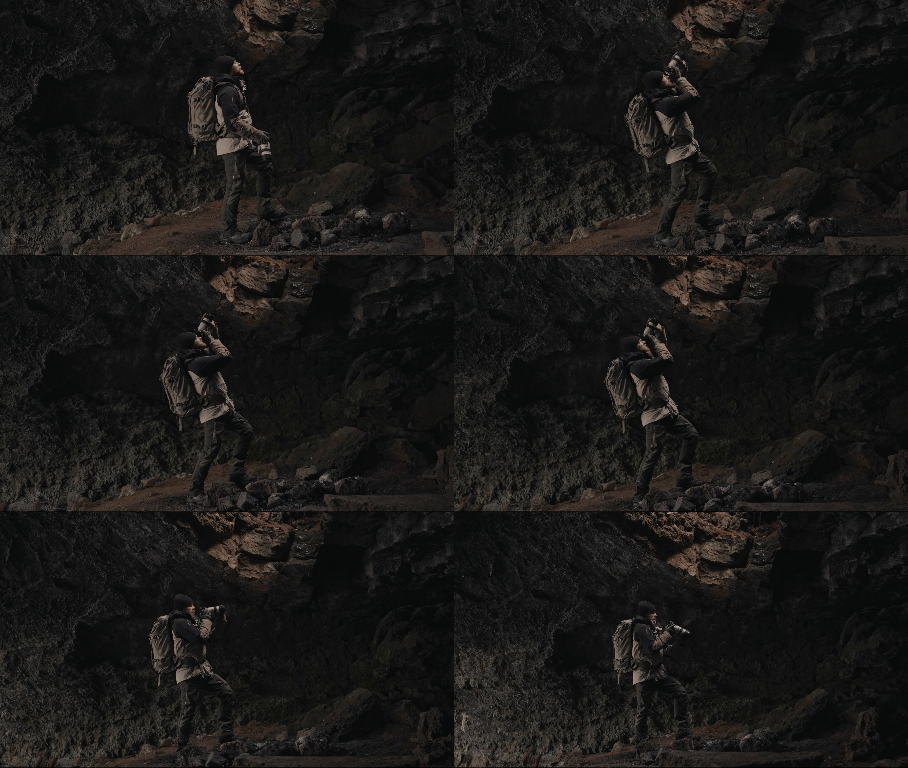
The Expand Video feature of Runway AI enables users to convert their videos into multiple resolutions; 1280x768 (landscape) or 768x1280 (portrait). Since the tool adds beyond the edges of the existing video, the visual quality will not be negatively impacted in the process.
Learn more: How to Use Runway's Expand Video tool?
| Input Video | Text prompt | Guidance Image | Output Video |
 |
None | None |
 |
| In a cave with lava in the foreground | None |
 |
|
| None |
 |
 |
Descriptive Prompting
While you can use Expand Video without a prompt, inputting one helps you gain more control over the final output. By describing what you want to be shown in the expanded areas, you can effectively reduce the risk of the tool producing less unpredictable results.
RUNWAY’S NEW “EXPAND” → Awesome.
— Rory Flynn (@Ror_Fly) November 26, 2024
Outpainiting is super consistent.
QUICK TIPS:
+ Text prompts still have big influence
+ Your text prompts influence the “outpainting”
+ So w/e you want to generate “net new”
+ Make sure it’s in your prompt
MJ PROMPT Ex:
wide angle documentary… pic.twitter.com/6uZqqGLIfo
Guidance Image
With Expand Video, you can use an expanded image of the existing video’s first frame to give the tool a precise idea of the kind of output you want. With this, you don’t even need to use a text prompt. Simply upload the image and the expanded output will match it.
Best Practices When Expanding Videos Using Runway
If you intend to expand existing videos, there are several aspects to consider when using this tool that will help you achieve the best possible results.
- When uploading videos, make sure the input is at least 620 pixels in width and height. Runway Expand Video will not accept anything less for expansion.
- If you intend to upload a guidance image, it is important to ensure that it matches/aligns with the first frame of the video to prevent a visual jump.
- You can feel free to expand a video multiple times but be sure to hover over the Duration icon to estimate what the cost of credit will be.
- If the existing video contains a subject, it is always best to ensure it is close to the center of the frame to prevent any potential distortion or alteration in detail.
Video Reviews
Other Reviews on X
Runway Gen-3 Expand Video is one of my favorite features to fill in the space around an existing video.
— Heather Cooper (@HBCoop_) January 4, 2025
More examples & workflow below: pic.twitter.com/NXRPavygTh
Image the possibilities with @runwayml Gen3’s new Expand feature. This almost seems impossible. 🤯 (view full on mobile) pic.twitter.com/Gf1bIe3c4N
— Blaine Brown (@blizaine) November 23, 2024
Just 2 days ago, Runway dropped Expand Video for Gen-3 Alpha.
— Min Choi (@minchoi) November 24, 2024
And people can't stop getting creative with it.
12 wild examples: pic.twitter.com/pKDkVizCtZ
1. Expand Lord of the Rings scenehttps://t.co/ri3kFVQOHC
— Min Choi (@minchoi) November 24, 2024

10M+Users
Using Pollo AI to Create and Inspire


Trusted by 10M+ Creators and Marketers Worldwide
- Liz CassidyDec 15, 2025Easy to use, great results for short videosI’ve been using Pollo AI mainly for short videos and quick image-to-video tests. The interface is straightforward and it works well even with simple prompts, which is a big plus compared to tools that need long, complicated instructions. The results can be really impressive, and it’s honestly been fun to experiment with. I’d love a bit more consistency on faces when there’s movement, but overall it’s been a solid experience for what I needed.
- Richard QuickOct 15, 2025Awesome websiteAwesome website. loads of options and a great way to learn how to work with 'AI' my reasoning for 5 stars is based upon price, versatility and ease of use. Also I would like to add, Pollo AI runs a lot of promos on different AI products as well. I rate their customer service at 5 stars, when I purchased my first subscription my computer crashed the following weekend and I lost all my data and info passwords you name it I lost it, contacted pollo by email they responded quickly and found my info/username and account, and I was able to restore my account.
- armourdudeNov 19, 2025I have been using Pollo AI for short…I have been using Pollo AI for short videos. It is easy to use and works well with simple prompts. Other generators seem to need long drawn out complicated explanations to get even close to what I want.
- DuduJan 14, 2026I'm just amazed by the level of quality…I'm just amazed by the level of quality output that Pollo AI can produce from a simple image. The motion, the realism, It's too good!!
- Ray WarnesDec 30, 2025A fabulous journeyI find Pollo easy to use, it gives me great results and I'd recommend it to anyone. It has been a wonderful experience for me.
- lawless clanNov 22, 2025i tried 220 online img to vid in 2…i tried 220 online img to vid in 2 months, and this is the best online video.I will subscribe for a year; there are many reasons. But freedom is the most important.


Helpful Articles About Runway Expand Video
FAQs
Is Runway AI's Expand Video free to use?
You can access the Extend Video tool for free via Runway’s ‘Basic’ plan. However, this will only provide you with limited access.
What is the maximum input size that Runway Expand Video supports?
You can upload videos with a file size of up to a maximum of 64MB. To be more specific, the tool supports videos of up to 10 seconds in length. This means you can only use the Expand Video tool to reframe short video clips rather than lengthy visual sequences.
How much will it cost to use Runway Expand Video?
Runway will expand any existing videos that are 5 seconds or less for 25 credits. If the uploaded video is longer than 5 seconds, then it will cost 50 credits to expand. You can hover over the ‘Duration’ icon to check estimated costs before generation.
How to guarantee quality results when expanding videos?
You can either use the text prompt option or upload a guidance image to help minimize any deviations from your desired output. If it doesn’t meet your needs, you can always feel free to try again using different inputs until the output matches your creative vision.
What other AI video generation methods does Runway support?
Besides the expand video feature, Runway also supports functions such as image-to-video conversion. Now you can try this feature using Pollo AI image to video AI with the same Runway model!