



CapCut MCP Review: A Scorecard for Creators Who Post Every Day
CapCut is a go-to editor for many TikTok and Reels creators, so its move into ChatGPT got plenty of attention. The CapCut × ChatGPT plugin, which CapCut also calls the CapCut MCP connection, lets you build and adjust a CapCut draft by chatting. We went through CapCut's two official plugin pages, the price list and the install file that the setup prompt loads, and scored it on the things that matter to people who post daily: where it runs, how much you can edit in chat, templates, captions, the hand-off to export, and cost. Short answer: it is a useful drafting tool for ChatGPT desktop users, and a weaker fit if you want finished posts in other chat apps.
Verdict in brief
- Who it suits: people already editing in CapCut who chat with ChatGPT on a desktop and enjoy finishing by hand.
- Scorecard: templates and assets Strong · chat editing Good (desktop) · captions Good · app support Limited · finished export in chat Limited · pricing clarity Mixed.
- Watch out for: most features need the ChatGPT desktop app, there is no official Claude version, and some features need a subscription, credits, or both.
- If that's a deal-breaker: Pollo MCP plugs into Grok, Claude, ChatGPT, Gemini, and Cursor, sends back the final video without a watermark, and turns a raw talking head take into a clean post.
A CapCut Draft Is a Start. Pollo MCP Ships the Video.
Brief, link, or clip in; an edited, watermark-free video out, inside the AI chat you already use.
Try Pollo MCP
What CapCut MCP is, and what it isn't
CapCut's plugin is an official integration between CapCut and ChatGPT. It was announced at CapCut World Los Angeles, with CapCut's newsroom post dated October 27, 2026, and the banner on CapCut's site now says the plugin is live on ChatGPT and Codex. You install it by pasting a prompt into the ChatGPT desktop app or a Codex task. The prompt tells ChatGPT to fetch an install file from CapCut's servers. That file puts plugin version 0.3.3 on your Mac or Windows machine, wires up an MCP server with the name capcut_creation, and finishes with a CapCut log-in.
What it is not: a server you can add to any MCP app. CapCut's pages name ChatGPT and Codex only. The unofficial CapCut servers you may find for Claude are built by outside developers and work by writing CapCut draft files, which is a different thing. If you already know CapCut as a video editor, think of the plugin as a way to start and steer that editor from a chat window.
The scorecard
Ratings are our editorial judgment from CapCut's published documentation and plans, checked on November 25, 2026. They are not lab scores.
| Category | Rating | What we found |
|---|---|---|
| Setup | Good | Paste one prompt into ChatGPT desktop or Codex, then sign in to CapCut |
| App support | Limited | ChatGPT and Codex only; mobile and web get rough cuts and templates |
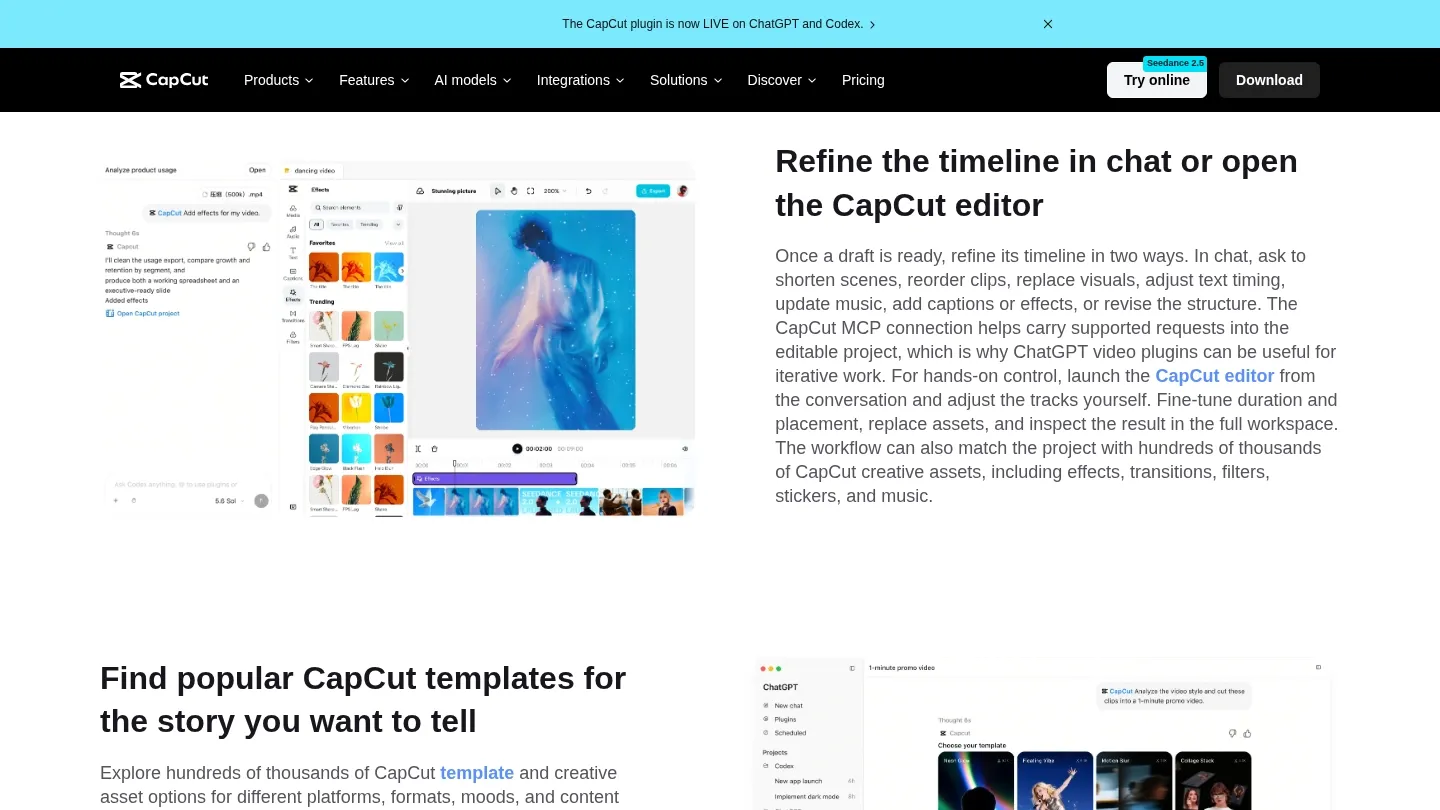
| Editing in chat | Good (desktop) | Trim, reorder, replace media, captions, music, effects; open in CapCut |
| Templates and assets | Strong | Hundreds of thousands of templates, effects, stickers, music, and stock |
| Captions | Good | English, Spanish and more; automatic keyword highlighting |
| Generation | Mixed | Video and image generation on desktop; no models named |
| Talking head clips | Fair | Podcast and talking-head clips via CapCut's podcast editor |
| Finished export in chat | Limited | Draft first; CapCut is where you inspect and export |
| Pricing clarity | Mixed | Plan or credits needed for some features; plugin costs not listed |
Category notes
Setup (Good) and app support (Limited)
Setup is short if you use the ChatGPT desktop app: copy, paste, approve, sign in. The catch is the device split. On ChatGPT mobile and web, CapCut lists only two abilities: turning uploaded clips into a rough cut and finding templates. Video and image generation, captions, further draft editing, and slides need the desktop app. For a creator who drafts on a phone between shoots, that is a real gap. And if your team uses Claude, Cursor, Gemini, or Grok, there is no official path at all.
Editing in chat: Good, on desktop
In the desktop app, you can ask CapCut to trim clips, reorder scenes, replace media, adjust captions, change text timing, update music, and add effects. You can also open the project in the CapCut editor from the chat and work on the tracks yourself. That two-way setup is the plugin's best idea. Our main reservation is that CapCut does not publish a list of the editing operations the plugin supports, so it is hard to know ahead of time which requests will land.
Templates and assets: Strong
This is CapCut's home ground. Its catalog runs to hundreds of thousands of templates, and the plugin can also dig through music, stock video, stickers, filters, effects, and transitions. Describe a mood or a platform, and it narrows the list for you. For trend-driven accounts, few tools can match a library of this size.
Captions: Good
CapCut lists subtitle languages such as English and Spanish, with automatic highlighting for important words. Caption styles and timing can be changed in chat. Caption generation is listed as a desktop-app feature.
Generation: Mixed
On desktop, you can describe a subject, style, and movement, add reference images, and generate videos or images. CapCut is careful here, warning that generation is "not an automatic guarantee of a complete or final video". The plugin pages do not name the models behind it, so you cannot pick a model for a shot.
Talking head and podcast clips: Fair
CapCut's use cases include turning a podcast recording or talking-head clip into a focused explainer with its podcast editor, and trimming pauses in tutorials. It does not describe a one-step filler-word clean-up from chat, or copying the edit of a reference video.
Finished export in chat: Limited
CapCut's pages mention exporting, yet they also call CapCut the place that "remains the workspace for detailed inspection and export". In practice, plan to open the draft in CapCut before you post. No export formats are listed for the plugin.
Pricing clarity: Mixed
Per the plugin FAQ, you may need a subscription, credits, or both for some features; newcomers might get seven days of Pro free. The plans: Free costs nothing, Pro is USD 19.99 monthly and includes 1,200 AI credits, and Ultra is USD 79 monthly with 8,645. CapCut labels these prices "for reference only". When we visited, a pop-up also offered new sign-ups 200 credits to try Seedance video creation. What the page does not say is how many credits a plugin job uses.
Pros and cons
Pros:
- Official and backed by CapCut's huge template and asset library.
- Drafts stay fully editable on a CapCut timeline.
- Chat edits plus a one-click jump into the CapCut editor.
- Multilingual captions with keyword highlighting.
- Use cases built for small businesses: store promos, product launches, Reels ads, tutorials.
Cons:
- Full features only in the ChatGPT desktop app; mobile and web are limited.
- No official Claude, Cursor, Gemini, or Grok support.
- Ends in a draft; final checks and export happen in CapCut.
- Plugin credit costs are not published.
- No model choice per shot.
How it compares with other AI video MCPs
| Tool | Works in | Finished video back in chat? | Entry cost |
|---|---|---|---|
| CapCut MCP | ChatGPT (desktop for full features), Codex | Editable draft; export in CapCut | Some features need a plan or credits; Pro USD 19.99/mo |
Pollo MCP | ChatGPT, Claude, Cursor, Grok, Gemini; CLIs | Yes: watermark-free MP4, MOV or WebM | 20 bonus credits; plans from $12/mo |
| invideo MCP | Claude, ChatGPT, Cursor, Gemini | Rendered video or pro NLE project | Basic plan, 190 credits/mo |
| ChatCut | Web, desktop, Claude Code, Codex, Cursor | Yes, from its editor | Free plan; paid from $25/mo |
| Higgsfield MCP | Claude, ChatGPT plugin, Cursor, Telegram | Not stated; results go to Assets | Paid plan required; Starter $19/mo |
| Runway MCP | ChatGPT, Claude, Cursor, Replit, Muse | No; single assets | Runway plan; credits on every job |
| OpenArt MCP | ChatGPT, Claude, Cursor, Kimi | Not stated | No free MCP tier found; 10% off |
| ImagineArt MCP | ChatGPT, Claude, Grok, Manus, Cursor, Codex | Not stated | Free: 100 credits a day |
Where Pollo MCP fills the gaps
The categories where CapCut's plugin scores lowest, app support and finished export, are where Pollo MCP is strongest. It links the Pollo AI creative platform to Grok, Claude (in a browser or on desktop), ChatGPT, Gemini, and Cursor. For terminal fans, the Pollo CLI supports OpenClaw, Cursor, Claude Code, Hermes and Codex too. You authorize it in a browser tab; API keys never come up.
A finished video, not a draft
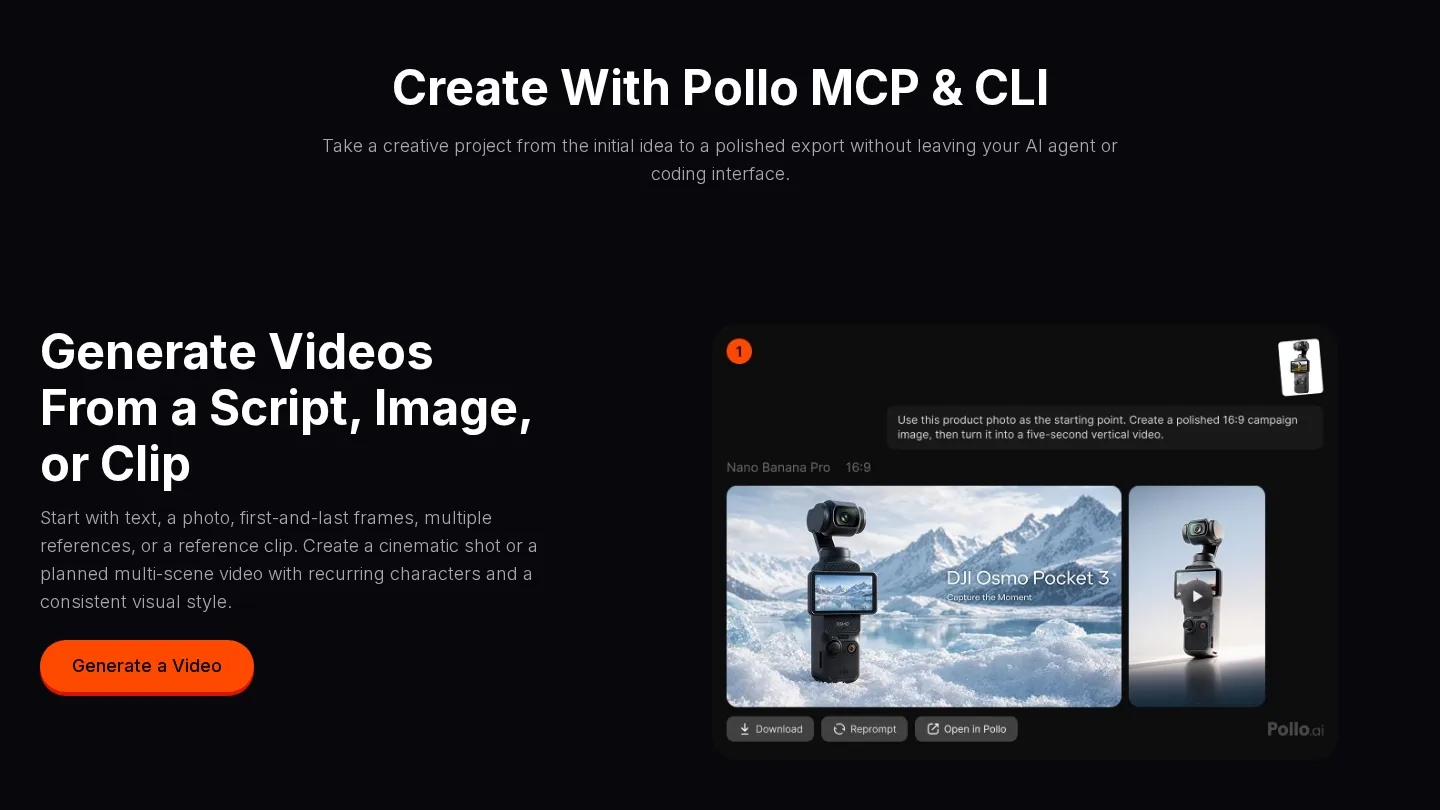
Pollo MCP writes the plan, creates each shot and edits on its own timeline, with subtitles written by AI, 23+ transitions, splits and trims, audio fades, speed control and full version history. Approve the cut, and you receive it watermark-free as MP4, WebM or MOV. If you ever want to adjust something by hand, the same project opens in Pollo's AI video editor on the web.
Links, models and batches
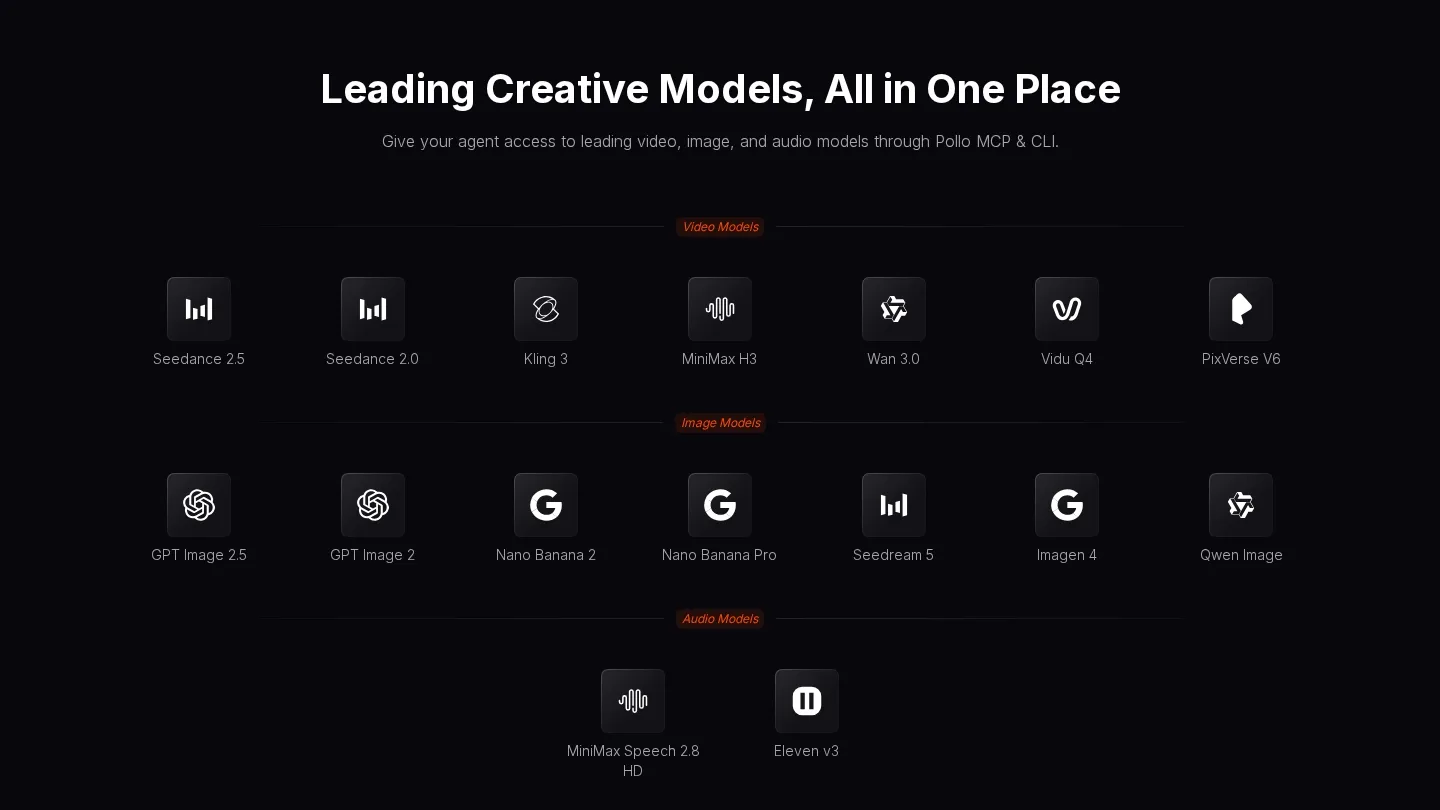
Inputs can be text, photos, clips, a voice recording, a shop page, a post from TikTok or YouTube, or any article online. You can also pick, shot by shot, from a lineup of 100+ models spanning video, images, and audio. The Seedance 2.5 video model handles multi-cut story clips well, and GPT Image 2.6 is a good choice for product stills and thumbnails. Batches go up to 12 jobs.
Pollo Library and workflows
Where CapCut leans on templates, Pollo MCP leans on Pollo Library. That means five libraries for animation, transitions, sound effects, captions, and shots, which the assistant uses during the edit. One edit can use up to 23 sound effects, and a recreated ad tracks its reference instead of drifting into generic output. Next to it are 73 built-in creative workflows for long-to-short clips, product ads, short dramas and explainers, plus a Motion Graphics set (Logo Animation, Software Demo, Animated Chart, Data Story).
Talking head videos
For creators who film themselves, this is a key difference. Upload what you recorded and Pollo MCP removes every "um", "uh," and long gap, writes captions to match your voice, and drops B-roll where the cuts show. Use replicate mode with a favorite creator's clip, and the edit follows that clip's pacing. You can still caption anything on the web with the AI caption generator.
One Space, shared
A shared Space links your assistant, pollo.ai, and Pollo Agent, so work started in Claude is ready to pick up on the website.
Things to make with Pollo MCP
- Turn one sentence into a short animated series.
- Build a story video from your travel photos.
- Bring a still photo to life.
- Line up your photos so each change lands on the music's beat.
- Turn a voice recording into a narrated explainer short.
- Split a long video into several vertical shorts, which Pollo's long video to short video page also handles.
- Make four platform versions of one video in one go.
- Polish a talking head video with no ums, full captions, and, if you like, replicate mode.
- Build motion graphics, from a logo animation or software demo to a data story or animated chart.
You get 20 bonus credits the first time you link it, which covers around 4 videos. Paid plans begin at $12 per month.
Sell More With Videos Made in Chat
Product ads, talking head clips and shorts, cut and captioned by Pollo MCP. Start with 20 bonus credits.
Start Creating with Pollo MCP
How we reviewed CapCut MCP
We approached this the way a social media editor would size up a new tool before putting it into a weekly routine. We read CapCut's plugin page and its newer ChatGPT page line by line, opened the runbook file the setup prompt loads, and studied the plan page with its FAQ. We then took a typical week of work for a small online shop, a product reel, a talking head tip, and a few clips from a livestream, and checked how far CapCut's own documentation says the plugin can take each job. Ratings reflect what CapCut documents today. Where CapCut does not say something, such as plugin credit costs or export formats, we mark it as not stated rather than guess.
FAQ
Is CapCut MCP worth it?
Yes, if you use the ChatGPT desktop app and already finish videos in CapCut. Its templates and editable drafts save time. If you want finished posts in other chat apps, Pollo MCP is a better fit.
Is CapCut MCP free?
Partly. Expect a plan, credits, or both for some features, with a possible 7-day trial for new accounts and Pro at USD 19.99 a month. Pollo MCP starts you with 20 bonus credits.
Does CapCut MCP work in Claude?
No official version exists. CapCut's plugin is for the ChatGPT desktop app and Codex. Pollo MCP connects to Claude both at claude.ai and in the desktop app.
Can CapCut MCP generate videos?
Yes, in the ChatGPT desktop app. On ChatGPT mobile and web, it can build a rough cut from your clips and find templates, but not generate new footage.
Does CapCut MCP export a finished video?
You get an editable draft, and CapCut's editor is where the export happens. Pollo MCP returns the finished file in chat, in MP4, WebM, or MOV, free of watermarks.
What is the best alternative to CapCut MCP?
Pollo MCP. It works in Grok, Claude, ChatGPT, Gemini, and Cursor, and brings 100+ models, a timeline editor, and talking-head clean-up.