



OpenArt MCP Review (2026): Ad Skills, Plans and Team Limits
OpenArt MCP is one of the most ad-focused AI video connectors you can add to ChatGPT, Claude or Cursor today. Its skills cover UGC ads, product listing videos, TV-style commercials and hook tests, and the setup takes about a minute. We reviewed it from the point of view of a marketing team that needs to ship ads every week. Our view: the skills are strong, and the team controls are real, but the plan you need is pricier than it looks, and the MCP stops before the final edit.
Verdict in brief
Good for: teams that want guided ad skills inside the chat, brands running ads in several languages (Dub Video covers 22 languages), and large teams that want one shared credit pool.
Not ideal for: teams that need an edited, ready-to-post file from the chat, or that make talking head videos from their own camera footage.
Plan to budget: Plus ($34 a month per seat) if you need commercial use rights; Business (from $227 a month) for a shared pool.
Better fit for finished ads: Pollo MCP, which plans, edits, and exports in the same chat and starts with 20 bonus credits.
I would pick Seedance 2.5 for consistent brand visuals, Kling 3.0 for cinematic energy, and Veo 3 for polished realism.
Skills Are Nice. Finished Ads Are Better.
Pollo MCP takes the ad past the draft: cut, captioned, scored and exported in your chat.
Ship a Finished Ad Today
OpenArt MCP in One Paragraph
OpenArt MCP links your OpenArt account to an AI assistant. Once connected, the assistant can generate images and videos, plan multi-shot videos with Smart Shot, look up models, upload reference files, check your credits, switch workspaces and organize projects. Everything it makes appears in the chat and is saved to your OpenArt library. An optional skills pack adds ready-made workflows for ads and product videos. MCP use has no separate fee; each generation costs the same credits as it would on openart.ai.
Getting a Whole Team Connected
For one person, setup is simple. ChatGPT users install the OpenArt plugin from chatgpt.com/plugins and type @OpenArt. Claude users on the web or desktop add mcp.openart.ai/mcp as a custom connector. Cursor users add the same URL as an MCP server, and Kimi has its own plugin on kimi.ai. For Codex and Claude Code there is a CLI that runs on macOS, Linux and Windows. No API key is involved, just an OpenArt sign-in.
For a team, there is one extra step. On Claude Team or Enterprise, only an Owner or Primary Owner can add OpenArt for the organization. On ChatGPT Business or Enterprise, a workspace admin enables the plugin first, and members install it after that. Each person then signs in with their own OpenArt account, and when they work in a shared workspace, generations spend that workspace's credits and results go to its library.
One small catch: the skills pack is separate. ChatGPT gets the skills as soon as you connect. In Claude, you install them from a plugin marketplace, and automatic syncing of new skills needs a paid Claude plan.
The Ad Skills, One by One
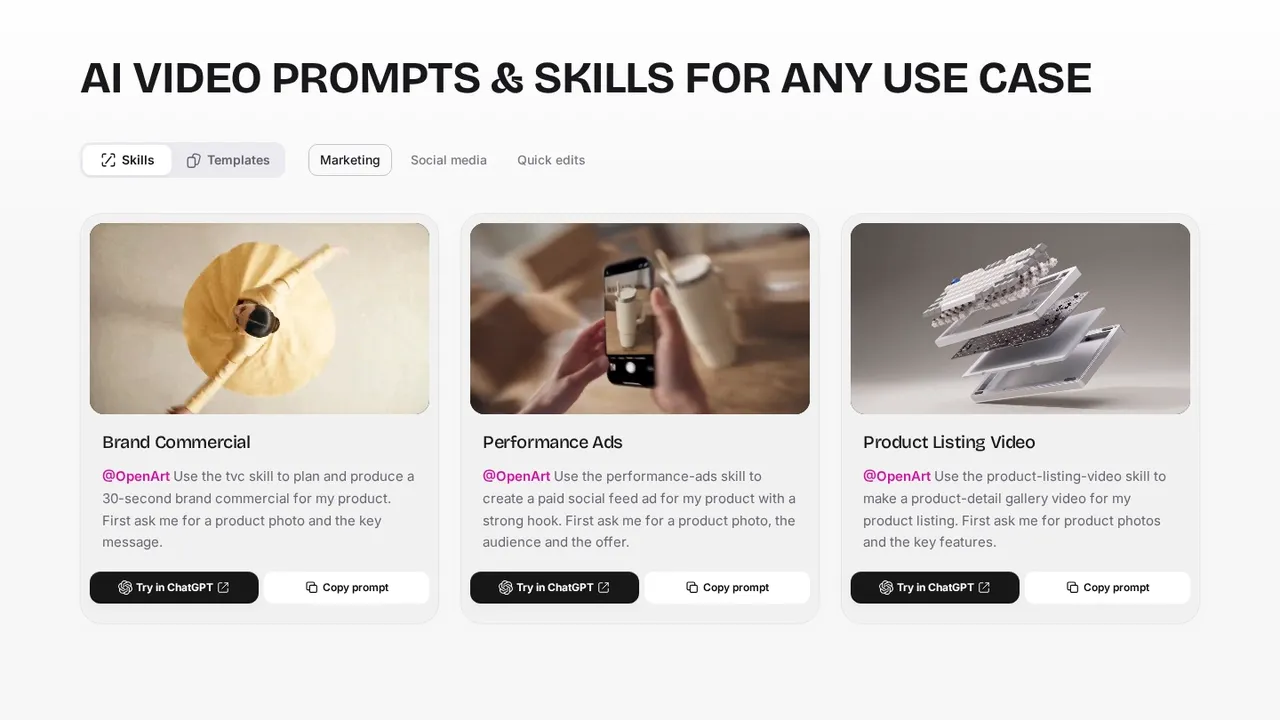
This is where OpenArt stands out. Each skill asks for the inputs it needs, writes a plan, and shows a draft before it renders at full quality. Here is what the skills page offers for marketing work:
Brand Commercial (TVC): a 30-second spot built from a product photo and a key message.
Performance Ads: a paid social feed ad with a strong hook, based on your audience and offer.
Product Listing Video: a product-detail gallery video from your product photos.
UGC Ads: a phone-style creator ad.
Talking Head: a short video of one generated person speaking to camera from your script.
Presenter Video (PGC): a more polished, staged presenter reviewing your product.
Hook Variants: several versions of a finished ad that differ only in the opening.
Ad Variation: a remake of a presenter-led ad with a new opening, B-roll, captions and sound.
Ad Remake: an existing ad rebuilt around your product, keeping the same structure.
Three more tools work on footage you already have: Replace Background, Relight Video and Dub Video, which translates speech into 22 languages with lip sync. There is no extra charge per skill.
For a performance team, Hook Variants and Ad Variation are the most useful. They match how paid social is tested in practice: keep the body, change the first seconds. What we could not find is a way to fine-tune the result afterward. If the third hook runs long, there is no documented trim or split, no version history, and no choice of transitions.
Smart Shot, Models and Asset Reuse
Smart Shot is OpenArt's planning tool, and it works through MCP today. You give it references and a prompt, and it plans the shots, framing and motion for a multi-cut spot. Your agent can show the shot plan first, or plan and render in one go. It is a sensible way to avoid burning credits on a wrong idea. The model list is broad. OpenArt's pricing page says plans include 100+ image, video and audio models, and the MCP FAQ names Seedance 2.5, Wan 3.0, Kling 3 Omni, Veo 3.1 and MiniMax H3 for video, plus GPT Image 2.5, Nano Banana Pro and Seedream 5 Pro for images. New models appear in the MCP on their own. You can also pull any past OpenArt generation back in as a style reference or a start frame.
OpenArt's Character feature is not yet available through MCP. The FAQ lists it as on the roadmap.
What Each Plan Really Buys a Marketing Team
Starter, $14 a month: 4,000 credits, MCP access and 8 parallel jobs. The plan card does not list commercial use rights, so it suits testing more than client work.
Plus, $34 a month: 12,000 credits, commercial use rights and 16 parallel jobs. For most marketers, this is the real starting plan.
Pro, $56 a month: 24,000 credits and 32 parallel jobs. A fit for one heavy user making video every day.
Wonder, $240 a month: 106,000 credits and priority support.
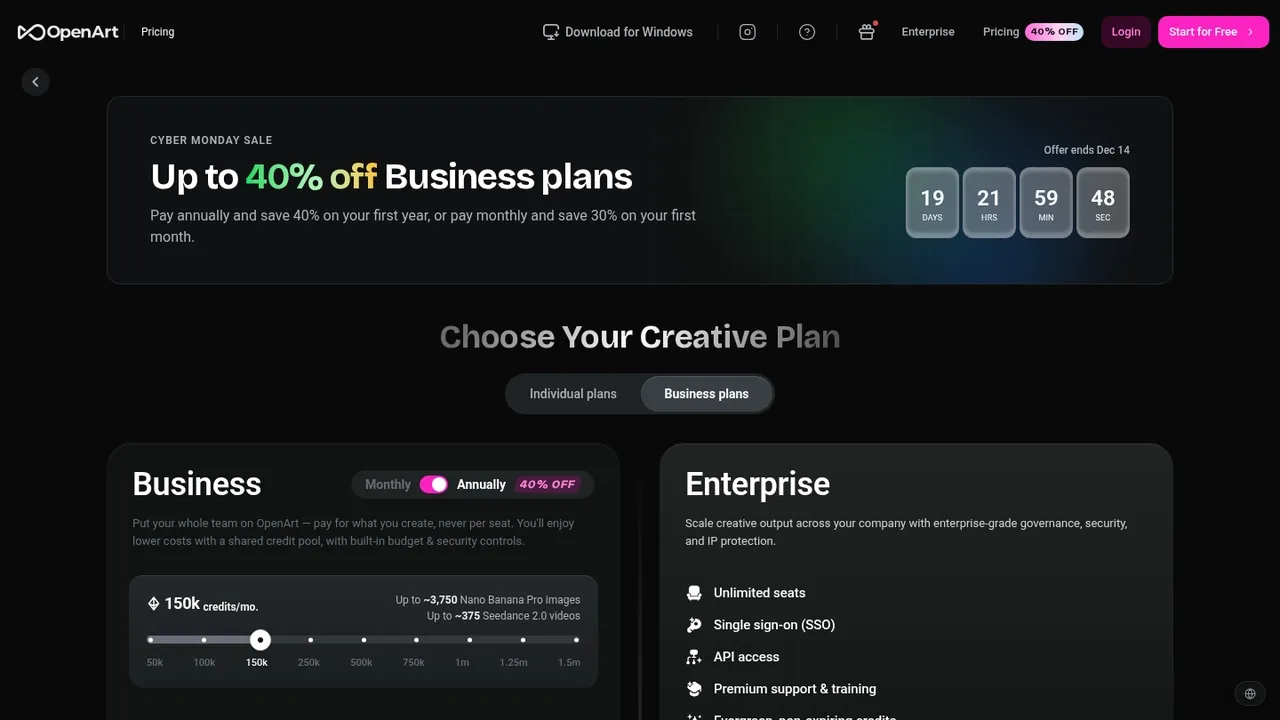
Business, from $227 a month: one shared pool from 50,000 to 1.5 million credits, up to 60 users, Admin, Editor and Viewer roles, credit limits and project permissions.
Enterprise, by quote: unlimited seats, SSO, API access and credits that do not expire each month.
Individual plans are per seat and monthly credits do not roll over. New accounts get 40 trial credits for seven days. OpenArt also advertises 10% off MCP generations, but the pricing FAQ explains the limits: it applies to Plus, Pro and Wonder, lasts seven days from first authorization, and covers MCP jobs in personal workspaces only. A sale was running when we checked, so first-period prices were lower than these list prices.
Learn more: the best OpenArt alternatives we have tested
What we liked
- A real ad toolkit: UGC, presenter, product listing, commercial, hook tests and remakes.
- Draft-first rendering and Smart Shot plans help keep credit spend under control.
- Dub Video in 22 languages with lip sync is useful for multi-market campaigns.
- Clear admin setup for Claude Team and ChatGPT Business, plus workspaces and projects.
- A Business pool with roles and spend limits for teams of up to 60 people.
What held it back
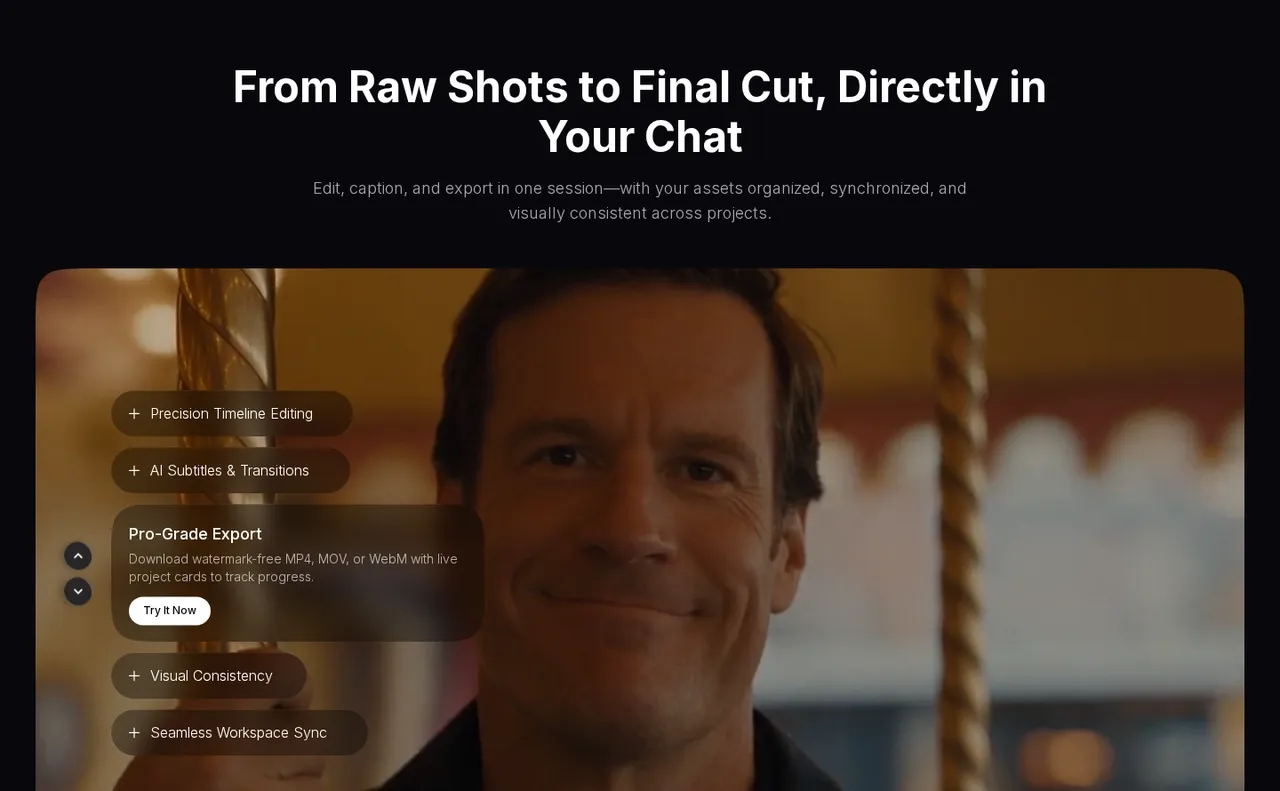
- No documented timeline editing: no trim, split, transitions or version history.
- No stated choice of export formats for a finished video.
- Commercial use rights start on Plus, not Starter.
- The 10% MCP discount is one-time, lasts 7 days after first connecting, and only covers Plus, Pro and Wonder in personal workspaces.
- Its Talking Head skill generates a presenter; it does not clean up footage you filmed.
- Grok and Gemini are not on its list of named assistants, and Character is not in MCP yet.
OpenArt MCP Next to Other AI Video MCPs
Tool | Main strength | Editing after generation | Cheapest way in |
| OpenArt MCP | Ad skills, Smart Shot, Dub Video | Edit skills (ad variation, remake, relight, dub); no timeline tools or export choice | 40 trial credits; Starter $14/mo |
Pollo MCP | Finished ads and talking heads; 100+ models | Trim, split, 23+ transitions, AI subtitles; MP4, MOV, WebM | 20 bonus credits; from $12/mo |
| Higgsfield MCP | Cinematic shots and characters | Editing Room skill; no export format named | Paid plan required; Starter $19/mo |
| invideo MCP | Live pro timeline | Full NLE; Premiere, Final Cut, DaVinci export | Basic plan, 190 credits/mo |
| Runway MCP | Gen-4.5 and other models | None stated | Runway plan; credits on every job |
| ImagineArt MCP | 99 tools for images, video, audio | None stated | 100 free daily credits, basic image models only; video from $5/mo |
| ChatCut | Editing your own footage | Multitrack timeline; XML export | Free plan; paid from $25/mo |
| CapCut × Codex | CapCut drafts from ChatGPT desktop | Edit the draft in CapCut | No MCP pricing listed |
In short, OpenArt is ahead of Runway's model-first MCP on ad skills, and behind Invideo and Pollo MCP on editing.
Where Pollo MCP Fits In
If you like OpenArt's ad focus but need the last step done too, Pollo MCP is the natural next tool. It works with more chat apps than OpenArt names: ChatGPT, Grok, Gemini, Cursor, and Claude on claude.ai or the desktop app. Coders can access video, image, and audio tools on Pollo AI from the terminal as well, since the Pollo CLI supports Claude Code, OpenClaw, Codex, Hermes, and Cursor. The workflow starts from what your team already has. Hand it a written brief, a folder of product photos or an old clip. Or paste a URL, whether that is a product listing, a TikTok you want to riff on, a YouTube review or a blog post. From there, it drafts a script, checks the credit cost, generates shots with any of 100+ models, and then edits. For example, Seedance 2.5 suits multi-shot product stories, and GPT Image 2.6 handles key visuals. Batches of up to 12 jobs make it easy to test options side by side. Talking head videos are a clear difference. OpenArt generates a presenter; Pollo MCP edits your real presenter. Give it a raw take, and it drops the filler and the dead air, captions what is said and patches jump cuts with B-roll. Replicate mode copies the pacing of a sample video you like.
Then comes the edit OpenArt's docs do not cover. Ask Pollo MCP to shorten a shot, split it in two, join episodes or restore an earlier version, and it does. It can also apply one of 23-plus transitions, generate subtitles, fade the soundtrack and retime a clip. You export a watermark-free MP4, MOV or WebM. If someone wants to make a final tweak by hand, the AI video editor on Pollo AI opens the same project.
Pollo Library gives those edits a finished feel. It is a set of five built-in libraries the assistant pulls from: animation, camera shots, caption styles, transitions, and sound effects. A video can carry up to 23 effects from that sound library, and ads recreated from a reference stay close to the source. There are also 73 built-in workflows. Some are for marketing staples like explainers and product ads, some for long-to-short clipping and short dramas, and a Motion Graphics group handles data stories, logo animations, software demos and animated charts. Projects sit in a Pollo Space that you can also access through Pollo AI, and you can set up one space per client or brand.
On cost, Pollo MCP plans start at $12 a month, and connecting for the first time adds 20 bonus credits to try it on a real brief.
Ad Jobs Pollo MCP Can Take Off Your Plate
Talking head videos from raw takes, cleaned, captioned, and styled in replicate mode.
A series of animations from one sentence about your brand character.
A travel or event story from a set of photos.
A product photo brought to life, as with the animate a picture tool.
A photo slideshow synced to the beat for a launch teaser.
A voice recording turned into an explainer, much like the explainer video maker.
Several vertical shorts cut from one long webinar or podcast.
Four platform versions of the same ad from one master video.
Motion graphics such as a product walkthrough, a chart that builds on screen, a data story or an animated logo.
Bring Your Footage, Leave with the Final Cut
Talking heads, product ads and shorts, edited and exported without leaving the chat. 20 credits on us when you connect.
Explore Pollo MCP NowHow We Put This Review Together
We approached OpenArt MCP the way a content lead would before rolling it out to a team. We went through the MCP page, the setup steps for each assistant, the skills and templates, the FAQ, and the full pricing page, including the Business tab. We followed a typical weekly brief, a product ad plus hook tests plus a talking head clip, and checked what each step needs and what the docs say you get back. We did not count anything the documentation does not state. All details were checked on November 25, 2026, and may change.
FAQ About OpenArt MCP Review
Is OpenArt MCP worth it?
It is worth it for teams that want guided ad skills and can finish edits elsewhere, especially on Plus or higher. If you need a finished, edited file from the chat, Pollo MCP is the better fit.
How much does OpenArt MCP cost?
There is no separate MCP fee. Generations spend normal OpenArt credits. Plans start at $14 a month (Starter), commercial use rights start at $34 (Plus), and Business starts at $227 a month for a shared pool.
How do I connect OpenArt MCP to Claude?
In Claude, go to Customize, then Connectors, add a custom connector named OpenArt with the URL https://mcp.openart.ai/mcp, and sign in. On Claude Team or Enterprise, an Owner adds it for the organization first.
Does OpenArt MCP work with ChatGPT?
Yes. Install the OpenArt plugin from chatgpt.com/plugins, sign in, and type @OpenArt in a chat. Skills are available right away in ChatGPT.
Can OpenArt MCP make talking head videos?
Its Talking Head skill generates a person speaking your script. To edit footage of a real person, removing filler words and adding captions and B-roll, Pollo MCP is built for that.
What is the best alternative to OpenArt MCP?
Pollo MCP is the best alternative to OpenArt MCP for teams that want finished ads. It adds timeline editing, Pollo Library, and watermark-free exports, and supports Grok and Gemini, as well as ChatGPT, Claude, and Cursor.