DeepAI is positioned as an all-in-one creative AI platform, strengthened by its partnership with Wolfram Research to enhance AI capabilities through advanced computation and real-time data integration.
Text to Image
Image to Image
Pollo Recast
Recreate viral videos. Remix new versions.
Pollo Agent x Gemini 4 Argon
Smarter reasoning. All through Pollo Agent.
Pollo Recast - Make It Viral Challenge
One upload in. Your viral video out. Unlimited rewards await.
WIN iPHONE DUO
Capture a city in one minute. Join the challenge now.
Pollo MCP
End-to-end content creation. Up to 4 Videos/ 20 Images for FREE.
Get Unlimited GPT Image 2.5
Faster. Sharper. Smarter. Go Unlimited with Ultra.
Unlock Unlimited MiniMax H3
Omni-Reference. Unlimited with Ultra.
Get Unlimited Wan 3.0
Native 30-second videos. Richer reference inputs.
Key Features of DeepAI
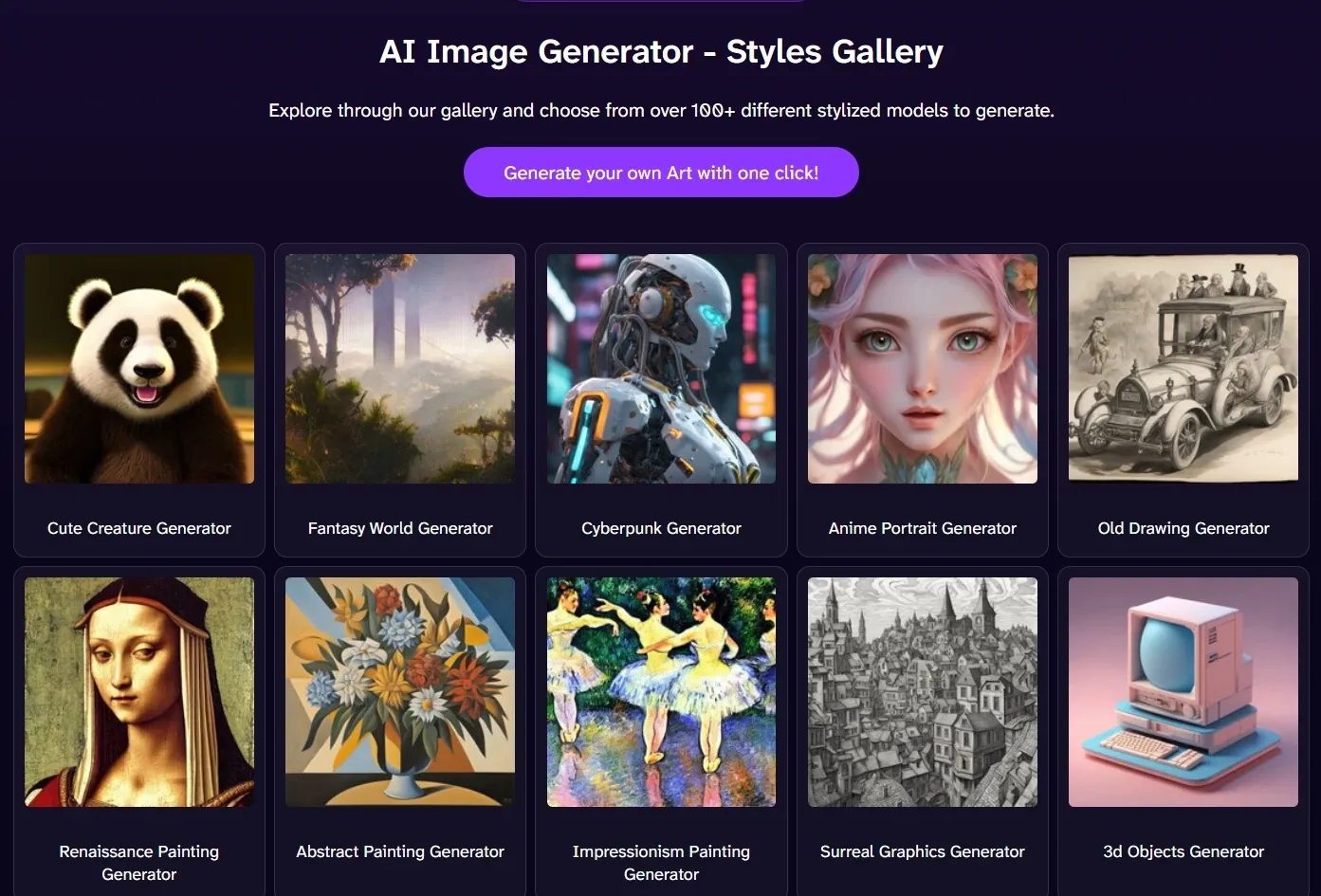
100+ Built-In Styles: Create images in anime, cyberpunk, classic, and more styles.
Flexible Shape & Output Settings: Adjust image shape and layout for different use cases.
Adjustable Quality Modes: Switch between HD and Genius for different quality levels.
API Integration for Developers: Generate images programmatically via API.
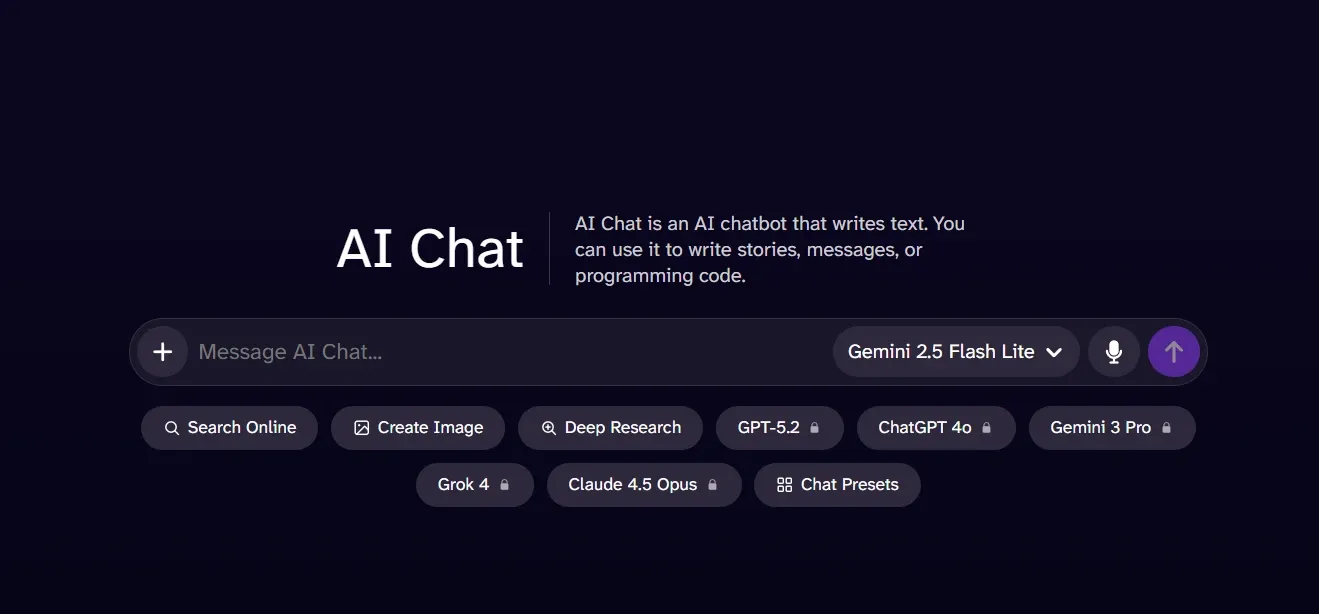
AI Chat with Image Assistance: Generate and edit images through build-in chatbox.
AI Image Editor with Prompt-Based Edits: Edit images with natural language, from object changes to style transfer.
AI Image Enhancement Tools: Expand, enhance, and refine images with basic editing tools.
AI Image Detector for Real-World Verification: Detect AI-generated or manipulated images to avoid fake visuals.
100+ Built-In Styles
With DeepAI, easily switch between styles like anime, cyberpunk, fantasy, or classic art without rewriting your idea, making it ideal for exploring concepts, testing looks, and shaping creative directions quickly.
Flexible Shape & Output Settings
Whether you're creating visuals for social posts, banners, or presentations, you can quickly match the format without extra editing with DeepAI.
Compared to StarryAI, which mainly offers preset canvas ratios like 1:1,4:3, and 9:16 for standard use cases, DeepAI provides more flexible control over output shape and formatting, making it easier to adapt visuals across different platforms without rework.
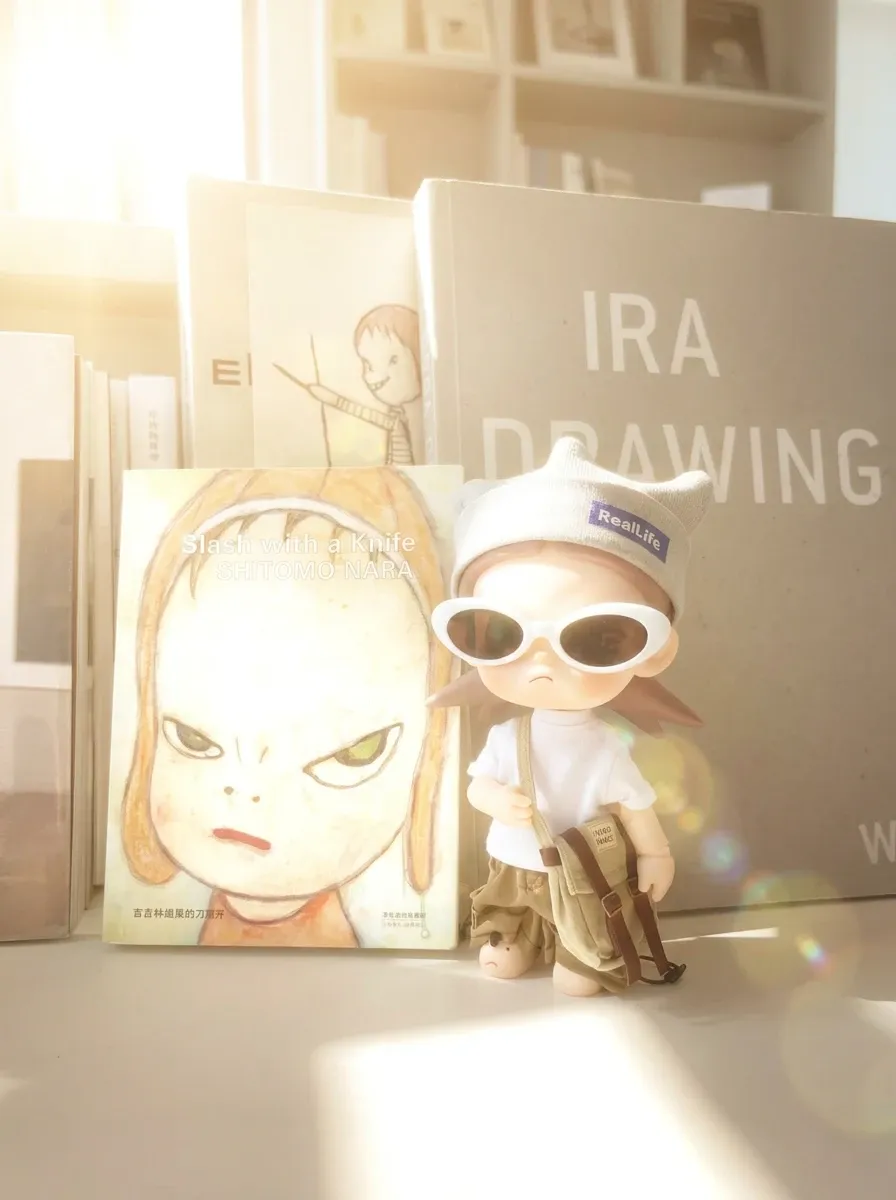
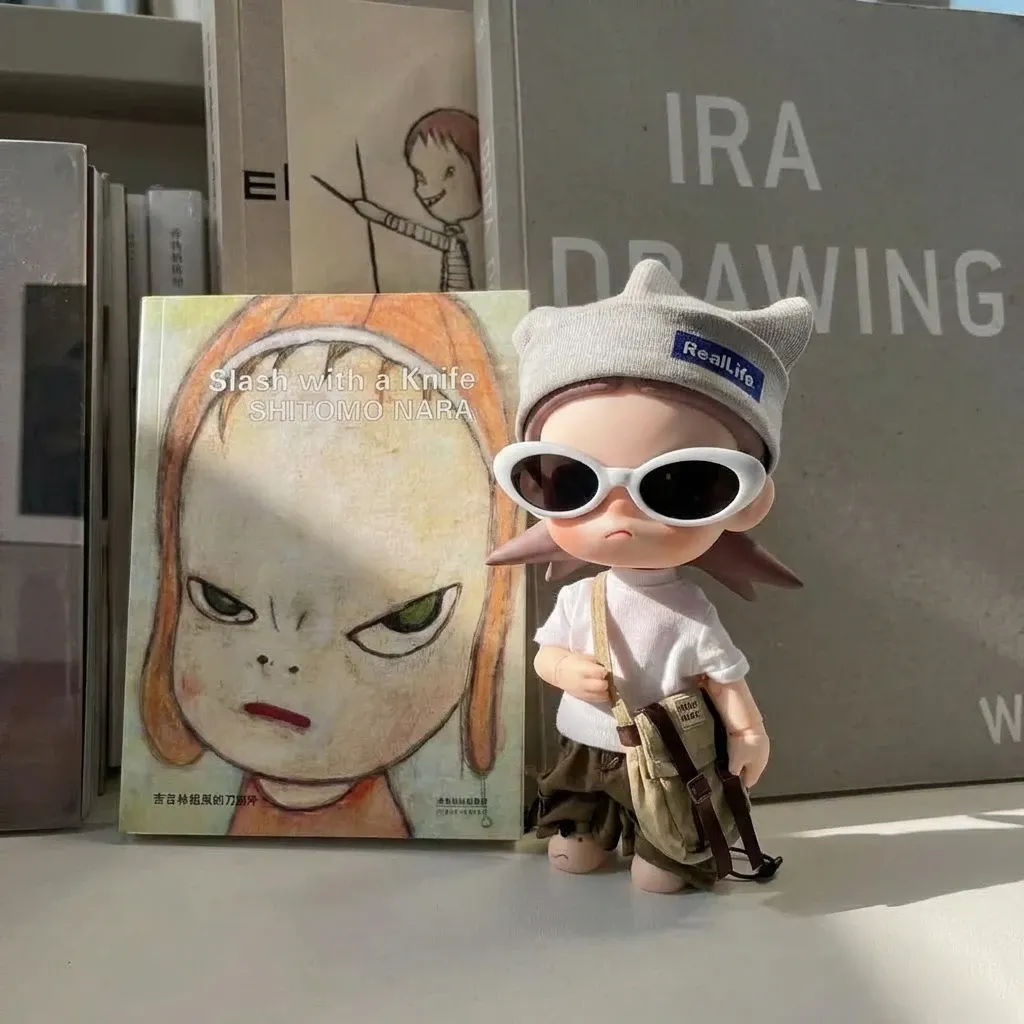
Adjustable Quality Modes
Quickly iterate with faster outputs during ideation, then switch to higher-quality modes when you need sharper visuals for sharing, publishing, or client delivery.
Prompt
Standard Output Image
Genius Output Image
A small toy figure standing on a desk next to illustrated books, indoor scene with natural sunlight, soft shadows, realistic lighting, cinematic feel, shallow depth of field, highly detailed.
API Integration for Developers
Easily plug DeepAI image generation into your own apps or workflows, making it practical for automating content at scale or building AI-powered tools.
Compared to NightCafe, which focuses on web-based creation and does not offer a public API, DeepAI provides a developer-friendly API for direct integration.
This makes it easy to generate product images in e-commerce systems, create visuals at scale for content platforms, or embed AI generation into SaaS tools.
AI Chat with Image Assistance
DeepAI includes an AI chat interface that allows users to generate and edit images through prompts or reference inputs, combining chat and visual creation in one place.
Compared to this, Pollo Agent goes further by turning a simple conversation into a complete creation workflow.
Instead of just generating or editing images step by step, it can understand your goal, break it into tasks, and produce cohesive outputs such as videos, visuals, or campaign assets without repeated prompting or post-editing.
AI Image Editor with Prompt-Based Edits
DeepAI supports editing images by uploading files or using image URLs, then describing the changes in natural language.
You can replace objects, change colors, merge elements from different images, or apply one image’s style to another. This is useful for creating product mockups, fixing visual issues, or testing different design variations without manual editing.
AI Image Enhancement Tools
DeepAI includes tools for expanding images, removing backgrounds, colorizing photos, and enhancing resolution for basic editing needs.
Compared to this, AI image enhancer of Pollo Al focuses on higher-quality results with one-click sharpening, noise reduction, and realistic upscaling, making it more reliable for e-commerce images, social content, and low-resolution fixes.
AI Image Detector for Real-World Verification
DeepAI analyzes images to detect AI-generated or manipulated content. Use AI image detector to check product photos before listing, verify profile images, or review visuals in reports and news.
This helps you avoid fake images and make faster decisions without manual checks.
Who Uses DeepAI in Real Workflows
Content Creators: Generate visuals for videos, blog posts, or social content, and quickly test different styles or ideas without manual editing.
Designers: Explore concepts, build mockups, and refine visuals by adjusting details, combining elements, or testing variations.
Entrepreneurs & Marketers: Create product images, ad creatives, and pitch visuals, or quickly clean and adapt images for listings and campaigns.
High (image + video), suitable for ready-post content
Workflow
Tool-based, separate features
Integrated generate + edit workflow
Editing-first workflow
From idea to ready-to-use images and videos
Ease of Use
Very simple, beginner-friendly
More features, slightly higher learning curve
Easy basics, advanced tools take practice
Easy (guided creation)
What Users Say About DeepAI
Some users feel that DeepAI is a fast and easy tool for generating quick visuals, with several praising its simplicity, affordable pricing, and ability to produce results that match basic prompts.
However, other users complain about inconsistent output quality, unclear credit usage, and limitations when handling more complex or professional tasks.
Overall, many see it as a good entry-level option for casual use, but not reliable enough for high-quality or production-level creative work.
Who is the Target Audience of DeepAI
Taken together, these mixed user experiences highlight a clear pattern in how DeepAI is perceived: easy to use and accessible, but not built for demanding creative work.
In that context, DeepAI is best understood as an entry-level AI platform focused on speed and simplicity rather than advanced control. It mainly attracts beginners, hobbyists, and developers who want to experiment with AI, prototype ideas, or integrate basic generation features via API.
Overall, it serves as a low-barrier AI tool for quick testing and exploration, rather than a platform designed for high-end, production-level results.
A More Powerful DeepAI Alternative: Pollo AI
For users who find DeepAI limited in control and output quality, Pollo AI offers a more refined approach to image creation.
Its AI image generator supports both creating images from prompts and transforming existing visuals, all within a unified workflow designed for ready-to-use results.
Rather than relying on a single model, Pollo AI brings together powerful image models like Nano Banana and Seedream, making it easier to explore styles, improve consistency, and tailor outputs to different needs.
By combining generation and transformation in one place, Pollo AI delivers a more complete image workflow without the need to switch tools.
3 Reasons to Choose Pollo AI
01
Multiple Top AI Models in One Place
Access advanced image models like Nano Banana and Seedream in one platform, making it easy to explore styles, improve consistency, and choose the right model for each task.
02
Pollo Agent for Flow Creation
Go beyond image creation with Pollo Agent. It helps turn ideas into structured, ready-to-use content, adding more context and usability to your workflow.
03
AI Image Tools for Ready-to-Publish Visuals
Refine and polish images with Pollo AI image tools, making them clean and ready to publish. You can use an AI clothes changer or background remover for quick, post-ready results.
I’ve been using Pollo AI mainly for short videos and quick image-to-video tests. The interface is straightforward and it works well even with simple prompts, which is a big plus compared to tools that need long, complicated instructions. The results can be really impressive, and it’s honestly been fun to experiment with. I’d love a bit more consistency on faces when there’s movement, but overall it’s been a solid experience for what I needed.
Awesome website. loads of options and a great way to learn how to work with 'AI' my reasoning for 5 stars is based upon price, versatility and ease of use. Also I would like to add, Pollo AI runs a lot of promos on different AI products as well. I rate their customer service at 5 stars, when I purchased my first subscription my computer crashed the following weekend and I lost all my data and info passwords you name it I lost it, contacted pollo by email they responded quickly and found my info/username and account, and I was able to restore my account.
I have been using Pollo AI for short videos. It is easy to use and works well with simple prompts. Other generators seem to need long drawn out complicated explanations to get even close to what I want.
i tried 220 online img to vid in 2 months, and this is the best online video.I will subscribe for a year; there are many reasons. But freedom is the most important.
DeepAI is an AI image generator that lets users create and edit images with simple prompts and built-in tools. It offers 100+ styles along with features like background removal, image expansion, and colorization, making it easy to produce visuals quickly without complex setup.
What is DeepAI AI Chat?
DeepAI AI Chat is a lightweight AI chat tool that helps users generate ideas, write content, and interact with AI in real time. It is integrated with DeepAI’s creative tools, allowing users to combine text prompts with image generation or editing tasks in one place. This makes it useful for quick brainstorming, prompt refinement, and simple content creation workflows, especially for users who want a fast and straightforward way to work with both text and visuals.
Can I edit images with DeepAI?
Yes. DeepAI supports basic image editing such as background removal, expanding images, colorizing old photos, and modifying visuals using text descriptions.
Is commercial use allowed for DeepAI images?
Yes. Images generated with DeepAI can be used for commercial purposes, depending on its terms of service.
Is DeepAI suitable for professional design work?
DeepAI works well for quick visuals and simple projects, but it may lack the control and quality needed for more advanced or professional design tasks.
Upgrade to Better Results with Pollo AI
Access top AI models and AI photo tools to create complete, ready-to-publish images in one workflow, with no editing skills required.








 Liz Cassidy


