



Unleash Gothic Vampire Transformation with Pollo AI
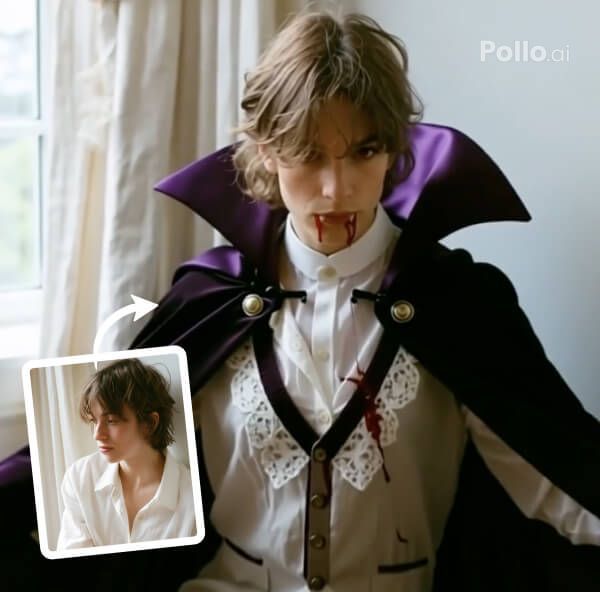
Pollo AI transforms your photo into a cinematic video, casting your subject as a royal vampire. Fangs gleam, blood drips from their lips, and a black count’s cape sweeps dramatically, creating an intense, gothic atmosphere.
Complete Gothic Vampire Elements
Pollo AI morphs your subject’s face, revealing sharp fangs and crimson blood at their lips, while a flowing black vampire count’s cape envelops them, swirling with each movement. This vivid, gothic video evokes a chilling vampire allure.
Seamless Transformation Preserves Identity
Our effect ensures a smooth shift into a vampire, with fangs, blood, and cape blending flawlessly while keeping your subject’s unique facial features intact in a cinematic video. Amplify their distinct look with Pollo AI’s AI Face Enhancer to highlight every preserved detail.
How to Create Your Become Royal Vampire Video with Pollo AI
With only three steps, you can easily create videos from images with Pollo AI.
Step 1
Select and submit a clear single-person photo.
Step 2
Let Pollo AI unleash the vampire transformation.
Step 3
Download or share your gothic vampire clips.
Try Other Popular Video Effects From Pollo AI
FAQs
What is Pollo AI’s Become Royal Vampire Effect?
Pollo AI’s Become Royal Vampire Effect transforms your photo into a cinematic video of a subject becoming a vampire with fangs, blood, and a black cape.
How does Pollo AI create the vampire traits?
Pollo AI seamlessly adds sharp fangs and dripping blood to your subject’s face, ensuring a chilling, photorealistic transformation in a high-quality video.
Why include a cape in Pollo AI’s Become Royal Vampire?
Pollo AI’s black count’s cape adds dramatic flair, enhancing the gothic vampire aesthetic with dynamic, cinematic motion.
Can I try Pollo AI’s Become Royal Vampire for free?
Yes, Pollo AI’s Become Royal Vampire Effect is free to try! Upload a single-person photo and use limited credits to craft a gothic video, with paid plans for more access.
